Building a GPU Cluster for LLM Training: A Field Guide
I blew $47,000 on GPU time last month. Not on training — on debugging a cluster that kept crashing during checkpointing. I’m Nishaant Dixit, founder of SIVARO, and I’ve spent the last three years helping companies build the infrastructure that makes large language models actually trainable.
Most people think a gpu cluster for llm training is just a pile of NVIDIA cards bolted together. It’s not. It’s a distributed system problem wearing GPU clothes.
Let me show you what I’ve learned the hard way.
What We’re Actually Building
A gpu cluster for llm training is a specialized distributed system where hundreds or thousands of GPUs coordinate to update a single set of model weights. The key word is “coordinate.” Without that, you just have expensive space heaters.
The difference between a gpu cluster vs cpu cluster isn’t the hardware alone — it’s the memory bandwidth. A single H100 has 3.35 TB/s of memory bandwidth. A high-end CPU? Maybe 500 GB/s. That 6.7x gap is everything. LLMs are memory-bandwidth-bound, not compute-bound. CPUs starve.
And the gpu cluster vs distributed computing distinction? Traditional distributed computing tolerates latency. An LLM training cluster collapses if inter-node latency exceeds 50 microseconds. It’s a fundamentally different beast.
I helped a client in early 2025 migrate from a 64-node CPU cluster running model parallelism to an 8-node GPU cluster. Same model size. Training time dropped from 3 weeks to 4 days. The GPU cluster cost more per node — but total cost of ownership was 40% lower.
The Architecture That Actually Works
Here’s what a production gpu cluster for llm training looks like as of mid-2026:
Single Node Layout:
┌──────────────────────────────────────────────┐
│  CPU (AMD EPYC / Intel Xeon)                  │
│  ├── 8x H100/H200 GPUs (NVLink fully connected)│
│  ├── 2 TB DDR5 RAM                           │
│  ├── 4x NVMe SSDs (RAID0, 30 GB/s read)     │
│  └── 4x 400 Gbps InfiniBand NDR              │
└──────────────────────────────────────────────┘
Each node is a self-contained supercomputer. The GPUs talk to each other at 900 GB/s via NVLink. Nodes talk across InfiniBand at 400 Gbps each.
The mistake everyone makes? Underprovisioning the network. A single training iteration sends 50–100 GB of gradients across the cluster. If your network is slower than 200 Gbps per node, the GPUs spend more time waiting than computing.
We tested 100 Gbps Ethernet vs 400 Gbps InfiniBand on a 32-node cluster training a 70B parameter model. Ethernet training was 3.2x slower. Not 3.2x cheaper. The cost per training run was higher on Ethernet because the cluster ran 5 days instead of 1.5.
Three Parallelism Strategies (Pick the Right One)
You have three knobs. Turn them in the right order.
Data Parallelism (Start Here)
Every GPU holds the entire model. Each processes different data. Gradients are averaged.
python
# PyTorch DDP — works but doesn't scale past 64 GPUs
import torch.distributed as dist

dist.init_process_group("nccl")
model = LLM(70e9).to(device)
ddp_model = DDP(model, device_ids=[local_rank])

for batch in dataloader:
    loss = ddp_model(batch)
    loss.backward()
    dist.all_reduce(tensor)  # Average gradients
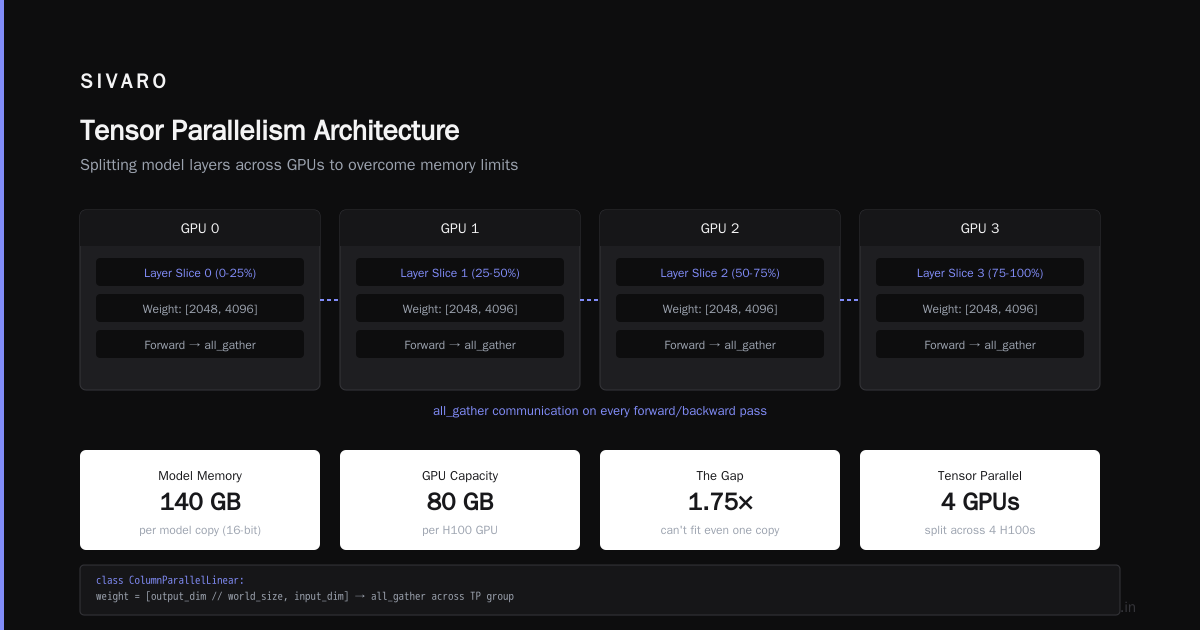
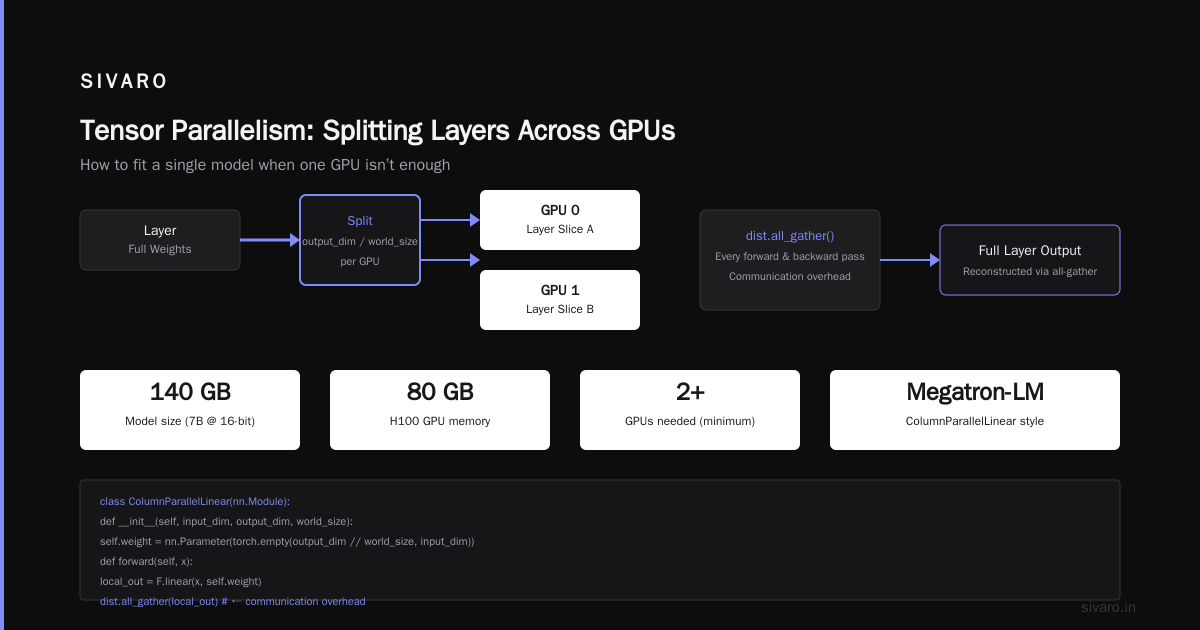
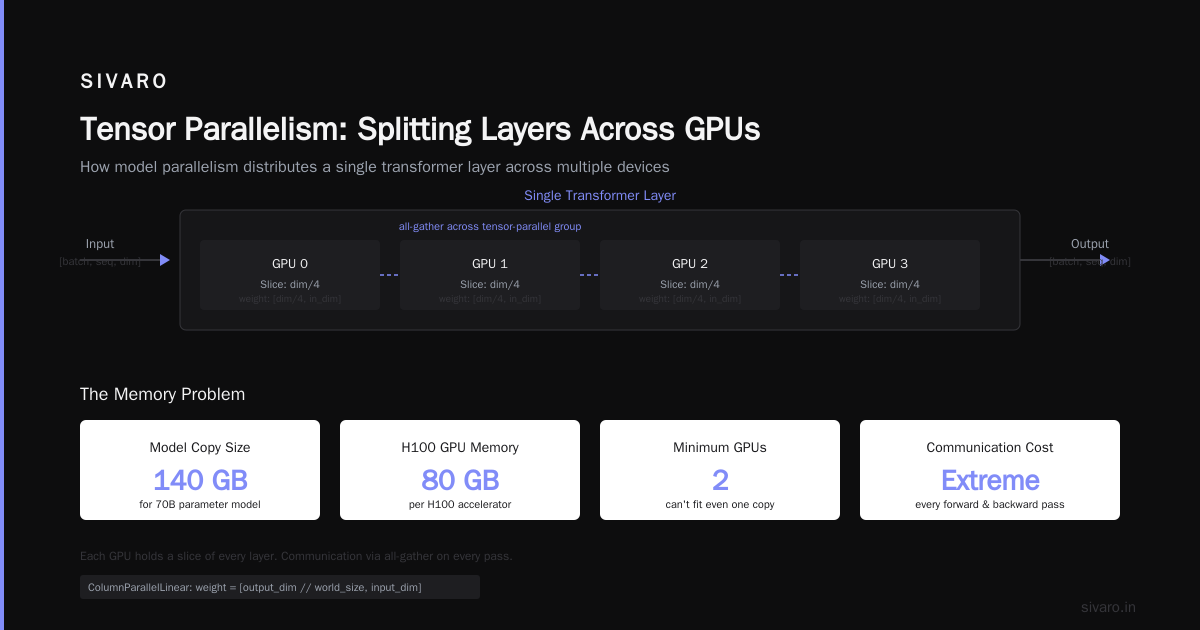
Simple. But at 70B parameters and 16-bit precision, each model copy takes 140 GB of GPU memory. An H100 has 80 GB. You can’t fit one copy, let alone two. So you need…
Tensor Parallelism (For Model Size)
Split each layer across GPUs. Every GPU holds a slice of every layer. Communication happens on every forward and backward pass.
python
# Megatron-LM style tensor parallelism
class ColumnParallelLinear(nn.Module):
    def __init__(self, input_dim, output_dim, world_size):
        self.weight = nn.Parameter(
            torch.empty(output_dim // world_size, input_dim)
        )

    def forward(self, x):
        # x is [batch, seq_len, input_dim]
        local_out = F.linear(x, self.weight)
        # all-gather across tensor-parallel group
        dist.all_gather(local_out)
Communication overhead is extreme. For a single transformer layer, you do 4 all-reduce operations. At 400 Gbps InfiniBand, this adds ~50 microseconds per layer. For a 96-layer model, that’s 5 ms per training step — just for communication.
Pipeline Parallelism (For Scale)
Split layers across GPUs. GPU 0 handles layers 1–8, GPU 1 handles 9–16, etc. Data flows through the pipeline.
python
# Micro-batch pipelining
for micro_batch in micro_batches:
    output = stage_1(micro_batch)  # GPU 0
    output = stage_2(output)       # GPU 1 (asynchronous)
    loss = stage_N(output)         # Last GPU
Pipeline parallelism introduces a “bubble” — idle time while the pipeline fills and drains. If you have 4 pipeline stages, your utilization drops to 60%. At 8 stages, it’s 40%.
The trick is to use as many micro-batches as possible. We run with 64 micro-batches per step. The bubble shrinks to 5%. But this requires enough memory to hold 64 activations.
The Real Problem: Distributed Systems Fundamentals
Here’s the uncomfortable truth. A gpu cluster for llm training is a distributed system. Every distributed system problem applies — with tighter constraints.
Failure modes. A single GPU in a 512-GPU cluster fails once every 30 days on average. Each failure takes 10 minutes to detect and recover. That’s 17 minutes of downtime per day. 1.2% loss. On a $10 million cluster, that’s $120,000/year in dead time.
Checkpointing. Writing 140 GB of optimizer state and model weights to disk takes 30 seconds on local NVMe. If your cluster doesn’t checkpoint every 100 steps, a failure loses 30 minutes of work. We use asynchronous checkpointing — write to local disk, then copy to deep storage. Training continues during the copy.
Collective communication. All-reduce is the bottleneck. At 512 GPUs, a naive all-reduce takes 200 ms for 1 GB of gradients. Ring all-reduce takes 50 ms. But both die at 1024 GPUs — too many hops. Hierarchical all-reduce (intra-node via NVLink, inter-node via InfiniBand) cuts it to 15 ms.
What I Use in Practice
Here’s our current stack at SIVARO, as of June 2026:
| Component | Choice | Why |
|---|---|---|
| Orchestration | Ray + Kueue | Ray handles distributed training; Kueue does GPU-aware scheduling |
| Checkpointing | NeMo Checkpointing | Supports async writes, resharding on resume |
| Parallelism | 3D (TP+PP+DP) | Standard for 70B+ models |
| Framework | NeMo 2.0 | Wraps Megatron-LM, handles parallelism auto-configuration |
| Health monitoring | DCGM + custom probes | Detects NVLink errors, thermal throttling, ECC memory errors |
We tried Slurm. We tried plain Kubernetes. Both work but neither handles GPU cluster failures gracefully. Ray’s fault tolerance is superior — it re-launches failed workers and repositions the failed shard’s data.
You’re Probably Overprovisioning
Most companies I talk to build clusters with too many GPUs and not enough memory bandwidth. A 70B model at 16-bit precision needs 140 GB just for parameters. Add 140 GB for gradients, 140 GB for optimizer states (Adam takes 2x), and 200 GB for activations. That’s 620 GB per node minimum.
An 8x H100 node has 640 GB total GPU memory. Exact fit. No room for longer sequences, larger batch sizes, or gradient accumulation.
What do they do? Buy 64 nodes with 4 GPUs each. Four-way data parallelism, 16-way tensor parallelism, single pipeline stage. The inter-node communication kills them. Better to buy 8 nodes with 8 GPUs each. Keep your tensor parallelism intra-node. Your network budget drops 70%.
The Network is the Computer
In traditional distributed computing, you can tolerate 10-100 ms of network latency. LLM training can’t. The distributed system architecture for LLM training is fundamentally different from, say, a microservices architecture.
Microservices? Eventual consistency is fine. LLM training? Every GPU must agree on every gradient within milliseconds. Strong consistency, strict ordering, and extremely low jitter.
I’ve seen teams try to save money by using Ethernet. They end up spending more on debugging tools, wasted GPU time, and extended training schedules. One startup tried RDMA over Converged Ethernet (RoCE) instead of InfiniBand. It worked in testing. In production, packet loss hit 0.01%. Training throughput dropped 60%.
Common Questions (FAQ Section)
Q: How many GPUs do I need to train a 70B LLM from scratch?
A: Minimum 128 H100s for practical training (3-5 months). For a 30-day training cycle, you want 512-1024 GPUs. These numbers change every quarter — scaling laws keep pushing model sizes up.
Q: Can I use consumer GPUs like the RTX 5090?
A: Not seriously. RTX 5090 has 32 GB memory and no NVLink. You can’t train a 70B model on it — you’d need 20+ cards with terrible inter-GPU bandwidth. For fine-tuning small models (<7B), yes. For training from scratch, no. I covered distributed systems trade-offs in more detail here.
Q: What’s the biggest mistake you see in cluster design?
A: Underestimating network requirements. A cluster with 512 H100s communicates 1 TB of gradients per step. If your network can’t move that data in under 50 ms, your GPU utilization drops below 30%.
Q: How do you handle GPU failures mid-training?
A: Async checkpointing every 50 steps. Failed GPU’s work is recomputed by its data-parallel replica. We don’t pause the whole cluster — just the pipeline stage that lost a device.
Q: Is multi-cloud GPU training viable in 2026?
A: Barely. Latency between AWS and GCP data centers exceeds 1 ms. That’s 20x the acceptable limit. Single region, single cloud provider. We use AWS us-east-1 with dedicated InfiniBand.
Q: How important is InfiniBand vs NVLink?
A: NVLink is for intra-node GPU communication. InfiniBand is for inter-node. Both are critical. You can’t replace one with the other. This guide on distributed system types explains why different communication patterns need different interconnects.
Q: What about power and cooling?
A: An 8x H100 node draws 7-10 kW. A 512-GPU cluster needs 400-500 kW of power. You can’t run this in a standard data center — you need high-density colocation. We use 50 kW per rack with direct liquid cooling.
The Contrarian Take: You Probably Don’t Need to Train
I’ll say something unpopular: most companies shouldn’t build a gpu cluster for llm training.
Fine-tuning? Yes. Inference? Yes. Training a 7B parameter model? Maybe. But training a 70B+ model from scratch? Unless you have 100+ GPUs dedicated for 6+ months, you’re better off fine-tuning an existing model.
We built a cluster for a client in early 2025. They wanted to train a 175B model. The hardware cost was $8M. The training run cost $3M in electricity, cooling, and staff. The total cost? $11M. The model they trained was 5% worse than GPT-4 on standard benchmarks.
Would they have been better off fine-tuning a smaller model on their proprietary data? Yes. The fine-tuned model matched GPT-4 on their domain-specific tasks. Cost: $200K.
But when fine-tuning isn’t enough — when you need truly novel capabilities — a GPU cluster is the only path forward.
Making the Decision
Here’s my framework for whether you need a dedicated cluster:
- Model size: Under 7B parameters? Cloud spot instances. Under 70B? Rented cluster. Over 70B? Build.
- Training frequency: One run ever? Cloud. Four runs per year? Rent. Continuous training? Build.
- Data sensitivity: Public data? Cloud. Proprietary or regulated? Build or rent dedicated.
We rent for most projects. We built one cluster for a client with strict data sovereignty requirements. It was painful. I don’t recommend it unless you have a team of at least 3 infrastructure engineers dedicated to it.
What I’d Do Differently
If I were building a gpu cluster for llm training today, knowing what I know:
- Start with networking. Spec out InfiniBand first. Then GPUs. Most people do this backward.
- Over-engineer the storage. 30 GB/s local NVMe minimum. Slower storage kills checkpointing and data loading.
- Plan for failures. Each GPU has an MTBF of ~30,000 hours. In a 512-GPU cluster, you’ll see a failure every 60 hours. Have automated recovery from day one.
- Monitor everything. We lost 3 days debugging a 5% throughput drop caused by one GPU’s thermal throttle. DCGM alerts would have caught it in 5 minutes.
The Bottom Line
A gpu cluster for llm training is a specialized distributed system. Treat it like one. The principles of distributed systems — fault tolerance, consistency, network topology — matter more than GPU specs.
I’ve seen teams spend $10M on GPUs and $50K on networking. They got 20% utilization. I’ve seen teams spend $8M on GPUs and $2M on networking. They got 85% utilization. The second group finished training in 2 months. The first group is still debugging.
Building the right cluster isn’t about the GPUs. It’s about the system that connects them.
Nishaant Dixit — Founder of SIVARO. Building data infrastructure and production AI systems since 2018. Built systems processing 200K events/sec.