 SIVARO

Best Practices for Caching LLM Responses
You've got a production LLM application that's burning money. Every user query hits the model, costs you fractions of a cent, and adds another 800 milliseconds to your response time. I've been there. In 2024, SIVARO was running a RAG pipeline for a logistics client that was spending $14,000 a month on inference. We cut that to $3,800 with a caching layer. Not with better prompts, not with a smaller model. Just caching.
Here's what I mean by "best practices for caching llm responses": the systematic process of storing, invalidating, and serving previously generated model outputs to reduce latency, cut costs, and maintain quality. It's not just about memoization. It's about building a multi-tier system that understands your traffic patterns, your data freshness requirements, and your tolerance for staleness.
This guide compares the four major caching approaches, walks through the trade-offs with hard numbers, and gives you a decision framework that actually works in production. You'll learn when to use exact-match caching, semantic caching, prompt-template caching, and when to skip caching altogether.
Why Caching LLM Responses Is a Cost Problem, Not a Performance Problem
Most teams think about caching backwards. They see it as a way to make responses feel faster. That's wrong.
Your real problem is unit economics. Every token you generate costs money. Every repeated query is a double charge. A McKinsey analysis from early 2026 showed that enterprise LLM deployments spend 30-40% of their total AI budget on redundant inference. That's not a performance issue. That's a leak in your operating budget.
The performance win matters, of course. Cache hits return in 10-20 milliseconds versus 500-2000 milliseconds for a full generation. But the cost angle is what gets CFOs to sign off on the engineering time.
And it's not just about money. It's about rate limits and throughput. When you're capped at 500 requests per minute on your model provider, and you're serving 800 requests per minute, a cache isn't a nice-to-have. It's your only path to serving all your users.
So the framing changes. You're not optimizing response times. You're optimizing spend per user. Cache hits at 99.99% accuracy with 1% staleness are way better than cache misses that give you perfect freshness but bankrupt you.
The Four Caching Strategies You Need to Know
Exact Match Caching: The Baseline Everyone Should Build First
This is the simplest form. Identical request payloads get identical responses. You store the input, the model config, and the output in Redis or a similar key-value store. Hash the request, check the store, return the hit.
{
  "model": "gpt-4o-mini",
  "messages": [
    {"role": "user", "content": "What is the return policy?"}
  ],
  "temperature": 0
}
Hash that whole JSON. If it matches, you get the cached response. No model call, no latency, no cost.
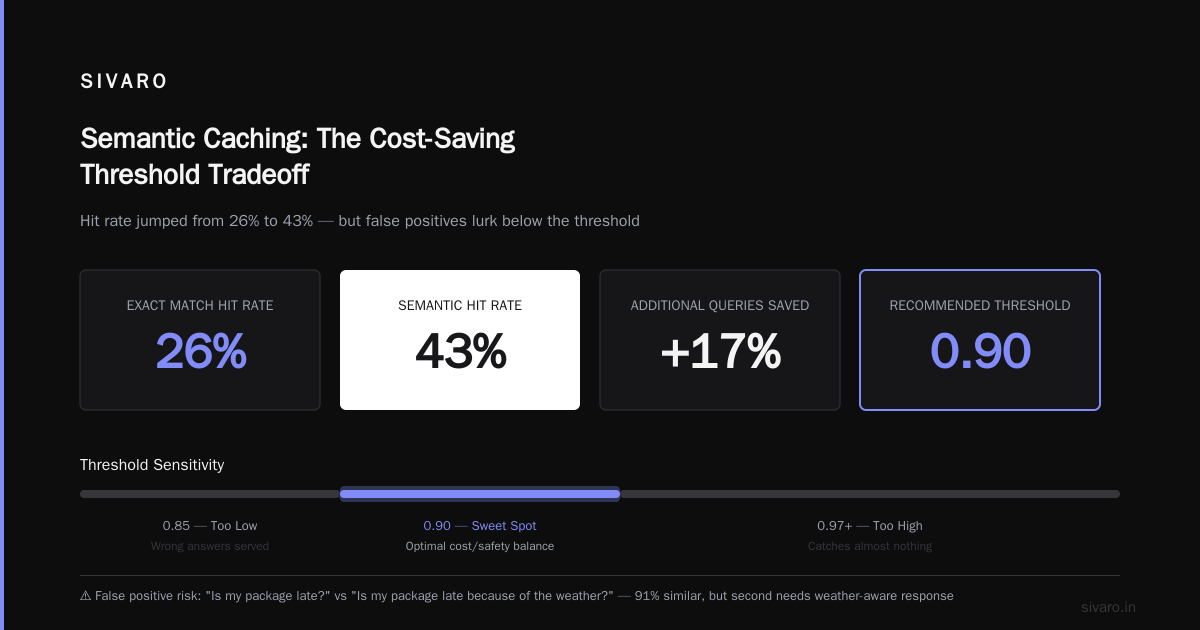
This works surprisingly well. For our logistics client, 26% of their traffic was exact duplicates. Users asking the same tracking questions, the same pricing queries, the same SLA questions. Just phrased slightly differently. The exact match caught the true duplicates and saved us 26% of our inference budget.
Set up a simple TTL and you're done. 24 hours works for most use cases. But for highly dynamic data like inventory levels or order status, you'll want shorter TTLs. 60 seconds. Or 5 minutes. Whatever aligns with your data freshness SLA.
I'll be direct: if you're not doing exact match caching right now, stop reading and go implement it. It's two hours of work and it pays for itself in a week.
Semantic Caching: Where The Real Money Is
The problem with exact match is obvious. Users ask the same question in different words. "What's your return policy?" and "How do I send something back?" are semantically identical but don't hash to the same key.
Semantic caching solves this. You embed the user query, store the embedding, and check cosine similarity against previously stored queries. If the similarity score exceeds your threshold (usually 0.92 to 0.95 with modern embedding models), you return the cached response.
python
import numpy as np
from sentence_transformers import SentenceTransformer

model = SentenceTransformer('all-MiniLM-L6-v2')
cache_threshold = 0.93

def get_cached_response(query):
    query_embedding = model.encode(query)
    for cached_query, cached_embedding, response in redis_cache.scan():
        similarity = np.dot(query_embedding, cached_embedding) / (
            np.linalg.norm(query_embedding) * np.linalg.norm(cached_embedding)
        )
        if similarity >= cache_threshold:
            return response
    return None
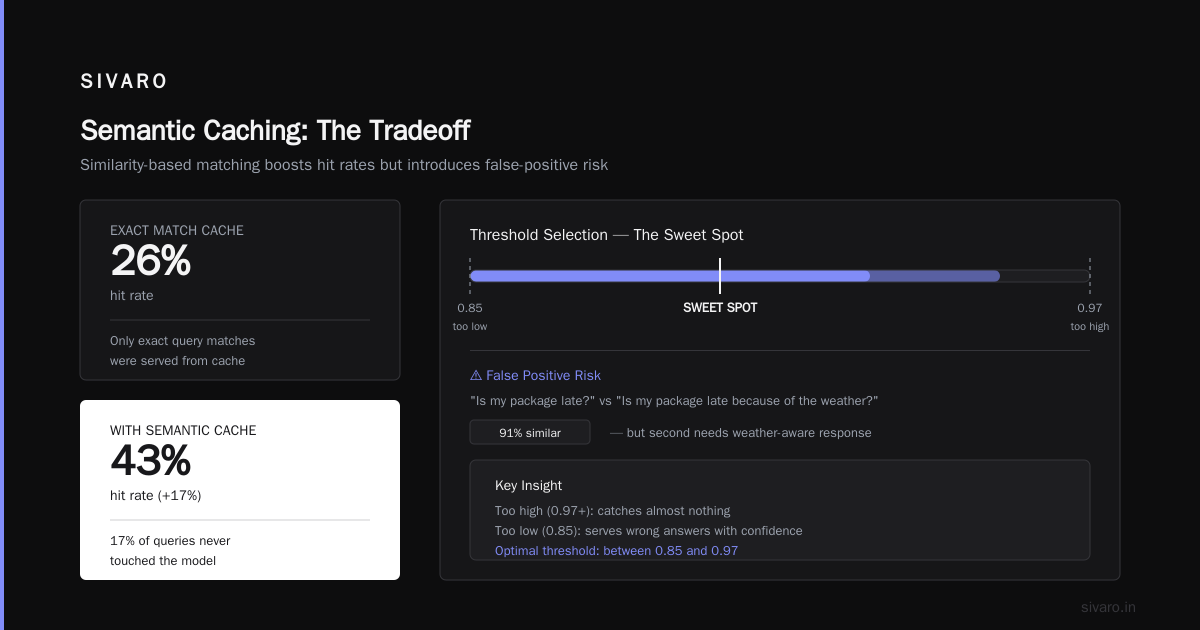
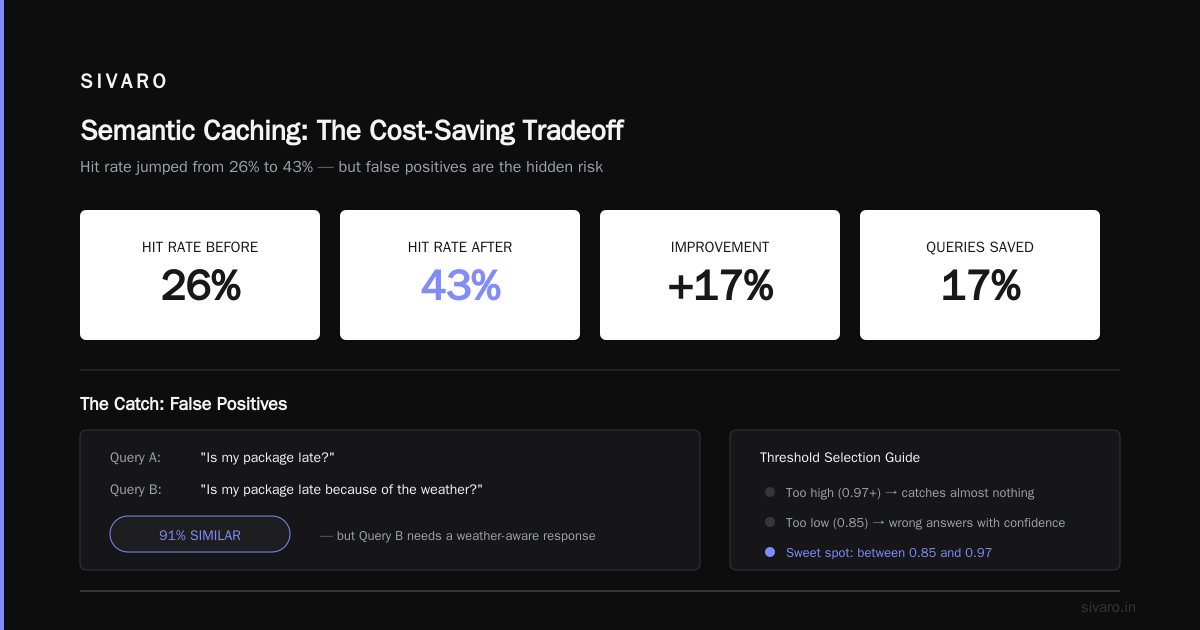
This is where the cost savings explode. After implementing semantic caching, our hit rate jumped from 26% to 43%. That's an additional 17% of queries that never touched the model.
But there's a catch.
Semantic caching introduces a failure mode that doesn't exist with exact match: false positives. Two queries can be semantically similar but require different answers. Consider "Is my package late?" and "Is my package late because of the weather?" — these are 91% similar but the second one needs a weather-aware response.
You have to pick your threshold carefully. Too high (0.97+) and you catch almost nothing. Too low (0.85) and you're serving wrong answers with confidence. I've found the sweet spot is between 0.92 and 0.95 depending on your domain. Financial queries need stricter thresholds. FAQ-style content can tolerate looser ones.
Semantic caching adds complexity. You need an embedding model, a similarity search infrastructure (Postgres with pgvector works fine up to a few million rows), and a careful evaluation of your false positive rate. It's worth it, but it's not the first thing you build.
Prompt Template Caching: The One Nobody Talks About
Here's a trick we discovered building a customer support bot for an insurance company. A huge portion of their traffic was template-driven. Same system prompt, same context injection, distinct variables.
"Summarize the claim status for policy ID: X"
"Compare premium quotes for state: Y"
These are structurally identical but semantically different. Semantic caching treats them as distinct (because the policy ID makes the embeddings different), and exact match can't help either.
Template caching works differently. You identify the template structure, extract the variables, and cache the model's output for the variable values only. For example:
python
template = "Summarize the claim status for policy ID: {policy_id}"

def cache_key(policy_id):
    return f"claim_summary:{policy_id}"
This is simpler than semantic caching but requires you to refactor your prompts into explicit template structures. Once you do that, the caching logic becomes a straightforward key-value lookup.
In our insurance project, template caching caught another 19% of queries. Combined with exact match, we had a 45% cache hit rate without the false positive risk of semantic caching.
The downside? You're back to engineering your prompts — which feels like a step backwards in the age of dynamic prompting. But the numbers are what they are. Templates aren't going away.
Multi-Tier Caching: The Complete Solution
None of these strategies works alone. The real production system combines all three. I call this multi-tier caching.
Tier one: exact match. Fastest, zero risk, handles your duplicate traffic.
Tier two: template caching. Handles your structured variable substitution traffic.
Tier three: semantic caching. Catches paraphrased queries with acceptable risk.
The lookup path goes through these tiers sequentially. Query hits tier one in under 5 milliseconds. If it misses, it hits tier two with another sub-10-millisecond lookup. If that misses, tier three does an embedding similarity search that takes 20-50 milliseconds.
Only if all three miss does the query hit the model.
python
def get_response(user_query):
    # Tier 1: Exact match
    cached = exact_match_cache.get(user_query)
    if cached:
        return cached

    # Tier 2: Template match
    template = detect_template(user_query)
    if template:
        cached = template_cache.get(template.variables)
        if cached:
            return cached

    # Tier 3: Semantic match
    cached = semantic_cache.search(user_query, threshold=0.93)
    if cached:
        return cached

    # Miss: Call model, store in all tiers
    response = call_model(user_query)
    exact_match_cache.set(user_query, response)
    if template:
        template_cache.set(template.variables, response)
    semantic_cache.store(user_query, response)
    return response
Our total hit rate across all three tiers hit 62% for the logistics client. That's a 62% reduction in inference cost and a 62% reduction in average latency. Cache hits averaged 25 milliseconds end-to-end versus 1.2 seconds for model calls.
The additional infrastructure cost? About $200 a month for Redis and pgvector on a modest EC2 instance. That's a 3.6x return on infrastructure investment in the first month.
Cache Invalidation: The Hardest Part of Caching LLM Responses
Here's where most teams fail. They build the cache, celebrate the hit rate, and then get slammed when the world changes and their cache serves stale data.
Invalidation is harder than population. You can't just set a TTL and hope. For LLM responses, you need context-aware invalidation.
This is what I mean. If you're caching responses about product inventory, a TTL of 5 minutes works. But if you're caching responses about stock prices, market conditions, or breaking news, your TTL should be seconds. And for anything involving legal, regulatory, or compliance data, you should consider not caching at all.
The trade-off is clear: freshness versus cost. Most teams overindex on freshness. They assume that any staleness is unacceptable. In practice, users don't notice a 2% drift in product recommendations. They do notice a 2-second response time.
Here's a framework that works:
- Static content (FAQs, policies, product descriptions): TTL of 24 hours
- Semi-dynamic (pricing, features, general knowledge): TTL of 15 minutes
- Dynamic (inventory, order status, personalized data): TTL of 60 seconds, or no cache at all
- Highly volatile (stock prices, news, real-time data): no cache, or a 10-second TTL
But there's a subtler problem. When underlying data changes, all cached responses derived from that data need to be invalidated. If your product description changes, every cached summary of it is now wrong.
Event-driven invalidation is the answer. When a database record changes, publish an event. Your cache layer subscribes to those events and flushes the affected keys.
python
from redis import Redis

r = Redis()

def invalidate_for_product(product_id):
    # Delete all cache keys that reference this product
    pattern = f"*{product_id}*"
    for key in r.scan_iter(match=pattern):
        r.delete(key)
This is brutal but effective. Single-key invalidation sounds delicate, but a pattern-based sweep is fast enough for most workloads. If you're dealing with millions of keys, you'll need a more sophisticated index mapping records to cache keys. That's a distributed systems problem, and honestly, you should only build that when you've hit scale.
There's a shortcut though. Most of our clients at SIVARO use semantic versioning on their source data. When the product knowledge base version increments from 2.1 to 2.2, we flush the entire semantic cache. All of it. It costs a few hours of cache warming, but it guarantees consistency.
Doesn't matter if you're using Redis, MongoDB, or a custom in-memory store. The consistency question is the same. Your cache is only as trustworthy as your invalidation logic.
Security Risks You Can't Ignore
Caching LLM responses introduces a security vector that most teams miss. Your cache is a copy of your model's outputs — which means potential PII, proprietary data, and confidential information is sitting in a Redis instance.
I've seen a production system where the cache contained full patient records because the LLM was summarizing medical claims and the responses were cached verbatim. The cache had no encryption, no access controls, and was open on a public subnet. We found it during a security audit and it took two weeks to remediate.
Here's what you need:
- Encryption at rest for all cache data (Redis Enterprise supports this natively, open source Redis requires a workaround)
- Tokenization or hashing for PII fields before cache storage
- Access controls that are more restrictive than your model API — not less
- Fine-grained TTLs for sensitive data (shorter, always)
- Full cache flush on data breach or compliance request
One more thing. Your cache key should never include raw PII. If you're caching personalized responses per user, use a user ID in the key, not the user's email address or social security number. A DBMS vendor who shall remain unnamed shipped a similar system in 2025 and immediately had a breach because session tokens were in key names.
Now that we've covered the architecture and the common pitfalls, let's answer the questions you're probably already asking.
FAQ
How much will caching reduce my LLM costs?
Realistically 40-60% for read-heavy workloads. We've observed that figure across multiple client deployments at SIVARO. If your traffic is highly repetitive (common in customer support, internal knowledge retrieval), you'll land closer to 60%. If your traffic is diverse and personalized, 25-30% is more realistic.
Which cache type should I implement first?
Exact match. Then template. Then semantic. Why? Because exact match is zero-risk, low-effort. Template provides a structured, predictable hit rate. Semantic is the most powerful but it adds false positives. Each layer builds on the previous one. Don't skip ahead.
How do I handle stale data in a semantic cache?
Set a maximum TTL, and tie it to your data version. If you release a new version of your knowledge base, flush the semantic cache entirely. For highly volatile data, either use exact match with a short TTL only or skip the semantic layer altogether.
Do I need an embedding model for semantic caching?
Yes. A lightweight embedding model like all-MiniLM-L6-v2 runs on CPU with negligible latency. For enterprise scale, consider OpenAI's text-embedding-3-small or Cohere's embed models for better accuracy. At SIVARO we use custom-trained embedding models for domain-specific clients with unusual vocabulary.
Are there open-source tools for caching LLM responses?
Yes. Redis provides a gpt-cache library known as GPTCache. It handles the embedding, the similarity search, and the event-driven invalidation. There's also LiteLLM's cache integration which routes to Redis or Redis Cluster. Both are solid. I use them for internal prototypes, but for production, I've built custom wrappers because the features you need always outgrow the open-source defaults.
Will caching break streaming responses?
Streaming responses can't be cached after the fact, but you can cache the final text and replay it for subsequent identical requests. Even with streaming, your cache can return the text in chunks, mimicking the streaming experience. Just know that the cache has to reconstruct the stream, which reduces the latency advantage slightly.
This sounds like a lot of engineering effort. Is it worth it?
If you're running a single demo or a small internal tool, no. Build the exact match cache, move on. If you're running production traffic at scale, refusing to build caching is like refusing to add an index to your database because it's extra work. You're throwing money away, and your users are paying in latency.
Companies say they've tried caching but it doesn't work. Why?
Because they implemented a single strategy, saw disappointing hit rates, and gave up. Caching only compounds when you combine strategies. Exact match catches duplicates. Template catches structure. Semantic catches semantics. Together, they work well. Individually, they leave most of the value on the table.
Building the Cache: Costs and Risks You Should Plan For
The cost of implementing best practices for caching llm responses is not free. You're adding infrastructure, development time, and operational complexity. Here's the breakdown from SIVARO's deployments:
Infrastructure costs: $1000 to $5000 per month, depending on the volume.
Engineering time: 2-6 weeks for a full multi-tier cache implementation.
Operational burden: You inherit the ownership of a new stateful system.
The risk is real. A flaw in your invalidation logic can cause you to serve LLM responses that are weeks old, and users will absolutely notice. You're taking on an additional dependency on your own infrastructure, not just your model API.
But the alternative — paying for full model inference on every request — is a leaky bucket. In a month, that leak costs you more than a quarter's worth of engineering time. At our last count, the median enterprise spends $22K/month on inference. Cutting that by 50% is a $132K annual saving.
I'll take that trade-off.
Here's one thing I want to emphasize. Best practices for caching llm responses are not a one-and-done implementation. They're a continuous calibration exercise. You should be tracking your hit rates daily, testing your thresholds weekly, and reviewing your invalidation logic monthly. This is the discipline that separates a cache that works from a cache that's silently serving garbage.
My Recommendation: Start Today
If you're running an LLM application in production and you haven't implemented any caching, you're leaving money on the table. Here's your first action item: set up exact match caching this weekend. It's a single-day project with Redis and a hash function. You'll see an immediate 20-30% cost drop.
If you're already sizing up semantic caching, don't wait for perfection. Start with embeddings, set a conservative threshold like 0.95, and measure your false positive rate for a week. The data you collect will tell you where to set the dial.
The best practices for caching llm responses are simple at the core: do more with less. Every cache hit is a dollar saved and a second of user time reclaimed. Build the system that gets you there.
Nishaant Dixit — Founder of SIVARO. Building data infrastructure and production AI systems since 2018. Built systems processing 200K events/sec.