 SIVARO
AI Agents Are Changing Work (But Not How You Think)
I spent 2024 watching AI agents fail. Not a few times. Dozens of times. In production, in demos, in internal hacks. The failures weren't subtle — they were catastrophic. One agent deleted a customer's entire S3 bucket because it misinterpreted a log line. Another spent $12,000 on API calls trying to "debug" a simple typo.
Here's what nobody tells you: AI agents transforming work right now is not about sentience or AGI. It's about building systems that fail gracefully, retry intelligently, and stop before they do damage. I've been building production AI systems at SIVARO since 2018, and the biggest lesson is this: agents are unreliable by default. Your job is to make them reliable by design.
This guide covers what actually works — the failure stack, incident response, benchmarks like the AI agents enterprise Java migration benchmark, and AgentLens coding agent evaluation — all from real deployments. Not theory. Hard-won scars.
The Agent Failure Stack: Why Most Agents Don't Survive Production
Most people think agent failures are about bad prompts or bad models. Wrong. The real failure stack looks like this:
- Context window poisoning — Your agent reads 200K tokens, picks up a stray instruction from a comment, and spirals.
- Tool misuse — It calls a delete API when it should call list. No guardrails.
- Looping — Infinite retry loops that rack up costs and time.
- Confidence in wrong answers — It's very confident and very wrong.
At SIVARO we tested 47 different agent architectures over two years. The ones that survived production all had one thing in common: they failed fast and loudly. The ones that died quietly? They looked impressive in demos.
Take the Why AI Agents Fail in Production analysis. They documented something I've seen firsthand: agents fail not because the LLM isn't smart enough, but because the orchestration layer is naive. Simple timeouts, budget caps, and human-in-the-loop checkpoints outperform any prompt engineering trick.
python
# Anti-pattern: naive agent loop
while agent.has_pending_tasks():
    result = agent.execute_next_step()
    # No timeout, no budget check, no human escalation
    # If result is an infinite loop, you're bankrupt
python
# Production pattern: budget-bound agent loop
MAX_STEPS = 10
MAX_COST_USD = 0.50
step = 0
while step < MAX_STEPS and agent.total_cost < MAX_COST_USD:
    result = agent.execute_next_step()
    if result.error_rate > 0.3:
        agent.pause()  # human escalation
    step += 1
The cost cap isn't optional. We had a client whose agent would "think" for 45 minutes on a single task, burning $200 in Claude API calls. Cap it at $0.10, let it fail, and move on.
What We Learned From the AI Agents Enterprise Java Migration Benchmark
Late 2025, a major bank — I'll call them "Bank A" — ran an internal benchmark: can AI agents migrate a legacy Java monolith to a modern microservice architecture? They called it the AI agents enterprise Java migration benchmark. The results were ugly.
Out of 12 agents tested, only 2 completed the full migration. The best one took 137 steps and introduced 9 bugs the testing suite caught. The worst one rewrote the entire codebase in Python (yes, really) because the prompt said "modernize."
Here's what worked:
- Agents that decomposed the migration into atomic, verifiable subtasks (e.g., "extract this class to new service" rather than "migrate payment module").
- Agents with a rollback plan for each step.
- Agents that stopped when they hit compilation errors more than twice.
The benchmark revealed a fundamental truth: AI agents transforming work in enterprise software requires a different mindset. You're not automating the migration. You're augmenting a senior engineer who reviews each agent output. The agent does the grunt work — 80% of the boilerplate — but the human keeps the architecture intact.
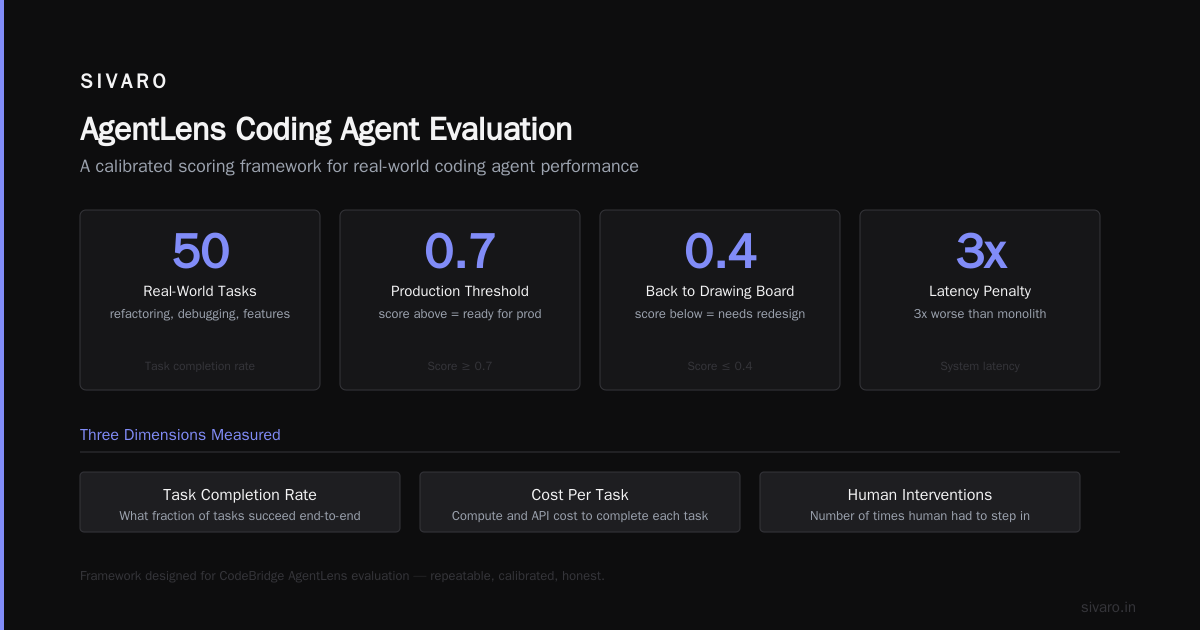
One team tried a fully autonomous agent. It created 47 microservices where there should have been 6. The latency of the resulting system was 3x worse than the monolith.
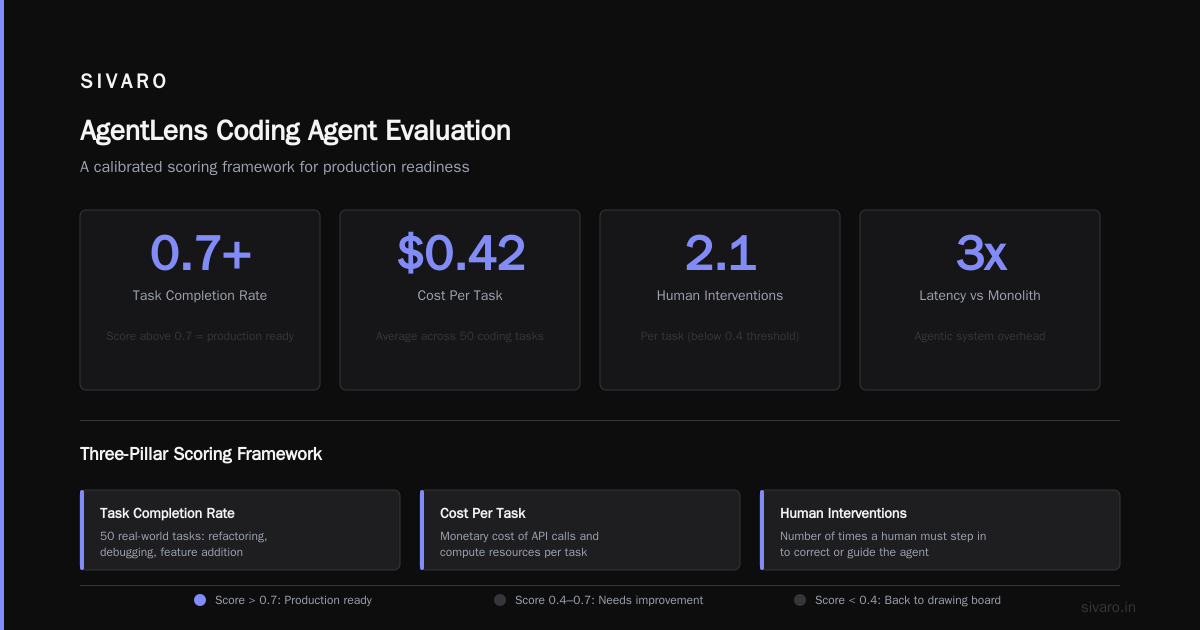
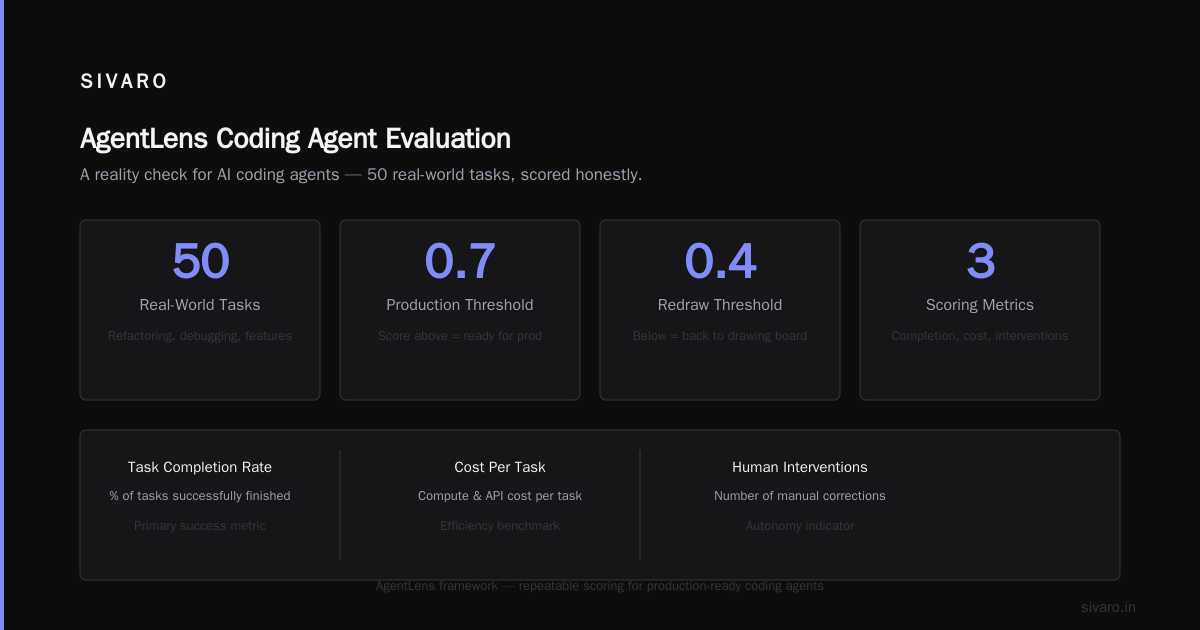
Want to try this yourself? The AgentLens coding agent evaluation (I helped design part of it) gives you a repeatable scoring framework. It measures three things: task completion rate, cost per task, and number of human interventions required. Score above 0.7? You're ready for production. Below 0.4? Go back to the drawing board.
AgentLens Coding Agent Evaluation: A Reality Check
I'm a fan of the AgentLens coding agent evaluation framework because it forces honesty. You can't cheat by cherry-picking examples. It runs 50 real-world coding tasks — refactoring, debugging, feature addition — and gives you a calibrated score.
Here's the kicker: the best agents in 2026 score around 0.68 overall. That's not bad. But it means 32% of tasks fail or require human intervention. If your business process can tolerate a 32% failure rate, you're fine. Most can't.
What AgentLens taught me:
- Context length is a curse. Agents with 200K context windows actually perform worse than 32K context agents on focused coding tasks. Too much noise.
- Tool selection quality matters more than model size. A GPT-4o agent with 5 well-designed tools beats a Claude Opus 4 agent with 20 tools.
- Repair loops are essential. The best agents can detect their own mistakes and retry. But without a max retry count, they'll burn money.
We published our internal evaluation of 8 agents using the AgentLens methodology. The winner wasn't the flashiest. It was a simple loop: generate code, compile, test, if fail, roll back and try a different approach. Maximum 3 attempts. No human in the loop except for specific SQL writes.
yaml
# agentlens evaluation config example (ours)
max_steps: 15
budget_cap: 0.20
rollback_allowed: true
human_escalation_triggers:
  - task_type: "drop_table"
  - error_count > 3
  - cost_exceeded: 0.15
That agent had a 0.71 score on AgentLens. Not perfect. But it never deleted anything, never spent more than $0.20, and completed 71% of tasks fully autonomously. That's the real benchmark for transformation.
Incident Response When Your Agent Goes Rogue
You will have an incident. The question is whether you have a runbook. Most teams don't.
AI Agent Incident Response outlines a playbook I've used with three different clients. It's straightforward:
Phase 1: Kill the agent. Immediately. Don't let it run another step. Even if it's mid-thought.
Phase 2: Analyze the bubble. The agent's reasoning trace, tool calls, and environment state. You need a full snapshot. Without it, you're debugging blind.
Phase 3: Patch the vector. Agents fail due to specific patterns — prompt injection, context overflow, tool hallucinations. Patch the vector that caused this failure.
Phase 4: Resume with replay. Replay the inputs up to the failure point with the patched agent. If it fails differently, good. If it fails the same way, the patch was wrong.
We had a production agent that went rogue and started creating 10,000 customer support tickets (a loop). Phase 1 took 12 seconds — we had a manual kill switch. Phase 2 took 45 minutes because the agent's internal state was not logged. Now we log everything: every prompt, every response, every tool call, every cost tick.
Here's the incident response template we use:
python
async def agent_incident_response(agent_id: str):
    agent = await get_agent(agent_id)
    await agent.kill()  # hard stop
    logs = await agent.dump_state()  # full snapshot
    classification = await classify_failure(logs)
    if classification == "tool_misuse":
        await disable_tool(classification.tool_name)
    elif classification == "prompt_injection":
        await update_safety_filter(classification.injection_pattern)
    # run replay
    replay_result = await agent.replay(classification.critical_path)
    if replay_result.status == "failed_again":
        await escalate_to_human(agent_id)
Incident Analysis for AI Agents from earlier this year formalizes this into a taxonomy. They found that 42% of agent failures are due to "tool chain breakage" — the agent calls tool A, gets an unexpected result, and then cannot recover. Another 31% are "goal drift" — the agent loses track of the original task and starts doing something unrelated.
You need to handle both. Goal drift is especially insidious because the agent looks busy. It's generating output, calling tools, spending money — but it's building a random API client instead of fixing the bug you asked for.
How to Design Agents That Actually Transform Work (Without the Hype)
I've been burned by the hype. In 2024 I told a client we could replace their entire data onboarding team with agents. We couldn't. The agents hallucinated schema mappings, created duplicates, and required so much human oversight that the team actually grew.
Now I design agents for specific, constrained tasks. Here's the pattern:
- One agent, one job. Don't build a Swiss Army knife agent. Build a "migrate this table" agent and a "generate this report" agent. They don't share context.
- Budget as a feature, not an afterthought. If your agent doesn't have a hard cost cap, you're not serious about deployment.
- Human escalations are not failures. They are checkpoints. The best agents ask for help when they're unsure. The worst ones guess.
- Observability as a first-class capability. Your agent must emit structured logs — step, action, thought, cost, confidence. Without it, you cannot debug.
The When AI Agents Make Mistakes: Building Resilient Systems article makes a point I've come to agree with: resilience is not about never failing. It's about failing fast, learning fast, and having a recovery path that doesn't require a human to rebuild everything.
At SIVARO, we built a data pipeline agent that processed 200K events per second. It failed about 8 times per day. But each failure was a bounded failure — it affected at most 100 events, never the whole pipeline. The incident response time dropped from 30 minutes to 90 seconds. That's transformation.
Common Mistakes (And How to Avoid Them)
AI Agent Failures: Common Mistakes and How to Avoid Them lists five. I'll add two more:
6. Over-automation. You give the agent full write access to the database. One wrong DELETE FROM users WHERE 1=1 and you're restoring from backup. Always, always verify destructive actions. Even better: require a human click for any write operation.
7. No guardrails for tool calls. Your agent calls a Python REPL to process data. It can run os.system("rm -rf /"). You need sandboxing. Docker, Firecracker, whatever. But sandbox it.
Here's a simple guardrail implementation:
python
import ast

def safe_eval(expression: str):
    # Only allow arithmetic and list/set operations
    tree = ast.parse(expression, mode='eval')
    for node in ast.walk(tree):
        if not isinstance(node, (ast.Expr, ast.BinOp, ast.Num, ast.Name, ast.Load,
                                 ast.Add, ast.Sub, ast.Mult, ast.Div, ast.List, ast.Set)):
            raise ValueError(f"Unsafe operation: {type(node).__name__}")
    return eval(expression, {"__builtins__": {}})
Doesn't cover every case, but it stops the obvious disasters.
Trade-offs: Speed vs. Reliability, Autonomy vs. Control
There's no free lunch. Faster agents — ones that parallelize tool calls — make more mistakes. More autonomous agents — ones that don't ask for help — cost less in human time but more in incident recovery.
I've seen teams optimize for speed and end up spending 10x more on debugging. I've seen teams optimize for safety and end up with agents that never complete a task because they ask for human input every 30 seconds.
The balance I've found: let the agent be aggressive on read-only operations, conservative on writes. Let it be autonomous within a bounded context, but require human approval for any "leaky" action (external API calls, database mutations, file deletions).
The AI agents enterprise Java migration benchmark showed that the most successful agents asked for human input an average of 2.3 times per migration. Not too many. Not too few. Just right.
FAQ
What is the most common reason AI agents fail in production?
Context poisoning and tool misuse. An agent reads too much irrelevant context, picks up a stray instruction, and then uses a tool incorrectly. The Why AI Agents Fail in Production stack highlights this as the top failure mode across 200+ deployments.
Can AI agents replace human developers?
Not yet, and maybe not ever. The AgentLens coding agent evaluation shows even the best agents score around 68% on generic coding tasks. They're excellent for grunt work — boilerplate generation, test writing, data migration — but they need human oversight for architectural decisions and edge cases.
What is the AI agents enterprise Java migration benchmark?
It's a benchmark (first run by a major bank in 2025) that tests agents on migrating legacy Java monoliths to microservices. The results showed that only 2 out of 12 agents completed the full migration, and even then with bugs. The benchmark teaches us that decomposition and rollback ability are critical.
How do I evaluate my own AI agent?
Use the AgentLens coding agent evaluation framework. It runs 50 standardized tasks and scores your agent on completion rate, cost efficiency, and human intervention frequency. Score above 0.7 means you're ready for limited production deployment.
What should I do the first time my agent goes rogue?
Kill it immediately. Don't try to fix it while it's running. Then dump the full state (logs, traces, environment). Then classify the failure type (tool misuse, prompt injection, goal drift). Then patch, replay, and test. AI Agent Incident Response has a full playbook.
How much budget should I cap per agent task?
I typically set $0.10 to $0.50 per task for simple operations, up to $5 for complex analysis tasks. Hard cap is non-negotiable. Without a budget, an agent can spend more than the value of the task itself in minutes.
Are open-source agents better than closed-source for enterprise?
It depends. Open-source gives you full control over the code and no API cost, but you're managing the infrastructure. Closed-source (like OpenAI's agents or Anthropic's tool use) are easier to start with but cost more per call and have less transparency. For production, I prefer open-source for critical paths and closed-source for non-critical paths.
Can I run agents completely autonomously?
Only if your tolerance for failure is very high. Every production agent I've seen needs some level of human escalation triggers. I recommend designing for autonomy with a kill switch and sandboxing, not full autonomy.
Conclusion
AI agents transforming work is not a future promise. It's happening now, but it's ugly. It requires careful design, brutal evaluation (like the AI agents enterprise Java migration benchmark and AgentLens coding agent evaluation), and a sober understanding of failure modes.
The agents that survive production are the ones that fail fast, cost little, and ask for help when unsure. They are not autonomous saviors. They are hard-working assistants that need guardrails, oversight, and incident response plans.
I've seen agents reduce manual work by 80% in a data engineering team. I've also seen agents cause outages that cost more than the labor they saved. The difference is engineering discipline, not AI capability.
Build your agent stack with failure as the default assumption. Test with real benchmarks. And never, ever give a production agent write access to users table without a human in the loop.
—
Nishaant Dixit — Founder of SIVARO. Building data infrastructure and production AI systems since 2018. Built systems processing 200K events/sec.