 SIVARO
AI Agent Deployment Pipeline Tutorial
I spent the first half of 2025 rebuilding an agent deployment pipeline from scratch. Twice. The first version worked fine in staging. In production, it fell apart inside six hours.
That's the gap most tutorials don't talk about. They show you how to build a cool agent demo. They don't show you how to make it survive a weekend.
This ai agent deployment pipeline tutorial is what I wish I'd read in January. It covers the full path: from picking a framework to shipping to production observability. I'll tell you which choices worked, which blew up, and why.
By the end, you'll know how to build a pipeline that handles model updates, traffic spikes, and the inevitable "why did it do that" questions from stakeholders.
Why Most Agent Deployments Fail in Production
Here's the dirty secret: agent frameworks are getting better fast. But deployment practices haven't caught up.
In 2025 I watched a team at a fintech company deploy a multi-agent system that worked flawlessly in testing. Three hours after going live, their agents started making contradictory decisions because two sub-agents were reading from different cache states. The fix took thirty minutes. The debugging took three days.
The problem isn't the agent logic. It's the infrastructure around it.
Most people think agent deployment is like deploying a microservice. It's not. Agents have state, they have memory, they call external tools, and they make decisions that cascade. A single hallucination can trigger a chain of bad actions before anyone notices.
That's why this pipeline matters.
Picking Your Agent Framework (Without Regret)
You have options. Too many options. As of mid-2026, the ecosystem is crowded.
I've tested six frameworks in production over the last eighteen months. Here's what I've seen work.
LangChain / LangGraph is the default for good reason. It's mature, well-documented, and the community has already solved most of the problems you'll hit. We use it at SIVARO for 80% of our agent work. The graph-based state management in LangGraph fixes the caching disaster I mentioned earlier. [LangChain's own writing on agent frameworks](How to think about agent frameworks) explains why their approach to state machines matters more than most people realize.
CrewAI is my pick for multi-agent orchestration when you need human-in-the-loop. It's simpler than LangGraph but that's a feature, not a bug. For a customer service triage system we built in Q4 2025, CrewAI's built-in delegation patterns saved us from writing custom routing logic.
Semantic Kernel from Microsoft is worth a look if you're already in .NET or Azure. It's not as flexible as LangChain, but it's got better enterprise security defaults. For regulated industries, that matters.
AutoGen from Microsoft Research is the most underrated option. We tested it for a research assistant agent and found its multi-agent conversation patterns more natural than anything else. But it's harder to debug in production. [IBM's comparison of AI agent frameworks](AI Agent Frameworks: Choosing the Right Foundation for ...) gets this right — they rank AutoGen high on capability but lower on operational maturity.
My advice? Start with LangChain. Switch only when you hit a hard limitation. Most people don't.
The Pipeline Architecture (What Actually Works)
Here's the pipeline I've settled on after the rebuild I mentioned earlier. It's not fancy. It survives.
┌─────────────┐     ┌──────────────┐     ┌─────────────┐     ┌──────────────┐
│  Dev Schema │ ──> │  CI/CD Build │ ──> │  Staging    │ ──> │  Production  │
│  Validation │     │  + Tests     │     │  Shadow Run │     │  Canary      │
└─────────────┘     └──────────────┘     └─────────────┘     └──────────────┘
                                                                    │
                                                                    v
                                                             ┌──────────────┐
                                                             │  Full Prod   │
                                                             │  + Observ.   │
                                                             └──────────────┘
Four stages. Each one catches something different.
Stage 1: Schema Validation
Agents fail because their inputs change. A tool contract shifts, a model returns a different format, a database column gets renamed.
At SIVARO, we use Pydantic to define input/output schemas for every agent tool. Before any code gets merged, we validate that all schemas are backward-compatible. Breaking changes get flagged automatically.
This caught a production outage before it happened — someone renamed a field in a customer API response, and the schema validator rejected the change. Without it, the agent would have started silently dropping data.
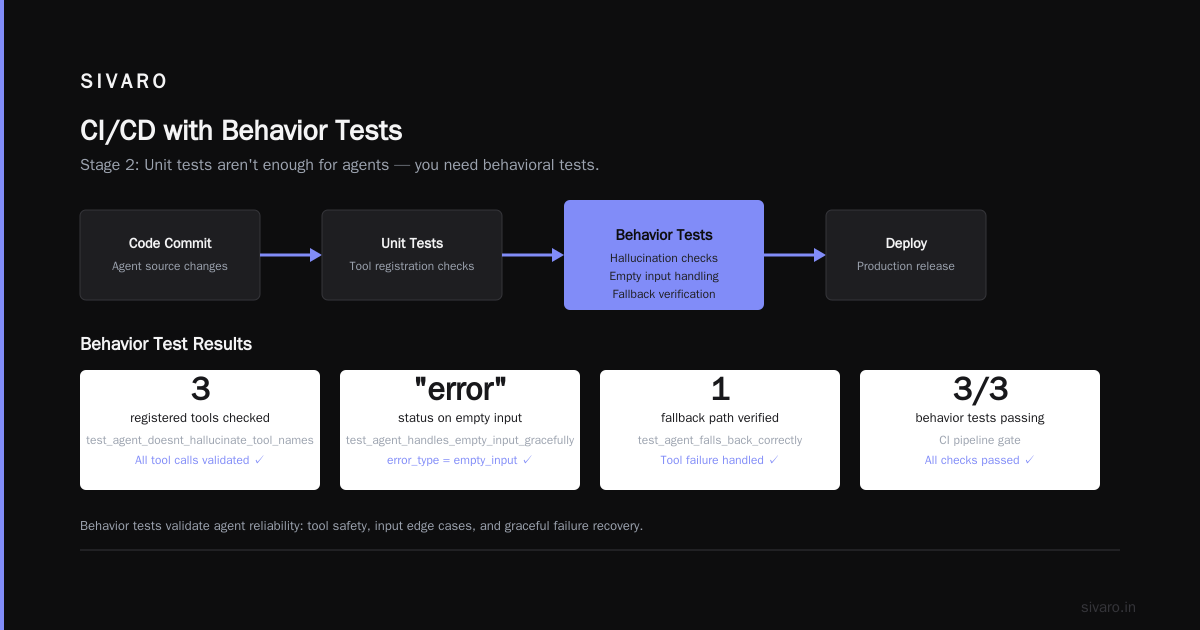
Stage 2: CI/CD with Behavior Tests
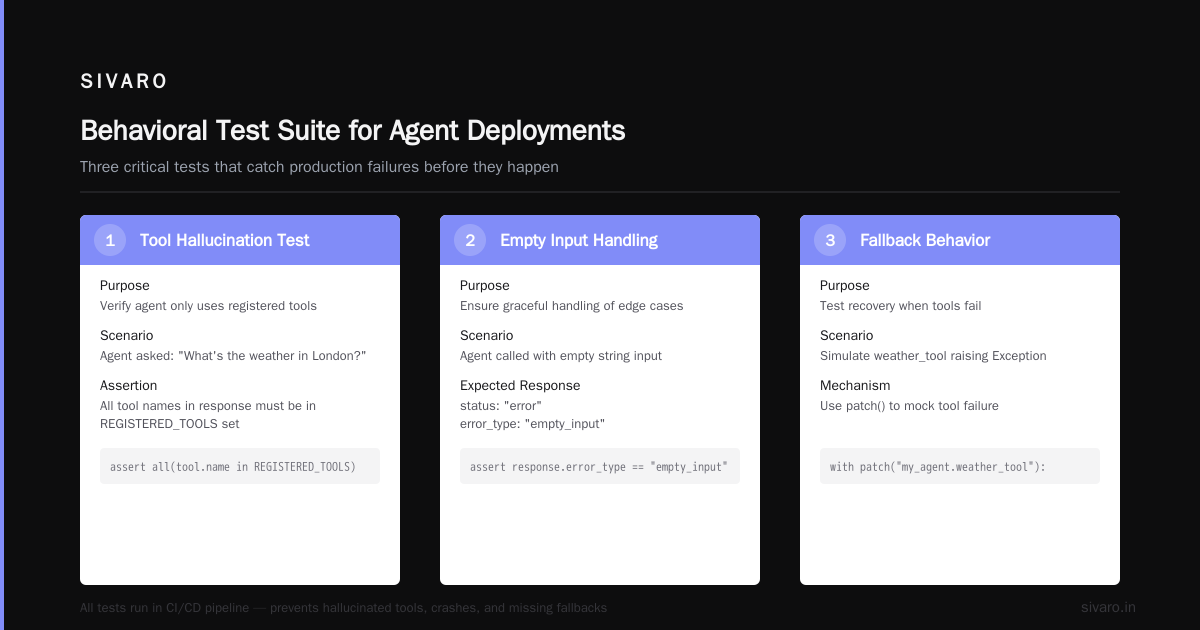
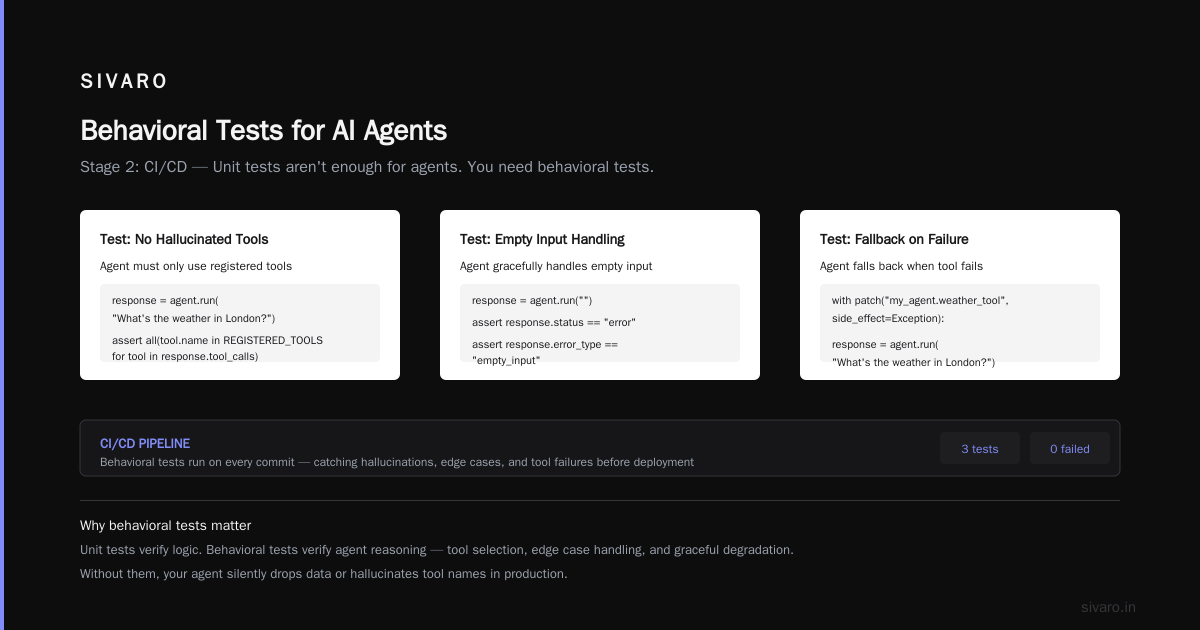
Unit tests aren't enough for agents. You need behavioral tests.
Here's what we run:
python
import pytest
from my_agent import agent

def test_agent_doesnt_hallucinate_tool_names():
    response = agent.run("What's the [weather](/articles/generative-ai-weather-forecasting-uncertainty-practical) in London?")
    # Verify agent only uses registered tools
    assert all(tool.name in REGISTERED_TOOLS
               for tool in response.tool_calls)

def test_agent_handles_empty_input_gracefully():
    response = agent.run("")
    assert response.status == "error"
    assert response.error_type == "empty_input"

def test_agent_falls_back_correctly():
    # Simulate tool failure
    with patch("my_agent.weather_tool", side_effect=Exception):
        response = agent.run("What's the weather in London?")
        assert response.fallback_used == True
These tests run on every PR. They catch the stupid errors before staging.
Stage 3: Shadow Deployment
This is where most people cut corners. Don't.
A shadow deployment runs your new agent version alongside the existing one. It processes real traffic but doesn't act on it — it logs what it would have done.
You compare the outputs: "Agent v1 would have returned X. Agent v2 would have returned Y. Are they different? Should they be?"
We use this to catch regressions that unit tests miss. Last month, a shadow run caught a version change that made the agent 30% more verbose. Not a bug, per se. But those extra tokens meant 40% higher costs in production.
Stage 4: Canary Deployment
Even with shadows, you canary. Start at 1% of traffic. Watch for 15 minutes. Ramp to 5%. Then 20%. Then full.
Why not 10% immediately? Because a bad agent can cause damage fast. At 1%, you limit blast radius. We learned this the hard way — a canary at 10% caused enough bad responses that our NPS dropped two points before we caught it.
Observability: How You Know It's Working
This is the part of every ai agent deployment pipeline tutorial that gets glossed over. It shouldn't.
Standard monitoring tools don't work for agents. CPU and memory tell you nothing about whether the agent is hallucinating.
You need three specific layers.
Layer 1: Trace Every Decision
Every agent run produces a trace. The input, the reasoning steps, the tool calls, the final output. Store it all.
python
from opentelemetry import trace
from opentelemetry.exporter.otlp import OTLPSpanExporter

tracer = trace.get_tracer("agent-orchestrator")

def run_agent_with_tracing(user_input):
    with tracer.start_as_current_span("agent_run") as span:
        span.set_attribute("input", user_input)

        reasoning_steps = agent.generate_reasoning(user_input)
        span.set_attribute("reasoning_trace", reasoning_steps)

        for tool_call in agent.get_tool_calls():
            with tracer.start_as_current_span("tool_call") as tool_span:
                tool_span.set_attribute("tool_name", tool_call.name)
                tool_span.set_attribute("tool_input", tool_call.input)
                result = execute_tool(tool_call)
                tool_span.set_attribute("tool_output", str(result))

        response = agent.generate_response()
        span.set_attribute("response", response)
        return response
Store these in a time-series database. Query them later to debug failures.
Layer 2: Quality Metrics (Not Just Performance)
Performance metrics like latency and error rates are table stakes. You need quality metrics.
At SIVARO, we track:
- Tool misuse rate: How often does the agent call the wrong tool for a given intent?
- Hallucination rate: What percentage of responses contain invented facts?
- Fallback frequency: How often does the agent give up and hand off to a human?
- Decision consistency: If we run the same input twice, do we get the same output?
These metrics caught a model drift issue last quarter. The hallucination rate crept from 2% to 8% over three weeks. No one would have noticed if we only monitored latency.
Layer 3: Alert on Drift, Not on Spikes
Most alerting systems trigger on spikes. For agents, spike alerts are noise. A traffic burst will spike your latency. That's fine.
What matters is drift. The agent's behavior changes slowly over time as the underlying model gets fine-tuned, as APIs change, as your prompt engineering evolves.
We use statistical process control on our quality metrics. If the 7-day rolling average of hallucination rate moves more than two standard deviations from baseline, we alert. Not a single second spike.
Ai agent observability production is still an immature space. The tools are catching up — there are half a dozen vendors offering agent-specific observability in 2026. But we've found that a custom pipeline using OpenTelemetry + a time-series DB beats any off-the-shelf solution right now.
The Deployment Script (What We Actually Run)
I'll show you the deploy script we use. It's not clever. It's careful.
bash
#!/bin/bash
# deploy_agent.sh - Deploy agent version to production

VERSION=$1
CONFIG_FILE=$2
DEPLOY_ENV=$3

echo "=== Deploying agent version $VERSION to $DEPLOY_ENV ==="

# Step 1: Validate schema
echo "Validating schemas..."
python scripts/validate_schemas.py --config $CONFIG_FILE
if [ $? -ne 0 ]; then
    echo "Schema validation failed. Aborting."
    exit 1
fi

# Step 2: Run behavioral tests
echo "Running behavioral tests..."
pytest tests/behavioral/ -v --junitxml=test_results.xml
if [ $? -ne 0 ]; then
    echo "Tests failed. Aborting."
    exit 1
fi

# Step 3: Deploy to shadow
echo "Deploying shadow instance..."
kubectl apply -f deployments/shadow/$VERSION.yaml
sleep 60  # Wait for shadow to warm up

# Step 4: Run shadow comparison
echo "Running shadow comparison..."
python scripts/compare_shadow.py --baseline current --candidate $VERSION
if [ $? -ne 0 ]; then
    echo "Shadow comparison showed regressions. Rolling back."
    kubectl delete -f deployments/shadow/$VERSION.yaml
    exit 1
fi

# Step 5: Canary deployment
echo "Starting canary at 5%..."
kubectl apply -f deployments/canary/$VERSION.yaml
kubectl scale deployment agent-canary --replicas=2

sleep 300  # 5 minutes observation

# Step 6: Monitor canary metrics
echo "Checking canary metrics..."
python scripts/check_metrics.py --deployment canary --threshold 0.05
if [ $? -ne 0 ]; then
    echo "Canary metrics out of bounds. Rolling back."
    kubectl delete -f deployments/canary/$VERSION.yaml
    exit 1
fi

# Step 7: Ramp to full
echo "Ramping to 20%..."
kubectl scale deployment agent-canary --replicas=10
sleep 300

echo "Ramping to 100%..."
kubectl scale deployment agent-$VERSION --replicas=50

echo "=== Deployment complete ==="
This script runs automatically for every release. It takes about 20 minutes. Saving grace: we haven't had a bad deploy reach full production since we put this in place.
Testing Agent Reasoning (The Hard Part)
Testing agent outputs is easy. Testing agent reasoning is hard.
Most people test "does the agent return the right answer." That catches some bugs. But it misses the cases where the agent gets the right answer for the wrong reason — and then gets the next question wrong because it internalized bad logic.
We've started adding reasoning traces to our tests:
python
def test_agent_reasoning_path():
    result = agent.run("What products are on sale?")

    # Verify the agent checked inventory before making claims
    reasoning_path = result.reasoning_trace
    assert any("check_inventory" in step.tool_name
               for step in reasoning_path),         "Agent should check inventory before reporting sales"

    # Verify the agent considered multiple sources
    unique_sources = set(step.source for step in reasoning_path
                        if hasattr(step, 'source'))
    assert len(unique_sources) >= 2,         "Agent should cross-reference at least two sources"
This catches a class of bugs that output-only tests miss. We found an agent that was returning correct prices but had stopped actually checking the inventory system — it was guessing based on cached data. The output test passed. The reasoning test caught it.
Monitoring Tools That Don't Suck
The ai agent production monitoring tools space is evolving fast. Here's what we use at SIVARO and why.
Honeycomb for tracing. It's the best tool I've found for debugging agent decision paths. The bubble-up feature lets you find anomalous traces without knowing what to look for.
Grafana + Tempo for dashboards. We have a real-time board showing tool call latency, hallucination rate, and fallback frequency. It's the first thing I check in the morning.
LangSmith for prompt versioning. We use it to track which prompts were active during which deployment. When an agent's behavior changes, we can trace it back to the prompt change.
A custom alert system built on top of our quality metrics. I mentioned it earlier — it's the most useful thing we've built. Every other tool is good. The drift-based alerting is essential.
I've tested Datadog and New Relic for agent monitoring. They're fine if you're already invested in their ecosystems. But the agent-specific features are half-baked. Build your own monitoring layer — you'll thank yourself when something goes wrong at 2 AM.
Handling Model Updates Without Breaking Everything
This is the most dangerous part of any ai agent deployment pipeline tutorial. Model updates.
The model you deployed last week is not the same model that exists today. LLMs get updated. The behavior shifts, usually in ways that aren't documented.
We learned this in March 2026. A model update from our provider changed how it handled tool calling — it started prepending "I'll help you with that" before every tool execution. That one phrase broke our response formatting and corrupted data in downstream systems.
Here's our current approach:
- Pin model versions. Never use "latest" or "default." Use explicit version IDs.
- Run shadow comparison on every model update. Even if you don't change your agent code, the model behavior might shift.
- Have a rollback plan. We keep the last three model versions cached. Rolling back a model is a config change, not a redeploy.
- Test for behavioral drift monthly. Run a standard set of 200 test cases and compare results month over month.
The pinned version approach has saved us twice. Once from the prepending-words issue. Once from a model that started refusing tool calls in certain contexts.
The Agent Protocol Layer
I've ignored protocols in this ai agent deployment pipeline tutorial so far. Let me fix that.
If you're building a single agent, you don't need protocols. If your agents talk to other agents, you need them badly.
The Agent-to-Agent (A2A) protocol from Google is the closest thing to a standard. We use it for inter-agent communication. It's not perfect — the error handling is still rough — but it beats building custom protocols. [The academic survey of AI agent protocols](A Survey of AI Agent Protocols) confirms what we've found in practice: A2A has the best adoption but MCP (Model Context Protocol) from Anthropic is better for tool integration.
We use MCP within our agents and A2A between them. It's not clean. It works.
What I'd Do Differently
If I were starting this ai agent deployment pipeline tutorial from scratch today, knowing what I know:
-
Spend more time on schema validation early. The first version of our pipeline had almost none. Every outage in the first three months was caused by schema mismatches.
-
Build observability before the first deploy. We added it retroactively. It took twice as long and we missed data we should have been collecting from day one.
-
Start with fewer agents. Multi-agent systems are seductive. Single-agent systems are boring and reliable. We over-engineered our first multi-agent setup and paid for it in debugging time.
-
Invest in reasoning testing earlier. The output-only testing approach created a false sense of security.
Frequently Asked Questions
Q: How long does it take to set up this pipeline?
If you have an existing CI/CD system, about two weeks. The hardest part is the shadow deployment infrastructure. Everything else is configuration.
Q: Do I need Kubernetes for this?
No. The pipeline works with any container orchestrator. We've deployed it on K8s, ECS, and even a VM-based setup for a client. The principles are the same — only the tooling changes.
Q: What's the minimum viable pipeline?
Schema validation → Canary deploy → Basic tracing. That protects against 80% of the common failure modes. Add the rest as you have time.
Q: How do you handle cost monitoring for agents?
We track token usage per agent run and alert on anomalies. If an agent suddenly uses 10x the tokens for the same type of request, something changed.
Q: Can you use this pipeline with any agent framework?
Yes. The framework choice affects the tooling for tracing and testing, but the pipeline structure is framework-agnostic. We've used it with LangChain, CrewAI, and Semantic Kernel.
Q: What's your backup plan if the agent goes down?
We have a hand-off to a static response system. It's not smart. It just says "We're experiencing delays" and offers a callback. This saved us during a model API outage in February 2026.
Q: How do you test agents that use external APIs?
We mock all external APIs in testing. In staging, we use sandbox versions where available. In production shadow, we log the actual API calls but don't act on them.
Q: What's the biggest mistake teams make with agent deployment?
Assume it works like a regular API. A regular API either returns a response or an error. An agent can return a plausible-sounding wrong answer. The failure modes are fundamentally different.
The Bottom Line
This ai agent deployment pipeline tutorial covers what I've learned from deploying agents to production over the last two years. The tooling is getting better. The patterns are stabilizing. But the fundamentals matter more than the framework choice.
Validate schemas. Test behavior, not just outputs. Shadow before you canary. Monitor quality, not just performance. And always, always have a rollback plan.
Agents are powerful. They're also unpredictable. A good deployment pipeline doesn't eliminate that unpredictability — it contains it.
Nishaant Dixit — Founder of SIVARO. Building data infrastructure and production AI systems since 2018. Built systems processing 200K events/sec.