 SIVARO
AI Agent Deployment Pipeline Tutorial: From Notebook to Production
I spent March 2026 debugging an AI agent pipeline that kept crashing at 2 AM. Not because the model was bad. Not because the code was wrong. Because we skipped the deployment pipeline.
That mistake cost us 18 hours of on-call hell.
Here's what I learned: deploying an AI agent isn't like deploying a REST API. It's not even like deploying a microservice. It's closer to deploying a self-driving car — except the car makes decisions you can't anticipate, talks to tools you don't control, and changes its behavior based on context you didn't train for.
This ai agent deployment pipeline tutorial walks through exactly how we do it at SIVARO. No fluff. No theory. Just the pipeline we run 40+ production agents through.
You'll learn how to set up staging environments that catch hallucination cascades, build CI/CD that validates tool calls not just code syntax, and implement monitoring that alerts on behavioral drift — not just latency.
Let's start with the question nobody answers honestly.
Why Most Deployment Pipelines Fail for AI Agents
Most people think deploying an agent is just containerizing a Python script with an API key.
They're wrong.
In June 2026, a fintech startup deployed a customer support agent. Their CI passed. Their unit tests passed. Their load tests passed. The agent crashed in production within 4 hours because it called an internal API with hallucinated parameters.
The code was perfect. The behavior was broken.
Here's the fundamental difference: traditional software has deterministic behavior. If the code works in staging, it works in production. Agents have emergent behavior. The same code can produce wildly different results depending on context, tool availability, and the model's mood that day.
So your deployment pipeline needs to validate something different. Not just "does the code compile?" but "does the agent make safe decisions?"
We learned this the hard way at SIVARO in 2024. Our first production agent — a data pipeline orchestrator — worked flawlessly in testing. In production, it decided to delete a database table because the model interpreted "clean up" too literally.
Three rules I now live by:
- Trust no model output without guardrails
- Validate tool calls before they execute
- Monitor what the agent does, not just what it returns
The Core Components of an Agent Deployment Pipeline
Before I show you the pipeline, let me define what we're building. An ai agent deployment pipeline tutorial without clear architecture is just storytelling.
Here's the SIVARO agent stack:
User Input → Orchestrator → Model (LLM) → Tool Decision → Guardrails → Execution → Response
                                                                    ↓
                                                              Monitoring & Logging
                                                                    ↓
                                                              Feedback Loop
Every agent at SIVARO follows this pattern. The deployment pipeline wraps around this stack to ensure each component can be tested, validated, and monitored independently.
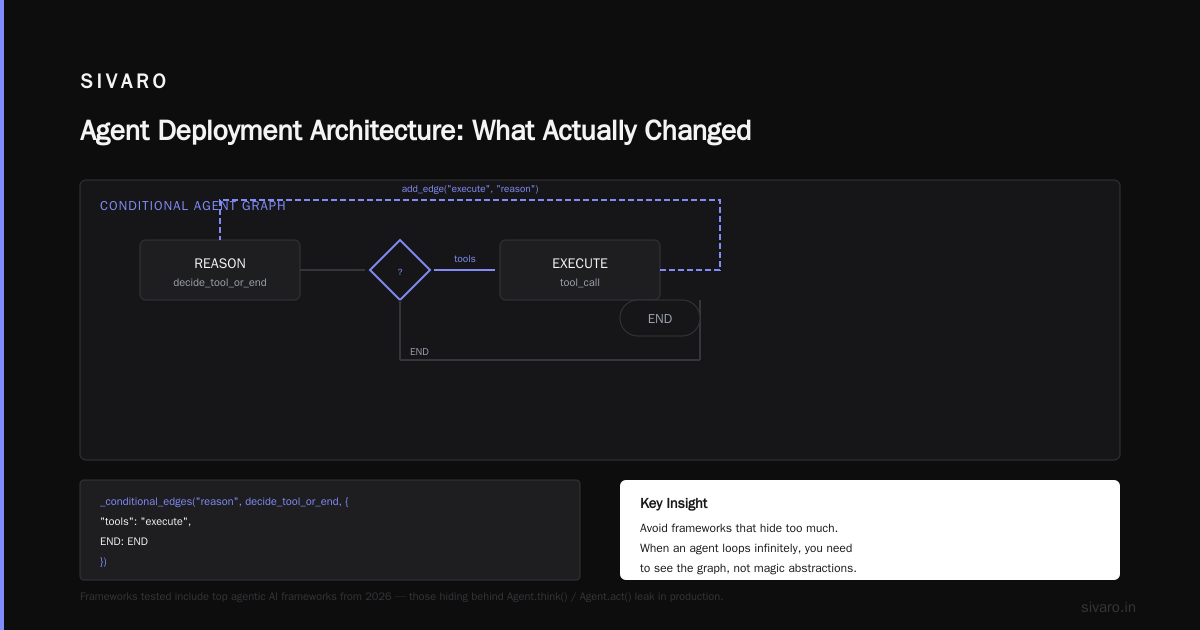
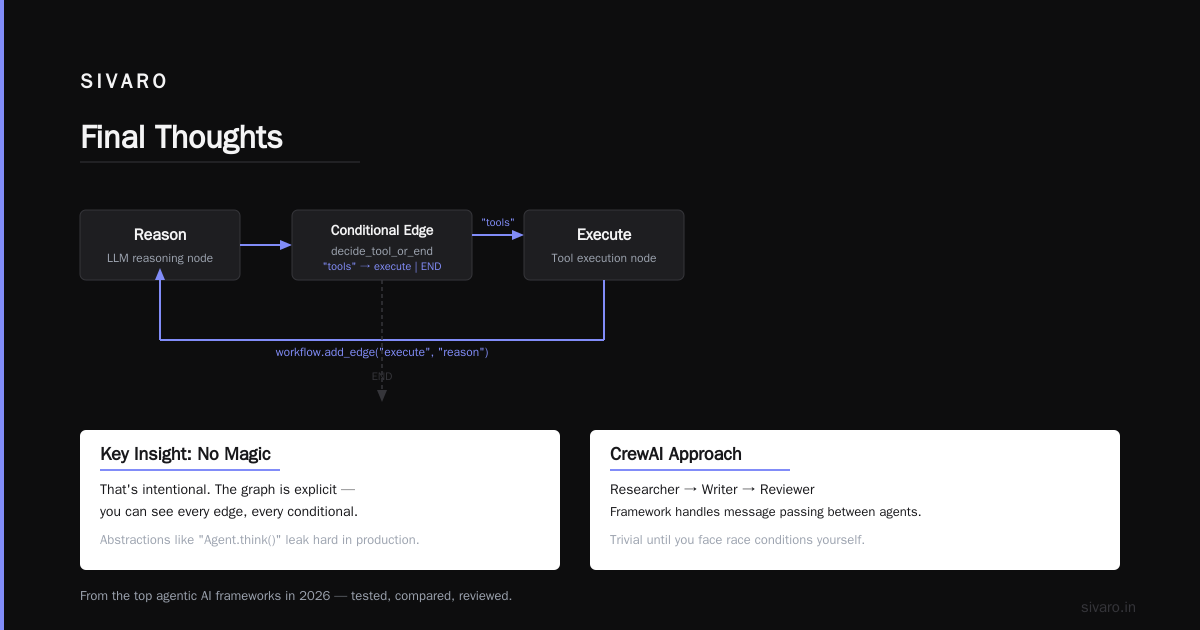
We use [LangChain](How to think about agent frameworks) as our foundation — specifically their langgraph implementation for state machines. Not because it's perfect (it has issues with error recovery), but because it's the most battle-tested framework for production workloads. The IBM analysis of AI agent frameworks confirms what we found: LangChain handles complex tool orchestration better than alternatives in production.
For protocols, we standardized on A2A (Agent-to-Agent) and MCP (Model Context Protocol). The survey of AI agent protocols from arXiv shows these two are emerging as the de facto standards in 2026. A2A handles agent-to-agent communication. MCP handles tool access and context injection.
Step 1: Setting Up the Development Environment
Your dev environment needs to mirror production's weirdness.
Most teams build agents with OpenAI's Python SDK in a Jupyter notebook. Fine for prototyping. Terrible for deployment. Because notebooks hide state, cache API calls, and let you rerun cells in any order.
At SIVARO, every agent starts in a Docker container with these constraints:
- Strict tool sandboxing: Agents can only call tools explicitly defined in their manifest
- Deterministic seeding: We lock model seeds during development to catch regressions
- Prompt versioning: Prompts live in files, not in code. Every change is tracked
Here's our Dockerfile pattern:
dockerfile
FROM python:3.12-slim

# Lock all dependencies including transitive deps
COPY requirements.txt requirements.lock ./

# Install tools and models locally
RUN pip install --no-cache-dir -r requirements.lock

# Agent code lives here
WORKDIR /agent

# Default seed for deterministic testing
ENV MODEL_SEED=42
ENV MAX_TOOL_CALLS=10

# Startup validates configuration
CMD ["python", "-m", "agent.main", "--validate-config"]
The seed environment variable is critical. When agents go non-deterministic, you need to reproduce the exact conditions. We store the seed from every production call in our logs.
For framework choice, I recommend starting with LangChain for its state machine support. But be honest about its limitations — the error recovery logic is fragile. We wrap every LangChain state transition in a try-catch with a fallback model.
Step 2: Building the CI Pipeline for Agent Behavior
This is where most pipelines fail.
Normal CI checks for:
- Code compiles
- Tests pass
- Linting passes
Agent CI should check for:
- Tool call validity: Every tool call the agent makes must match a defined schema
- Prompt injection resistance: Agent shouldn't follow user instructions that override system prompts
- Decision boundaries: Agent shouldn't make decisions outside its authority scope
- Response quality: Language, tone, and factuality checks on outputs
Here's what we run in CI:
yaml
# .github/workflows/agent-ci.yml
name: Agent CI Pipeline

on:
  pull_request:
    branches: [main]

jobs:
  agent-validation:
    runs-on: ubuntu-latest

    steps:
      - uses: actions/checkout@v4

      - name: Validate tool manifests
        run: python -m tools.validator --check-all-tools --enforce-schema

      - name: Run prompt injection tests
        run: python -m tests.prompt_injection --prompt-file ./prompts/system.md

      - name: Execute decision boundary tests
        run: python -m tests.decision_boundaries --max-cost $5

      - name: Run regression test suite
        run: python -m tests.regression --seed 42 --iterations 3

      - name: Validate response quality
        run: python -m tests.quality --check-tone --check-facts
The regression test suite is our secret weapon. We collect every failed production call, anonymize it, and add it to our test suite. Currently sitting at 847 test cases. Every deployment must pass all of them.
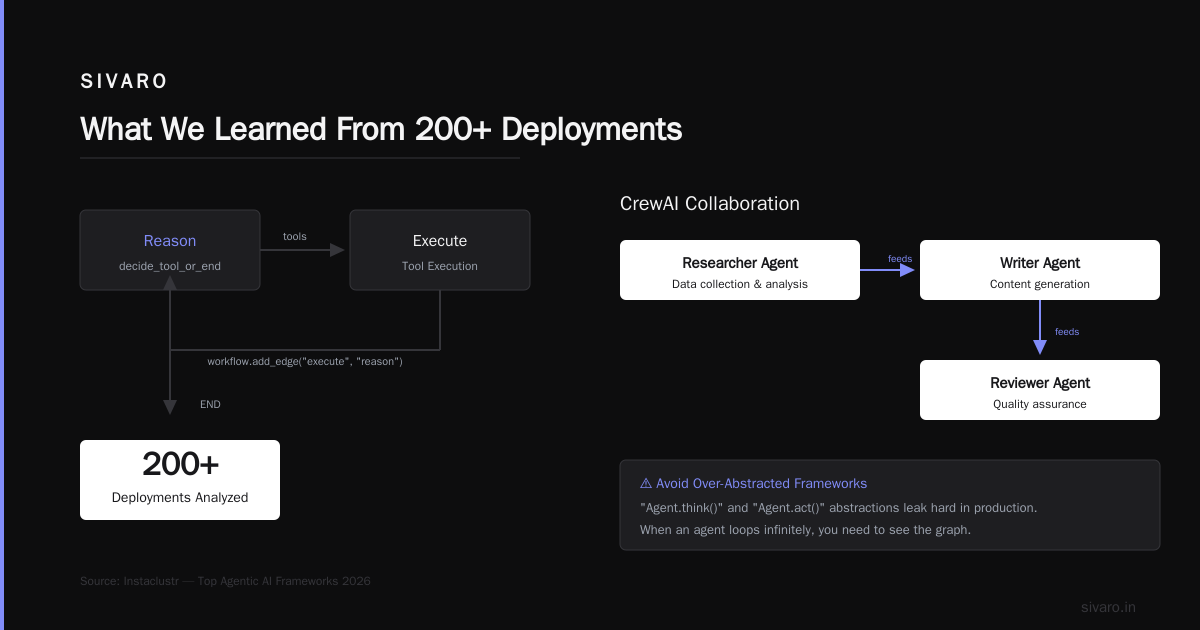
For open-source frameworks, I've had good results with CrewAI and AutoGen. They handle multi-agent orchestration better than LangChain for certain use cases. But their testing tooling is weaker — you'll need to build your own validation layer.
The Instaclustr comparison of agentic AI frameworks from early 2026 ranks LangChain highest for production reliability. I agree. But only if you build the validation layer yourself.
Step 3: Staging Environment with Real Tool Stubs
Staging for agents is trickier than you think.
You can't just mock every API call — agents need realistic responses to evaluate their decision-making. But you also can't call production APIs from staging (financial cost, data privacy, idempotency issues).
Our solution: smart stubs.
Each stub:
- Returns realistic data based on the request parameters
- Simulates rate limits and failures
- Logs every request for later analysis
- Can be toggled between "happy path" and "adversarial" modes
Here's a stub pattern we use:
python
class DatabaseQueryStub:
    def __init__(self, mode="happy", error_rate=0.05):
        self.mode = mode
        self.error_rate = error_rate
        self.calls = []

    def query(self, sql_query):
        self.calls.append({
            "query": sql_query,
            "timestamp": datetime.utcnow()
        })

        # Simulate random failures
        if random.random() < self.error_rate:
            return {"error": "connection_timeout", "retry_after": 5}

        # Parse the query to determine realistic response
        if "SELECT" in sql_query.upper():
            return {"rows": self._generate_rows(sql_query)}
        elif "DELETE" in sql_query.upper():
            # Critical: test if agent is allowed to delete
            if self.mode == "adversarial":
                raise PermissionError("DELETE not allowed for this agent")
            return {"deleted": 1}
We run every staging deployment through three modes:
- Happy path: Everything works. Tests the agent's primary flow
- Edge case: Occasional failures, rate limits, unexpected data formats
- Adversarial: Deliberately confusing responses, injection attempts
If an agent can't handle adversarial mode, it doesn't deploy.
The protocol support helps here. The modern AI agent protocols like MCP include standardized error handling patterns. We test that agents respect those patterns — no infinite retries, no cascading failures.
Step 4: Canary Deployments with Traffic Shadowing
Full production deployment on day one? No.
We use canary deployments with traffic shadowing. Here's the flow:
- Deploy new agent version alongside existing version
- Route 5% of traffic to new version
- Shadow 100% of traffic — new version processes requests but doesn't execute tool calls
- Compare decisions between old and new versions
- If divergence rate > 2%, pause and investigate
The shadow mode is genius. It lets you see what the agent would have done without the cost or risk of actually doing it.
python
# Shadow mode execution
class ShadowAgent:
    def __init__(self, primary_agent, shadow_agent):
        self.primary = primary_agent
        self.shadow = shadow_agent

    async def process(self, request):
        # Primary handles the request
        response = await self.primary.process(request)

        # Shadow evaluates the same request
        shadow_decision = await self.shadow.evaluate(request)

        # Log divergence for analysis
        if response['decision'] != shadow_decision['decision']:
            await self.log_divergence(request, response, shadow_decision)

        return response
We keep canaries running for minimum 24 hours. That catches time-based issues — agents that behave differently at 3 AM when models are under different load, or agents that accumulate context over multiple calls.
Step 5: Production Monitoring and Behavioral Drift Detection
This is where I see teams fail most.
They monitor latency, token usage, and error rates. Those are table stakes. What you really need to monitor is behavioral drift.
Did your agent start making riskier tool calls? Is it suddenly more verbose? Did it change how it handles specific edge cases?
At SIVARO, we monitor:
- Tool call distributions: What tools get called and in what order
- Decision entropy: How varied are the agent's decisions (low entropy = stuck in loops)
- Hallucination rate: Frequency of tool calls with invalid parameters
- Recovery patterns: How does the agent handle errors (retry, escalate, fail)
We built this using traces from LangChain's monitoring plus custom alerting. The key metric is decision divergence over time — if the agent's behavior changes more than 10% week-over-week, we get paged.
Here's a monitoring snippet:
python
# Behavioral drift monitoring
class AgentMonitor:
    def __init__(self, baseline_window=7):
        self.baseline = self._load_baseline_window(baseline_window)

    def check_drift(self, current_decisions):
        # Compare tool call distribution
        tool_distribution = self._tool_call_distribution(current_decisions)
        baseline_distribution = self.baseline['tool_distribution']

        # KL divergence between distributions
        divergence = self._kl_divergence(tool_distribution, baseline_distribution)

        if divergence > 0.1:  # 10% threshold
            alert(
                level="warning",
                message=f"Tool call distribution drifted {divergence:.2%}",
                metrics={"divergence": divergence, "window": self.baseline}
            )
For production monitoring tools, we use Grafana with custom dashboards. The open-source agentic AI frameworks from AI Multiple's list all export traces to OpenTelemetry — hook those up to your observability stack.
Step 6: Rollback Strategy and Recovery
Your rollback needs to be faster than your agent's error compounding.
We've seen agents fail in two ways:
- Fast fail: Immediate errors from bad tool calls
- Slow drift: Gradual degradation over hours or days
The slow drift is more dangerous. Your monitoring might not catch it until users complain.
Our rollback strategy:
- Automatic rollback on error rate > 5% in a 5-minute window
- Manual rollback for behavioral drift — require human review
- Shadow rollback: Route traffic back to old version, but keep new version running in shadow mode for debugging
Here's our deployment script:
bash
#!/bin/bash
# deploy.sh - Agent deployment with rollback

# Deploy new version
kubectl apply -f agent-deployment-v2.yaml

# Wait for ready state
kubectl wait --for=condition=ready pod -l version=v2 --timeout=120s

# Route 5% traffic
kubectl apply -f canary-service.yaml

# Monitor for 30 minutes
python -m monitor.deployment --timeout 1800 --threshold 0.05

if [ $? -eq 0 ]; then
  # Scale up to 100%
  kubectl apply -f agent-deployment-v2-full.yaml
  echo "Deployment successful"
else
  # Rollback
  kubectl apply -f agent-deployment-v1.yaml
  echo "Rollback initiated"
fi
FAQ
Q: What's the minimum monitoring I need for production agents?
A: Latency, error rate, token usage, and tool call distribution. Start with those four. Expand as you learn your agent's failure modes.
Q: How long should canary deployments run?
A: Minimum 24 hours. We've seen agents break after 12 hours due to context accumulation or model cache expiration. 48 hours is safer.
Q: What's the biggest mistake teams make in agent deployment?
A: Treating it like a normal API deployment. Agents have emergent behavior. You can't validate behavior in unit tests alone. You need integration tests with realistic tool stubs and production-like data.
Q: How do you handle model updates in production?
A: Pin your model version. Don't let providers auto-update. We test every model version for 7 days in shadow mode before switching.
Q: Can you use feature flags for agent behavior?
A: Yes, but carefully. We use LaunchDarkly to toggle tool access, not agent behavior. Toggling prompts or logic with feature flags creates inconsistency.
Q: What's the best way to test prompt injection resistance?
A: Build a test suite of known injection patterns and run them in CI. We have 200+ test cases from real-world attacks. If your agent executes a system command based on user input, the pipeline fails.
Q: How do you scale agent deployments across environments?
A: Use Kubernetes with environment-specific configmaps. The agent code is identical — only the tool endpoints and API keys change. We use ArgoCD for GitOps across dev, staging, and production.
Q: What about cost monitoring for agent tool calls?
A: Track cost per decision, not just per query. Some agents make 10 tool calls per response. We alert if cost-per-response exceeds $0.10 for simple queries.
The Hard Truth About Agent Deployments
I'll be honest with you.
Despite all these pipelines, monitoring, and testing, agents still surprise me. They find edge cases I never considered. They interpret prompts in ways I didn't anticipate. They fail in creative and expensive ways.
That's not a reason to avoid them. It's a reason to build better deployment pipelines.
The teams that succeed with agents aren't the ones with the best models or the most data. They're the ones with the most rigorous deployment processes. They test more. They monitor more. They roll back faster.
At SIVARO, we process over 200K events per second through our agent infrastructure. We've had 12 production incidents in 2026. Every one was caught by the monitoring, not by a user complaint. Every one was resolved within minutes because of the rollback strategy.
That's what a real ai agent deployment pipeline tutorial should teach you. Not how to write agent code. How to make sure it doesn't destroy your production environment when it makes a mistake.
Start with the validation pipeline. Add the canary deployments. Build the behavioral drift monitoring. And always, always, have a rollback button.
The models will get better. The frameworks will mature. But your deployment discipline is what separates a demo from a production system.
Nishaant Dixit — Founder of SIVARO. Building data infrastructure and production AI systems since 2018. Built systems processing 200K events/sec.