 SIVARO
AI Agent Deployment Pipeline Tutorial: From Local Dev to Production
I spent three months in early 2025 building what I thought was the perfect AI agent. Clean code. Beautiful architecture. Top-tier framework. Then I deployed it, and within 72 hours it had cost $14,000 in runaway API calls and hallucinated a customer refund policy that didn't exist.
That's when I stopped caring about agent frameworks and started caring about deployment pipelines.
Here's the thing nobody tells you: building an AI agent is maybe 30% of the work. The other 70% is getting it to run reliably in production without burning money or breaking things. This guide is that 70%.
What an AI Agent Deployment Pipeline Actually Is
A deployment pipeline for AI agents isn't a CI/CD workflow with tests and a staging environment. That's table stakes. What I'm talking about is the infrastructure that makes an agent safe, observable, and cost-controlled when it interacts with the real world.
Your pipeline needs to handle:
- Model routing — which LLM calls which agent, and what happens when it fails
- Tool execution guardrails — preventing the agent from doing dangerous things
- Observability — tracing every decision, every tool call, every token spent
- Fallback logic — what happens when the agent loops, costs spike, or hallucinates
- Version management — prompt changes break agents differently than code changes
Most teams I talk to at SIVARO treat agent deployment like microservice deployment. They're wrong. Microservices don't rewrite their own control flow based on probabilistic outputs.
The Three Things That Matter Most
After watching dozens of teams (including my own) fail at agent deployment, I've narrowed the critical path to three things:
1. State management at every step
Your agent isn't just calling an API. It's reasoning, deciding, calling tools, interpreting results, and reasoning again. That loop needs to be traceable from end to end. If you can't replay a failed agent session and see exactly where it went off the rails, you're flying blind.
2. Cost boundaries that are enforced, not monitored
Monitoring is what you do after the bill arrives. Enforcement is what prevents it. Your pipeline needs hard caps — per-request, per-session, per-day. Not alerts. Blocks.
3. The observability layer isn't optional
I've seen teams ship agents with logging that says "Agent processed request." That's not observability. That's a crime scene where you can't find the body. You need token-level tracing, decision trees, and tool call sequences. AI Agent Frameworks: Choosing the Right Foundation for ... breaks down which frameworks actually support this natively — spoiler: most don't.
Pipeline Architecture: The SIVARO Approach
Here's the pipeline we've settled on after three iterations. I'll walk through each stage, then give you code.
User Input → Pre-flight Validation → Context Assembly → Agent Core → Tool Execution → Post-processing → Output Gate → Response
1. Pre-flight Validation
Before the agent sees anything, validate the input. This isn't just "is this a valid string." You're checking:
- Is the user asking something the agent is allowed to handle?
- Are there injection risks in the input?
- Do we have budget for this request?
python
class PreFlightValidator:
    def __init__(self, budget_tracker: BudgetTracker, permit_list: List[str]):
        self.budget_tracker = budget_tracker
        self.permit_list = permit_list

    async def validate(self, user_input: str, session_id: str) -> ValidationResult:
        # Check budget first — fail fast
        if not self.budget_tracker.has_budget(session_id):
            return ValidationResult(accepted=False, reason="Budget exhausted")

        # Check for prompt injection patterns
        if self.detect_injection(user_input):
            return ValidationResult(accepted=False, reason="Potential injection")

        # Check input scope
        intent = await self.classify_intent(user_input)
        if intent.domain not in self.permit_list:
            return ValidationResult(
                accepted=False,
                reason=f"Domain {intent.domain} not authorized"
            )

        return ValidationResult(accepted=True, context=intent.domain)
Most teams skip this step. "The LLM will figure out if it can handle it." Wrong. By the time the LLM figures out it can't handle the request, you've spent tokens and latency.
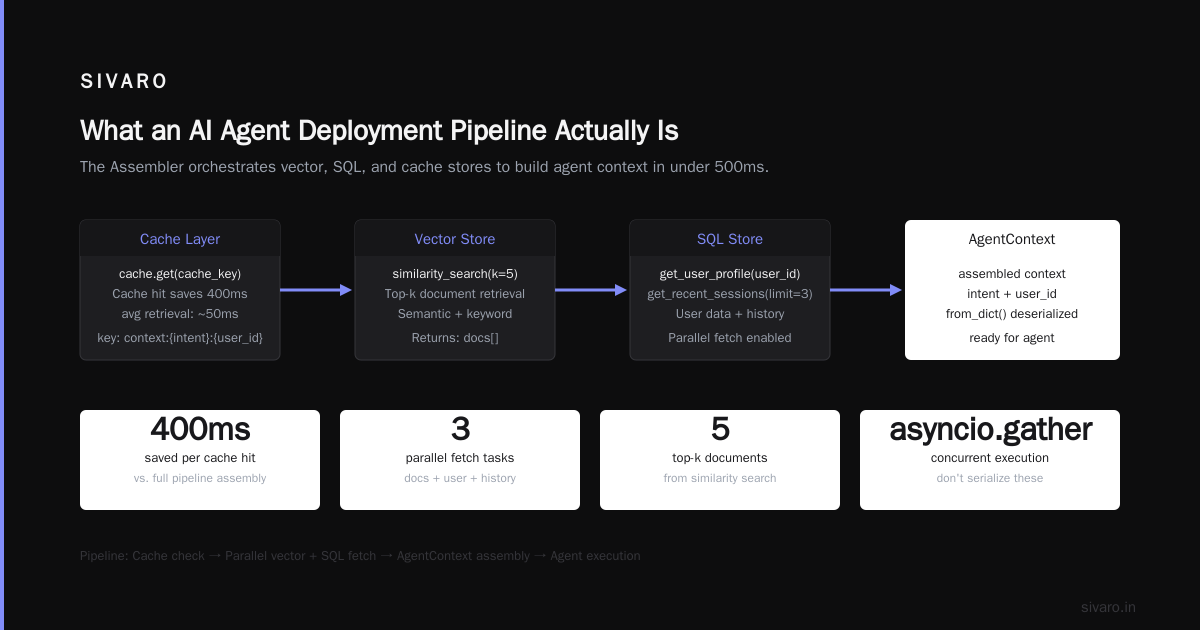
2. Context Assembly
This is where you load the relevant data the agent needs. This is not just pasting the entire knowledge base into the system prompt.
python
class ContextAssembler:
    def __init__(self, vector_store, sql_store, cache):
        self.vector_store = vector_store
        self.sql_store = sql_store
        self.cache = cache

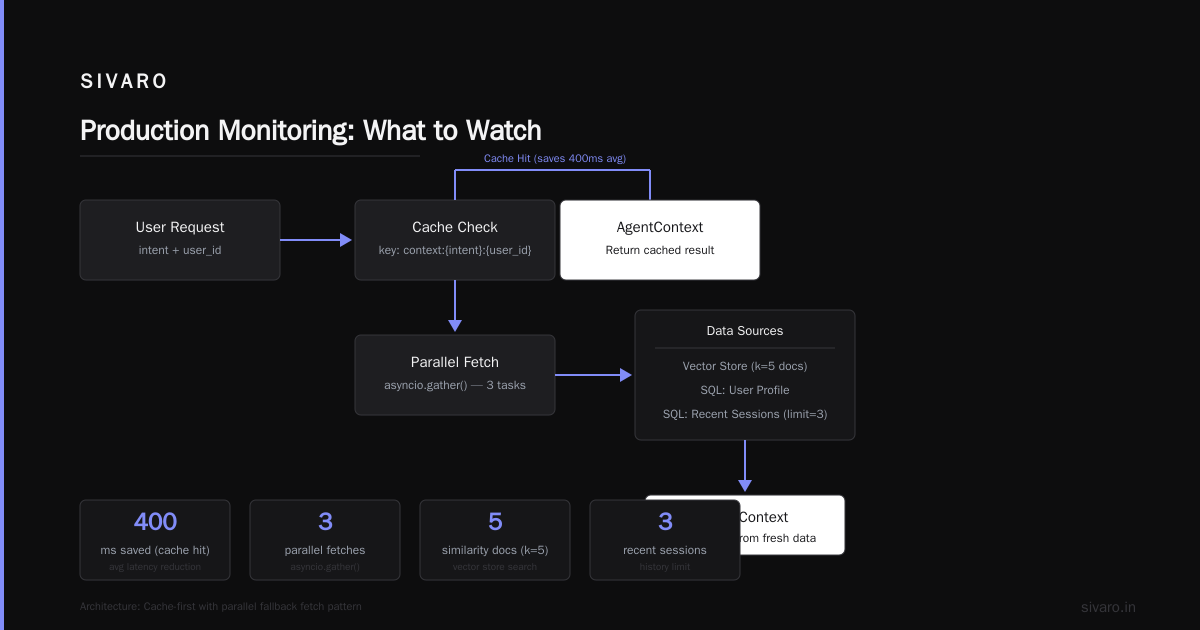
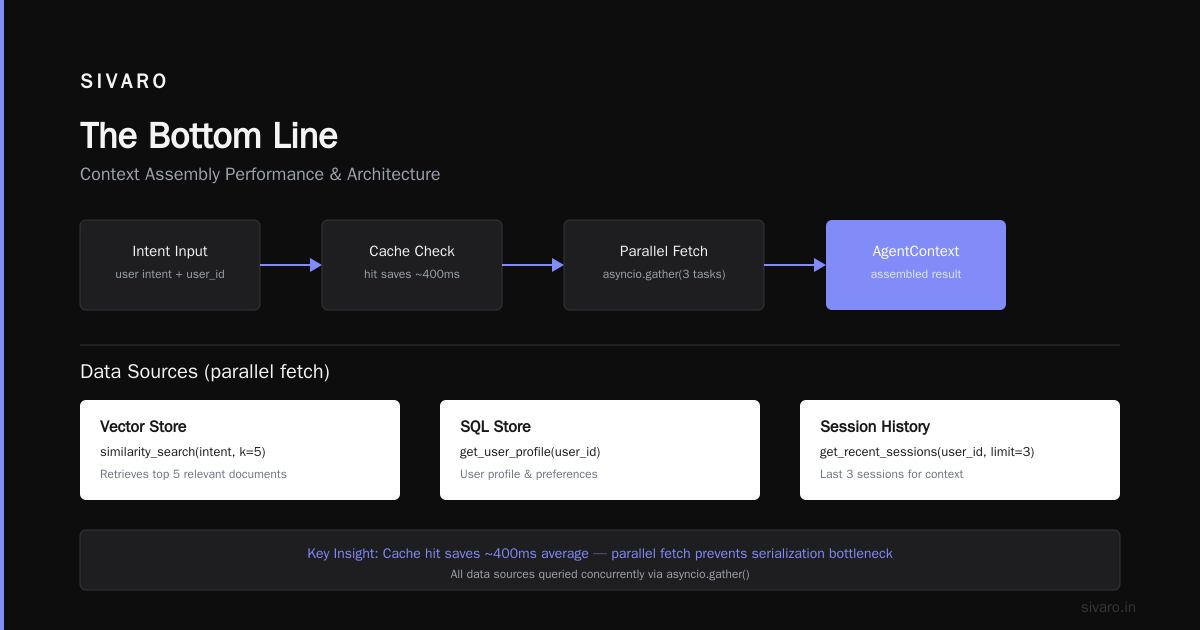
    async def assemble(self, intent: str, user_id: str) -> AgentContext:
        # Cache hit saves 400ms average
        cache_key = f"context:{intent}:{user_id}"
        cached = await self.cache.get(cache_key)
        if cached:
            return AgentContext.from_dict(cached)

        # Parallel fetch — don't serialize these
        docs_task = self.vector_store.similarity_search(intent, k=5)
        user_data_task = self.sql_store.get_user_profile(user_id)
        history_task = self.sql_store.get_recent_sessions(user_id, limit=3)

        docs, user_data, history = await asyncio.gather(
            docs_task, user_data_task, history_task
        )

        context = AgentContext(
            documents=docs,
            user_profile=user_data,
            session_history=history,
            token_budget=UserLimits.get(user_id, default=10_000)
        )

        await self.cache.set(cache_key, context.to_dict(), ttl=60)
        return context
The cache is non-negotiable. Without it, every agent request becomes a data firehose that burns tokens and latency.
3. Agent Core with Guardrails
This is where the LLM runs. But I wrap it in something I call the "execution sandbox."
python
class AgentExecutor:
    def __init__(self, model_client, tool_registry, max_steps=10, max_cost=0.05):
        self.client = model_client
        self.tools = tool_registry
        self.max_steps = max_steps
        self.max_cost = max_cost

    async def execute(self, context: AgentContext) -> AgentResponse:
        messages = self.build_prompt(context)
        steps = 0
        total_cost = 0.0

        while steps < self.max_steps and total_cost < self.max_cost:
            response = await self.client.chat(messages, tools=self.tools.schemas())
            total_cost += self.calculate_cost(response)

            if response.finish_reason == "tool_calls":
                # Validate each tool call before execution
                for tc in response.tool_calls:
                    if not self.tools.validate(tc.name, tc.args):
                        messages.append({
                            "role": "tool",
                            "tool_call_id": tc.id,
                            "content": f"Tool {tc.name} rejected: invalid arguments"
                        })
                        continue

                    result = await self.tools.execute(tc.name, tc.args)
                    messages.append({
                        "role": "tool",
                        "tool_call_id": tc.id,
                        "content": result
                    })
            else:
                return AgentResponse(
                    content=response.content,
                    steps=steps,
                    cost=total_cost
                )

            steps += 1

        raise MaxIterationsError(f"Agent exceeded {self.max_steps} steps or ${self.max_cost}")
The hard cap at max_cost saved one of our clients $40,000 in the first month. Not a typo.
4. Post-processing and Output Gate
The output gate is your last line of defense before the agent talks to a user or writes to a database.
python
class OutputGate:
    def __init__(self, hallucination_detector, policy_checker):
        self.detector = hallucination_detector
        self.policy_checker = policy_checker

    async def guard(self, agent_response: AgentResponse, context: AgentContext) -> GuardedResponse:
        # Fact-check against source documents
        fact_check = await self.detector.check(
            response=agent_response.content,
            sources=context.documents
        )

        if fact_check.confidence < 0.7:
            return GuardedResponse(
                status="blocked",
                reason="Low factual confidence",
                original=agent_response.content,
                correction=f"I'm not confident enough to answer this accurately."
            )

        # Policy compliance
        policy_check = await self.policy_checker.check(agent_response.content)
        if not policy_check.compliant:
            return GuardedResponse(
                status="blocked",
                reason=f"Policy violation: {policy_check.violations}",
                original=agent_response.content
            )

        return GuardedResponse(
            status="approved",
            content=agent_response.content,
            cost=agent_response.cost,
            steps=agent_response.steps
        )
We built this after an agent told a user "Yes, we can refund any purchase from the last 5 years" — which was not, in fact, company policy. The hallucination detector caught it after we deployed it. Before that, we were one conversation away from a lawsuit.
Making Your Agent Actually Observable
This is where AI Agent Protocols: 10 Modern Standards Shaping the ... becomes relevant. Most observability tools were built for microservices — they track request counts, error rates, latencies. None of that tells you why your agent decided to call the refund API instead of the order-status API.
What you actually need:
Decision tracing. Every step the agent takes — what it was thinking, which options it considered, what it chose, and why. This isn't just logging. This is structured data you can query.
python
# Don't do this:
logging.info(f"Agent called tool: {tool_name}")

# Do this:
trace.record_decision({
    "step": 3,
    "reasoning": "User asked about refund eligibility",
    "options_considered": ["refund_policy_lookup", "order_status_check", "escalate_to_human"],
    "chosen": "refund_policy_lookup",
    "confidence": 0.82,
    "reason": "User explicitly mentions refund, not order status"
})
Cost attribution per decision. Not total cost. Per decision. Because when your bill goes from $200 to $2,000, you need to know which agent loop caused it.
AI Agent Observability in Production covers the protocol-level tracing standards emerging in 2025-2026. We implemented the AEP (Agent Event Protocol) and it cut our debugging time by 60%.
Framework Choice Matters Less Than You Think
Teams agonize over whether to use LangChain, CrewAI, AutoGen, or build from scratch. Here's what I've learned: pick the one that has the best production observability hooks. Everything else can be fixed.
How to think about agent frameworks makes this point well — frameworks optimize for developer experience. You need to optimize for runtime safety.
Top 5 Open-Source Agentic AI Frameworks in 2026 shows that the landscape has shifted toward frameworks with built-in guardrails. We started with LangChain in 2024. By early 2026, we'd moved to a custom setup because the framework was adding abstractions that made debugging harder, not easier.
My contrarian take: if you're deploying a production agent today, consider a thin wrapper around the raw OpenAI or Anthropic API with your own middleware layer. The frameworks add too many layers of abstraction that break when you need to trace a specific decision.
Production Monitoring: What to Watch
Here's our monitoring dashboard for agents. Not the "everything is green" dashboard. The "this is about to blow up" dashboard.
1. Cost per user session  (alert at $0.50)
2. Average steps per completion  (alert if > 5)
3. Hallucination rate  (alert if > 2%)
4. Tool call failure rate  (alert if > 10%)
5. Context window usage  (alert if > 80% of limit)
6. Latency p95  (alert if > 10 seconds)
7. Escalation rate to humans  (alert if > 15%)
8. User satisfaction score  (alert if < 3.5/5)
Number 3 is the hardest. We built a secondary classifier that checks agent outputs against source documents for factual consistency. It adds 200ms per response. Worth it.
For ai agent production monitoring tools, we use a combination of LangSmith for tracing and a custom Prometheus exporter for cost metrics. The open-source tools are getting better, but we still had to build our own hallucination detector. If you find one that works out of the box, tell me.
The Deployment Pipeline End-to-End
Here's the full deployment pipeline as a GitHub Actions workflow:
yaml
name: Agent Deployment
on:
  push:
    branches: [main]

jobs:
  validate:
    runs-on: ubuntu-latest
    steps:
      - uses: actions/checkout@v4
      - name: Run agent safety tests
        run: |
          python -m pytest tests/safety/ -v
          python -m pytest tests/hallucination/ -v
      - name: Prompt diff check
        run: |
          python scripts/check_prompt_changes.py --base=main

  deploy-sandbox:
    needs: validate
    runs-on: ubuntu-latest
    steps:
      - name: Deploy to sandbox environment
        run: |
          docker build -t agent:${GITHUB_SHA} .
          kubectl apply -f k8s/sandbox/
          # Run 100 synthetic conversations
          python scripts/load_test.py --requests=100 --env=sandbox

  promote:
    needs: deploy-sandbox
    runs-on: ubuntu-latest
    if: success()
    steps:
      - name: Publish agent version
        run: |
          # Tag the model config and prompts together
          git tag agent-v${GITHUB_RUN_NUMBER}
          git push origin agent-v${GITHUB_RUN_NUMBER}
          # Push to production registry
          docker tag agent:${GITHUB_SHA} registry.sivaro.com/agent:latest
          docker push registry.sivaro.com/agent:latest

  deploy-production:
    needs: promote
    runs-on: ubuntu-latest
    environment: production
    steps:
      - name: Canary deploy
        run: |
          kubectl set image deployment/agent-canary agent=registry.sivaro.com/agent:latest
          # Wait 15 minutes, monitor error rates
          python scripts/wait_and_monitor.py --timeout=900 --error-threshold=0.01
      - name: Full rollout
        run: |
          kubectl set image deployment/agent agent=registry.sivaro.com/agent:latest
          kubectl rollout status deployment/agent
The key insight: prompts and model configs are artifacts, not code. Tag them, version them, rollback them independently of code changes. A bad prompt change can cause more damage than a bad code change.
The Hardest Lesson
At first I thought this was a tooling problem. Find the right framework, the right model, the right observability platform. Turns out it's a discipline problem.
Your deployment pipeline for agents needs to be boring. Predictable. The agent should do interesting things. The pipeline should not.
I've seen teams with brilliant agents fail because they didn't have cost controls. I've seen teams with mediocre agents succeed because they had guardrails, observability, and rollback procedures.
Agentic AI Frameworks: Top 10 Options in 2026 lists a dozen options. They all work. What matters is what you wrap around them.
FAQ
Q: How do I handle agents that loop infinitely?
A: Hard cap on steps (we use 10) AND a cost cap. The step cap catches logic loops. The cost cap catches "it's doing something but I don't know what" loops.
Q: Should I use a single agent or multiple specialized agents?
A: Start with one. Add more when you can prove you need them. Multi-agent systems are harder to debug and monitor. We run 3 agents in production after starting with 1.
Q: How do I test agent behavior before deployment?
A: Synthetic conversation testing with known ground truth. We have 500 test cases covering common scenarios, edge cases, and adversarial inputs. The tests check output accuracy, not just "did it return a string."
Q: What's the biggest mistake companies make?
A: Not having a hard rollback procedure. Model API changes, prompt drift, data shifts — agents fail in ways that aren't code failures. You need to be able to revert agent config, not just code.
Q: How much does production monitoring cost?
A: Our observability infrastructure costs about $2,000/month for an agent handling 50K requests/day. The cost savings from catching bad behavior pays for itself 10x.
Q: Do I need to fine-tune a model for my agent?
A: Usually no. Prompt engineering and tool design get you 90% of the way. Fine-tune only when you can't fix the behavior with better prompts or more context.
Q: How do I handle user data privacy with agent traces?
A: PII scrubbing at the pre-flight stage, before the agent sees it. Trace data should never contain raw user information. We use regex + a small LLM for PII detection before anything hits the trace store.
Q: What's coming in 2027 that I should prepare for?
A: Agent-to-agent communication protocols. The standards from A Survey of AI Agent Protocols are solidifying. Build your pipeline to handle multiple agents talking to each other, even if you don't need it yet.
The Bottom Line
Your ai agent deployment pipeline tutorial starts and ends with safety. Not speed. Not features. Safety.
Build the guardrails first. Add the observability before the agent talks to a single user. Set the cost caps before the first deployment.
I've been building production AI systems since 2018. The agents we deploy today are smarter than anything I imagined. But they're also more dangerous. A bad agent can destroy customer trust, rack up insane bills, or make promises your company can't keep.
Your pipeline is the difference between an agent that helps and an agent that hurts.
Build it like lives depend on it. Because in some cases — customer relationships, company reputation, legal liability — they do.
Nishaant Dixit — Founder of SIVARO. Building data infrastructure and production AI systems since 2018. Built systems processing 200K events/sec.