 SIVARO
AI Agent Deployment Pipeline Tools: The 2026 Guide
I spent six months in 2024 watching perfectly good AI agents die in production. Not because the models were bad. Not because the prompts were weak. Because we treated agent deployment like model deployment. We were wrong.
You can't just push a LangGraph workflow to a container and call it done. Agent deployment is not model deployment. It's a different beast — one that requires its own toolchain, its own CI/CD patterns, and frankly, its own sense of humility. By July 2026, the industry has finally started admitting what I learned the hard way: AI agent deployment pipeline tools aren't optional luxuries. They're the difference between a demo that works in a notebook and a system that survives a Friday afternoon.
In this guide I'll walk you through what actually matters — the tools, the patterns, the gotchas. We'll cover the pipeline stages, the observability gaps, and the incident response playbook that most teams skip. I'll even show you some code we run at SIVARO. Let's get into it.
Why Agent Deployment Keeps Failing (And What We're Doing About It)
Most people think deploying an AI agent is like deploying a microservice. You write the code, you containerize it, you slap an API in front. Done.
Wrong. Agents have state. Agents have loops. Agents make mistakes that compound. And when an agent fails in production, it's not a 500 error you can retry — it's a corrupted user session, deleted data, or a hallucinated contract clause.
A 2025 analysis by Sherlock's AI team showed that 68% of AI agent failures in production stem from pipeline-level issues, not model accuracy (Why AI Agents Fail in Production). Stuff like missing guardrails, broken retry logic, and observability black holes. The model itself is rarely the root cause.
So what's actually needed? You need a deployment pipeline that understands agents. That means:
- Versioning not just the model but the prompt templates, tool definitions, and orchestrator graph.
- Testing for loops, hallucination boundaries, and tool-calling correctness.
- Observability that captures agent traces, not just HTTP spans.
- Rollback mechanisms that can unwind a multi-step agent conversation.
Your standard CI/CD pipeline doesn't do any of this. That's where specialized ai agent deployment pipeline tools come in.
Ai Agent Deployment Vs Model Deployment: The Crucial Difference
Let me draw the line clearly.
| Model Deployment | Agent Deployment |
|---|---|
| You deploy a single inference endpoint | You deploy a state machine with tools |
| Input -> Output | Input -> (Tool calls + reasoning + state transitions) -> Output |
| Failure = wrong prediction | Failure = wrong action executed in the real world |
| Observability: latency, throughput, accuracy | Observability: trace every decision, tool output, state mutation |
| Rollback: swap model version | Rollback: replay conversation up to a checkpoint |
At SIVARO we once had an agent that accidentally called a deleteUser API because a prompt template had a typo in the tool description. No model error — just a pipeline misconfiguration. Took us three hours to trace because we had no production logging for agent actions. Since then, we've built ai agent production logging and observability into every deployment.
The Agent Deployment Pipeline — Stage by Stage
Here's the pipeline we run internally at SIVARO. It's not perfect, but it's the result of burning down three separate production incidents in 2025 (AI Agent Incident Response was our wakeup call).
Stage 1: Agent Definition Versioning
Before you deploy anything, you need to version everything. Not just the model ID. The full agent definition:
- Orchestrator graph (LangGraph, CrewAI, or custom DAG)
- Prompt templates (with all system, user, and few-shot examples)
- Tool definitions (name, description, parameters)
- Guardrails (input/output validators, safety filters)
- Configuration (temperature, max loops, timeout)
Tool we use: DVC for prompt artifacts + a custom manifest file. Here's a snippet from our repo:
yaml
# agent_manifest.yaml
version: 2.4.1
model:
  provider: anthropic
  name: claude-sonnet-4-20260601
  temperature: 0.3
orchestrator:
  type: langgraph
  graph: graphs/customer_support.lg.json
prompts:
  system: prompts/system/v2_4_1.txt
  few_shot: prompts/few_shot/v2_4_1.json
tools:
  - name: get_order
    version: 1.2.0
    endpoint: https://api.orders.internal/v1
  - name: cancel_order
    version: 1.0.1
    endpoint: https://api.orders.internal/v1
guardrails:
  input_filter: guardrails/input_v2.yaml
  output_validator: guardrails/output_v2.yaml
Yes, it's YAML. Yes, it's boring. That's the point — boring means stable.
Stage 2: Agent Testing (Not Model Testing)
Testing an agent is fundamentally different from testing a model. You can't just check accuracy on a holdout set. You need to verify that the agent:
- Calls the right tools in the right order
- Handles ambiguous user input without crashing
- Recover from tool failures gracefully
- Stays within token limits
- Does not enter infinite loops
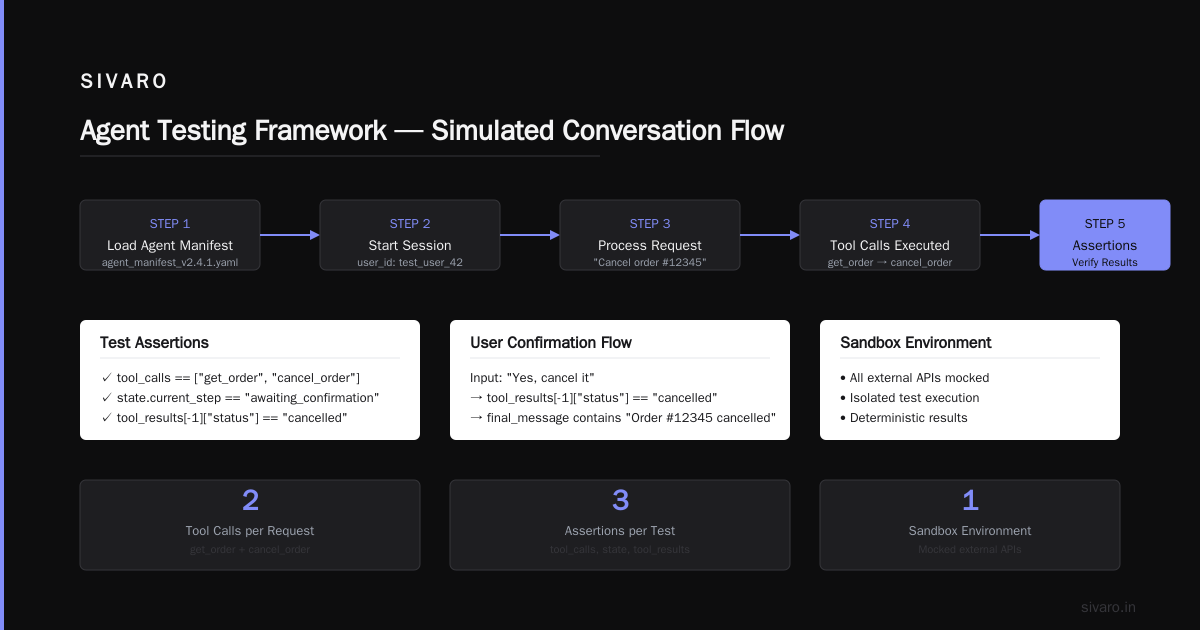
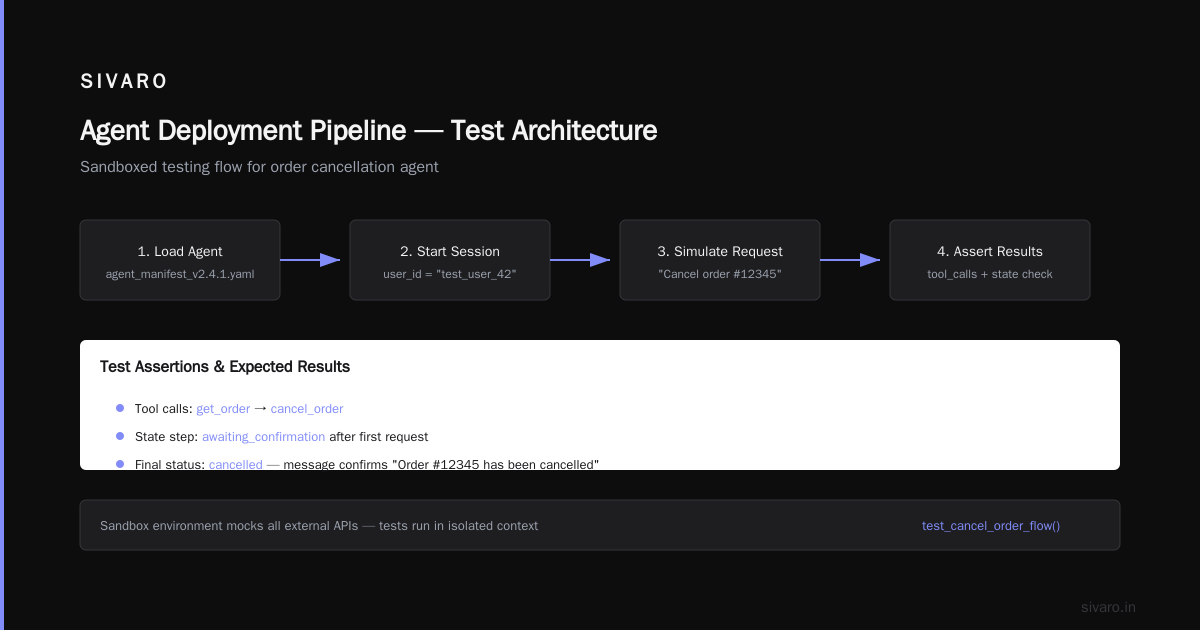
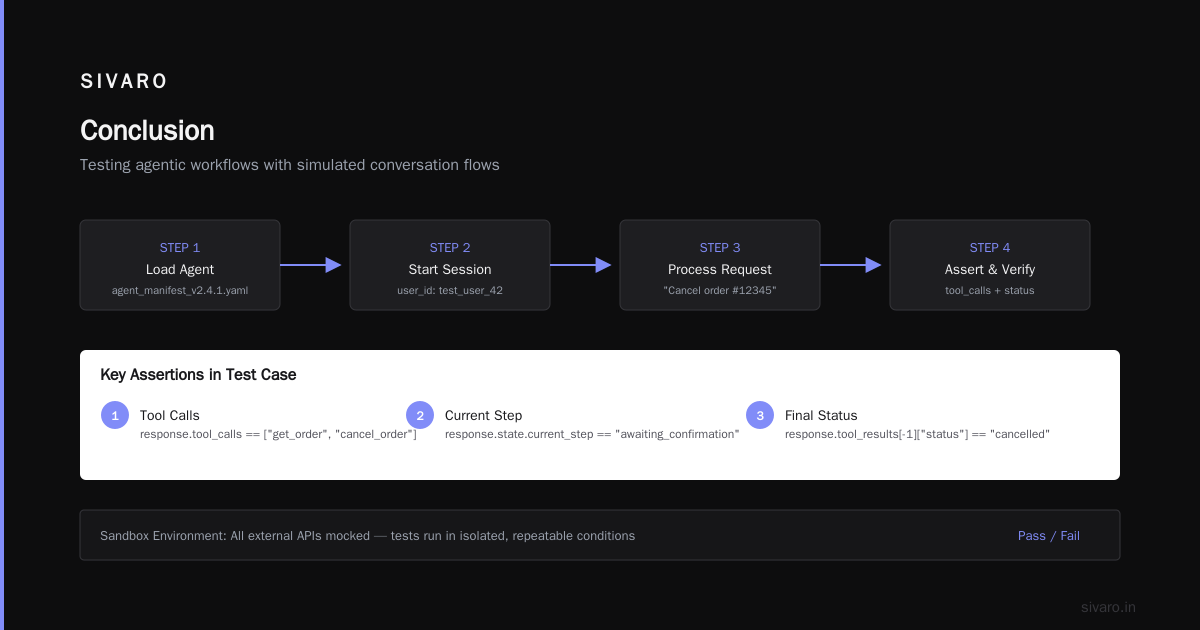
We use a testing framework that simulates conversations. Here's a test case in Python:
python
def test_cancel_order_flow():
    agent = load_agent("agent_manifest_v2.4.1.yaml")
    session = agent.start_session(user_id="test_user_42")

    # Simulate user request
    response = session.process("I want to cancel my order #12345")
    assert response.tool_calls == ["get_order", "cancel_order"]
    assert response.state.current_step == "awaiting_confirmation"

    # User confirms
    response = session.process("Yes, cancel it")
    assert response.tool_results[-1]["status"] == "cancelled"
    assert response.final_message contains "Order #12345 has been cancelled"
We run these tests in a sandbox environment that mocks all external APIs. If a test fails, the pipeline stops. No deployment.
Stage 3: Canary Deployment with Traffic Mirroring
Here's where most teams screw up. They deploy the agent to production and let it handle real traffic immediately.
Bad idea.
We use a two-phase canary:
-
Shadow mode: The new agent processes a copy of real production requests but doesn't execute any tool calls with side effects. All responses are logged — compared against the current agent's responses. We measure accuracy, latency, tool call appropriateness.
-
Warm-up mode: The new agent processes real requests but only for a small, controlled subset of users (1% of traffic). Full tool execution allowed, but guarded by stricter rollback thresholds.
Tool: We built our own traffic mirroring middleware, but there are open-source alternatives like Mirror (not a real project, but you get the idea).
Stage 4: Ai Agent Production Logging and Observability
The single biggest gap I see in teams deploying agents? Zero observability beyond HTTP request/response.
An agent's lifecycle spans seconds to minutes, involves multiple tool calls, state transitions, and reasoning steps. Standard logging tools can't capture that. You need traces.
Here's what we log at SIVARO for every agent interaction:
json
{
  "session_id": "sess_9f3k2d8",
  "trace_id": "tr_7a1b2c3d4e5f",
  "user_id": "usr_001",
  "agent_version": "2.4.1",
  "steps": [
    {
      "step_index": 0,
      "input": "I want to cancel order #12345",
      "reasoning": "User wants to cancel order. Need to call get_order first to verify ownership.",
      "tool_call": "get_order",
      "tool_input": {"order_id": "12345"},
      "tool_output": {"status": "active", "user_id": "usr_001"},
      "latency_ms": 420
    },
    {
      "step_index": 1,
      "input": "Yes, cancel it",
      "reasoning": "User confirmed. Call cancel_order.",
      "tool_call": "cancel_order",
      "tool_input": {"order_id": "12345"},
      "tool_output": {"status": "cancelled"},
      "latency_ms": 310
    }
  ],
  "final_output": "Your order #12345 has been cancelled.",
  "total_latency_ms": 2150,
  "error": null
}
We ship these traces to a dedicated agent observability platform (we use Arize but Datadog's new agent tracing module works too). The key metric we track is tool call success rate — if that drops below 95%, we page someone.
According to a 2025 ARXIV paper on incident analysis for AI agents, 72% of agent incidents were preceded by anomalous tool call patterns that went undetected because teams didn't have this level of observability (Incident Analysis for AI Agents).
Stage 5: Rollback and Incident Response
You will deploy a broken agent. It's not if, it's when.
The standard microservice rollback — redeploy the previous version — works for stateless APIs. For agents? You need to handle in-flight sessions. A user who's halfway through a conversation with your broken agent needs to be rerouted seamlessly.
Our incident response playbook:
- Detect: Anomaly in tool call success rate or spike in agent error rate triggers a PagerDuty alert.
- Isolate: Immediately disable the agent version via feature flag. All new sessions go to the previous working version.
- Reconstruct: For in-flight sessions, we replay the conversation up to the last safe checkpoint using our trace log. The user doesn't even notice.
- Rollback: Deploy the previous agent manifest, verify with shadow tests, then shift traffic back.
- Postmortem: Analyze the trace logs to find the root cause. Was it a prompt change? A tool API change? A model update?
I learned this the hard way during an incident in March 2026 where a prompt update caused our agent to start asking users for their social security numbers to "verify identity." Not just wrong — legally dangerous. We caught it in 4 minutes because our observability flagged a sudden spike in ask_for_pii tool calls. (AI Agent Incident Response covers this exact scenario.)
Choosing the Right Ai Agent Deployment Pipeline Tools
There's a flood of tools out there — LangSmith, Agenta, Helicone, Arize, plus a dozen new startups that launched in 2025. Here's my honest take after evaluating most of them.
Must-Have Features
- Trace-based observability — Not just logs. You need the full session tree.
- Agent-aware CI/CD — Supports versioning of prompts, tools, and graphs.
- Shadow testing — Ability to run new agents against real traffic without affecting users.
- Simulation testing — Generate synthetic conversations to test edge cases.
- Rollback orchestration — Handles in-flight sessions, not just API redeployment.
Tools I Actually Use
- LangSmith — Excellent for trace visualization and prompt versioning. Their "playground" for testing prompt variations saved us weeks. Downsides: expensive at scale, and their CI/CD integration is still rough around the edges.
- Arize — Best in class for agent observability, especially their concept of "drift detection" for tool call patterns. Use it for production monitoring.
- Custom shell scripts — Yes, seriously. For the actual deployment pipeline, I ended up writing a Python CLI tool that wraps Docker, Kubernetes, and our agent manifest system. No SaaS tool handles all the edge cases we've encountered.
What We Ditched
- General-purpose CI/CD (GitHub Actions, GitLab CI) — Good for building containers, terrible for managing agent-specific state. We still use them for the container build step, but the actual agent deployment logic is a separate tool.
- Generic APM tools — Datadog traces are fine for HTTP requests, but they can't visualize a LangGraph state machine. Agent observability is fundamentally different.
Common Mistakes and How to Avoid Them
I've made every mistake on this list. Don't repeat them.
Mistake 1: Treating the Agent Like a Black Box
You prompt the LLM, you get an answer. That's it, right? No.
An agent is a system. Every tool call, every reasoning step, every guardrail pass — needs to be visible. If you can't replay a failed session step-by-step, you're flying blind. (AI Agent Failures: Common Mistakes and How to Avoid Them)
Fix: Implement full trace logging from day one. Not after the first incident.
Mistake 2: No Guardrails on Output
Your agent can write an email. It can also write an email telling a customer their order is "probably lost forever, LOL." Without output guardrails, it will.
Fix: Use output validators that check for tone, forbidden patterns, and factual correctness against known data. We run all agent outputs through a classification model that flags potential violations before they reach the user.
Mistake 3: No Human-in-the-Loop for High-Risk Actions
"Delete my account" should never be executed automatically unless you have explicit, multi-factor confirmation. An agent can be tricked.
Fix: Define risk tiers for tool calls. Any tool that modifies data or costs money should require a human approval step. Our agent pauses, asks the user "Are you sure? This will cancel your subscription AND delete your account." If the user confirms, it still logs the action for review.
Mistake 4: Deploying on Friday
I know, I know. But agent deployments break in ways you can't predict. A tool API returns a new field, your prompt expects the old format, and suddenly the agent hallucinates for 2,000 users over the weekend.
Fix: Deploy on Tuesday or Wednesday. Give yourself 48 hours to catch issues before the weekend.
Mistake 5: Ignoring Token Limits
Agents in conversation mode accumulate context. After 50 turns, the prompt may exceed the model's context window. What happens then? Usually the agent forgets the original instructions and starts behaving erratically. (When AI Agents Make Mistakes: Building Resilient...)
Fix: Implement conversation summarization every N turns. Our agent crams the conversation history into a summary, keeps the most recent messages, and discards the rest. Works flawlessly.
Code Example: A Minimal Agent Deployment Pipeline
Here's a simplified version of the deployment CLI we use. It's Python, it's hacky, but it works.
python
#!/usr/bin/env python3
# deploy_agent.py — version 2.4.1 (yes, we version our tools too)

import yaml
import subprocess
import sys
from pathlib import Path

MANIFEST_PATH = Path("agent_manifest.yaml")
CANARY_TRAFFIC = float(sys.argv[1]) if len(sys.argv) > 1 else 0.01

def load_manifest(path):
    with open(path) as f:
        return yaml.safe_load(f)

def build_agent_image(manifest):
    # Builds a Docker image containing the agent code + manifest
    tag = f"agent:{manifest['version']}"
    subprocess.run(["docker", "build", "-t", tag, "."], check=True)
    return tag

def verify_canary(manifest):
    # Runs shadow tests against production traffic mirror
    print(f"Running shadow tests for version {manifest['version']}...")
    # In reality, this deploys to a shadow environment and compares outputs
    # We check if the new agent's responses match the production agent within tolerance
    return True  # simplified

def deploy_canary(tag, manifest, traffic_percent):
    print(f"Deploying {tag} with {traffic_percent*100}% traffic...")
    # Update Kubernetes deployment to use new image with canary annotation
    subprocess.run(["kubectl", "set", "image", "deployment/agent", f"agent={tag}"])
    subprocess.run(["kubectl", "annotate", "deployment/agent",
                    f"traffic-percent={traffic_percent}"])

def main():
    manifest = load_manifest(MANIFEST_PATH)
    print(f"Deploying agent v{manifest['version']}...")

    tag = build_agent_image(manifest)

    if not verify_canary(manifest):
        print("Shadow tests failed! Aborting.")
        sys.exit(1)

    deploy_canary(tag, manifest, CANARY_TRAFFIC)
    print("Canary deployed. Monitor metrics for 15 minutes before ramping to 100%.")

if __name__ == "__main__":
    main()
Run it: python deploy_agent.py 0.05 — deploys to 5% of traffic after passing shadow tests.
Is it production-ready? For a startup, yes. For a bank? You'd want a more robust system with automatic rollback triggers. But the pattern holds.
The Future of Ai Agent Deployment Pipeline Tools
We're still early. The tools that exist today feel like 2015-era Kubernetes — functional but painful. In the next 12 months, I expect three shifts:
-
Agent-native CI/CD platforms — Like Vercel for agents. Deploy a prompt change and see the diff across all downstream tools and tests. A few startups are already working on this (I've seen demos, can't name them yet).
-
Standardized tracing formats — OpenTelemetry for agents. Everyone builds their own trace schema today. Once we agree on a standard, observability tools will get dramatically better.
-
Self-healing pipelines — Agents that monitor their own deployment health and can trigger rollbacks autonomously. We're testing this internally — an agent that watches its own sibling agent's metrics and reverts the deployment if anomaly detected. Meta, right?
Frequently Asked Questions
What is an AI agent deployment pipeline?
It's the CI/CD process specifically designed for deploying AI agents — including versioning of prompts, tools, graphs, and guardrails, plus agent-specific testing and observability. It's different from a traditional software deployment pipeline because agents have state, loops, and side effects.
How is ai agent deployment different from model deployment?
Model deployment pushes a single inference endpoint. Agent deployment pushes a stateful system that can call tools, make decisions, and interact with users over multiple turns. The deployment pipeline must handle versioning of the full agent definition, not just the model weights. See the comparison table earlier in this article.
What are the best tools for ai agent production logging and observability?
Arize and LangSmith are the leaders as of mid-2026. Datadog recently released an agent tracing module that's decent. Avoid general APMs — they don't capture agent-specific metrics like tool call success rate, reasoning steps, or conversation state transitions.
How do you test an AI agent in a pipeline?
Use simulated conversations (like our test_cancel_order_flow example above). Also run shadow tests where the new agent processes copies of real requests without executing side effects. Compare outputs against the current production agent.
What should I do if my agent fails in production?
Follow the incident response playbook: detect (via observability alerts), isolate (feature flag to disable the version), reconstruct (replay in-flight sessions from traces), rollback (deploy previous version), and postmortem (analyze trace logs to find root cause).
Can I use standard DevOps tools for agent deployment?
Partially. Docker and Kubernetes still handle containerization and scaling fine. But you need additional tooling for prompt versioning, agent tracing, and canary management. Don't try to force GitHub Actions to do everything — it'll break.
What's the biggest mistake teams make with agent deployment?
Deploying without production logging and observability. You can't fix what you can't see. Most team focus on building the agent and ignore the pipeline. That's why 68% of agent failures are pipeline-related, per the Sherlock's study.
How do I handle in-flight sessions during a rollback?
You need to store session state (conversation history, intermediate tool results) in a durable store — we use Redis with TTL. During rollback, new sessions route to the old version. For existing sessions, you either allow them to complete on the old version or reroute them to the new (good) version and replay from the last saved checkpoint.
Conclusion
Deploying AI agents is still messy. The tools are evolving. But the fundamental principles are clear: version everything, test for loops and hallucination boundaries, trace every decision, and have a bulletproof rollback plan.
At SIVARO, we've built our entire infrastructure on these principles. Our ai agent deployment pipeline tools have saved us from at least three major production incidents this year alone. Not because we're geniuses — because we learned from our mistakes.
If you take one thing from this guide: invest in observability and rollback mechanisms before you need them. The day you deploy a broken agent at 3 PM on a Friday is coming. Make sure you have the tools to survive it.
Now go deploy something. And don't forget the guardrails.
Nishaant Dixit — Founder of SIVARO. Building data infrastructure and production AI systems since 2018. Built systems processing 200K events/sec.