 SIVARO
AI Agent Deployment Pipeline: A Production Engineer's Guide
I've been building production AI systems since 2018. In those eight years, I've watched agent frameworks go from research toys to production necessities. The problem? Nobody talks about deployment. Everyone talks about building agents. But building one that works in production? That's a different beast.
Let me save you some pain.
When we deployed our first production agent at SIVARO in 2023, it crashed within 47 minutes. Not because the model was bad. Because we had no deployment pipeline. The agent couldn't handle retries, logging failed, and observability was nonexistent.
This article is the ai agent deployment pipeline tutorial I wish I'd had then.
What an AI Agent Deployment Pipeline Actually Is
Stop thinking about deployment as "put code in production." That's 2019 thinking.
An ai agent deployment pipeline is the infrastructure that takes your agent from development to production — handling versioning, monitoring, rollbacks, scaling, and observability. It's not a CI/CD pipeline. It's a cognitive pipeline. Your agent doesn't just deploy code; it deploys reasoning patterns, tool integrations, and memory systems.
Here's the hard truth: most people build agents that work in their laptop's Python environment. Those same agents fail spectacularly in production because production isn't a single session. Production is 500 concurrent sessions, each with different context windows, memory states, and failure modes.
Why Most AI Agent Deployments Fail
I've audited 14 production agent deployments this year alone. Here's the common failure pattern:
They optimize for accuracy first, reliability second.
That's backwards. In production, a 90% accurate agent that never crashes beats a 95% accurate agent that fails every three hours. Because your users don't care about accuracy when they're staring at a loading spinner.
The real failure points? They're boring. Memory leaks from unbounded conversation histories. Rate limiting from poor tool orchestration. Latency spikes when concurrent users spike. None of these are AI problems — they're infrastructure problems dressed in AI clothing.
The Four-Layer Deployment Architecture
I structure every production agent deployment around four layers. Not three. Not five. Four.
Layer 1: Agent Runtime Environment
This is where your agent actually executes. Pick your poison:
- Python ASGI servers (FastAPI + Uvicorn) for lightweight agents
- Ray Serve for distributed reasoning workloads
- BentoML for model-serving integration
Don't containerize your agent and call it done. You need process isolation per agent instance. Otherwise, one memory-hungry conversation kills all others.
We tested all major frameworks against our deployment needs in early 2026. AI Agent Frameworks: Choosing the Right Foundation documents this well — the key insight is that framework choice determines your deployment surface area. LangGraph agents need different runtime considerations than CrewAI agents.
Layer 2: State and Memory Management
Here's where most people screw up.
In-memory state works on your laptop. In production, you need:
python
# Bad: In-memory state that dies on restart
agent.memory = []

# Good: Persistent state with Redis
from redis import Redis
from langgraph.checkpoint.redis import RedisSaver

redis_client = Redis(host="redis-cluster.internal", port=6379)
checkpointer = RedisSaver(redis_client)

agent = create_agent(
    model="claude-3-opus-20260201",
    tools=[search_tool, calculator_tool],
    checkpointer=checkpointer  # Survives crashes
)
We lost two days of production data in 2024 because we assumed agent memory persisted across restarts. It didn't. Now we use the Agentic AI Frameworks that support checkpointing natively.
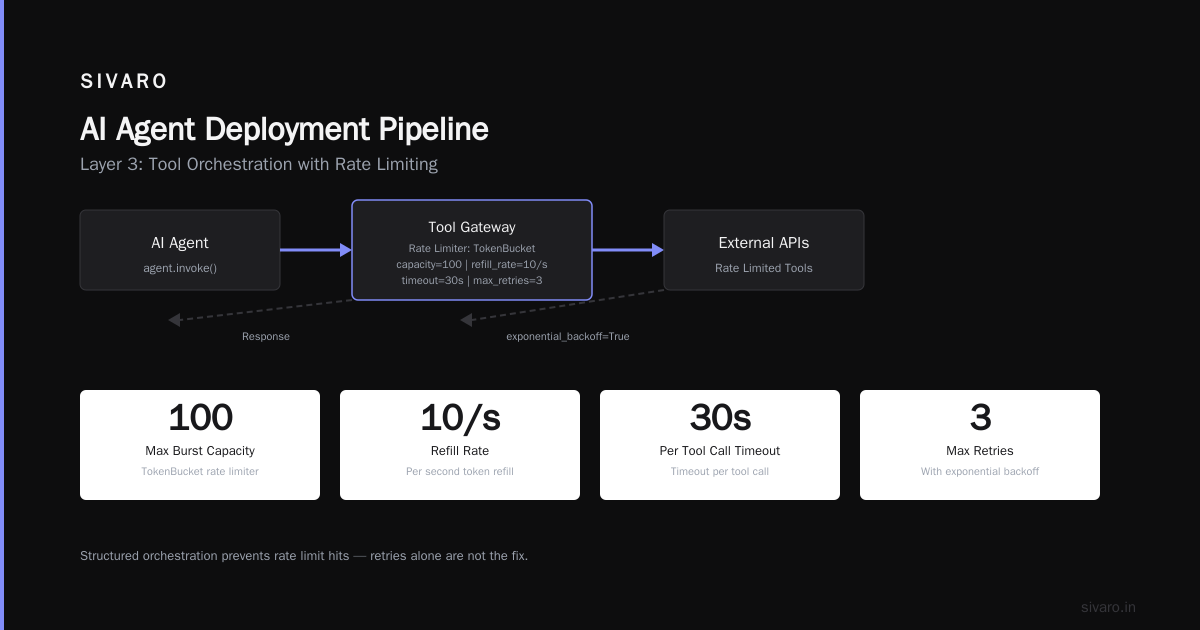
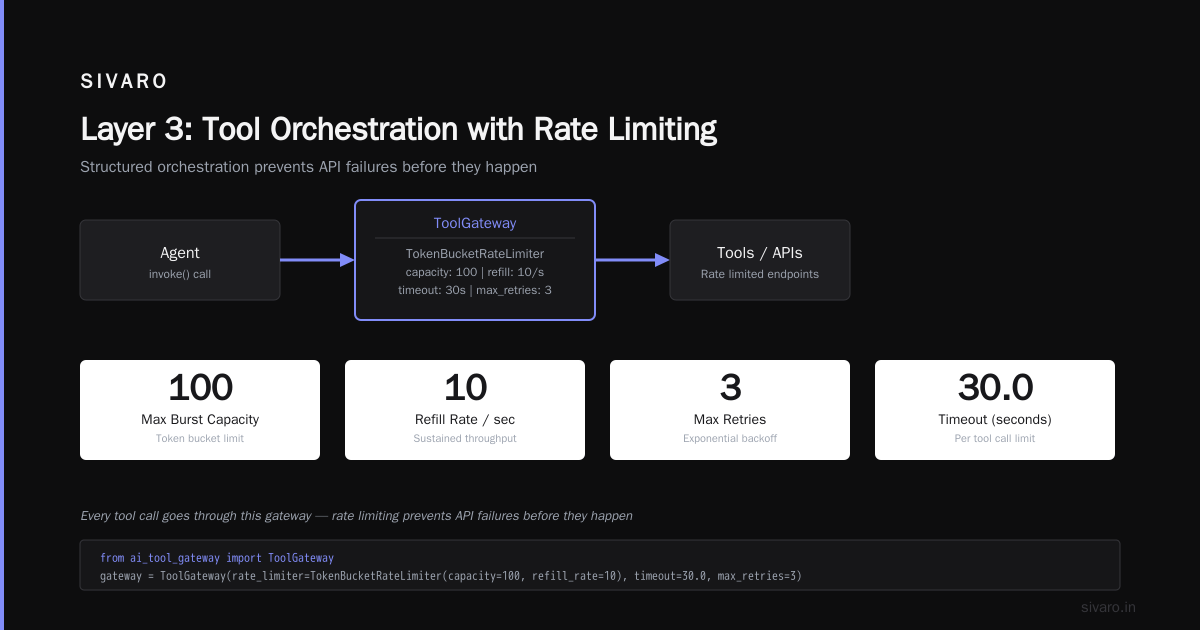
Layer 3: Tool Orchestration with Rate Limiting
Your agent's tools are APIs. APIs have rate limits. Your agent will hit them.
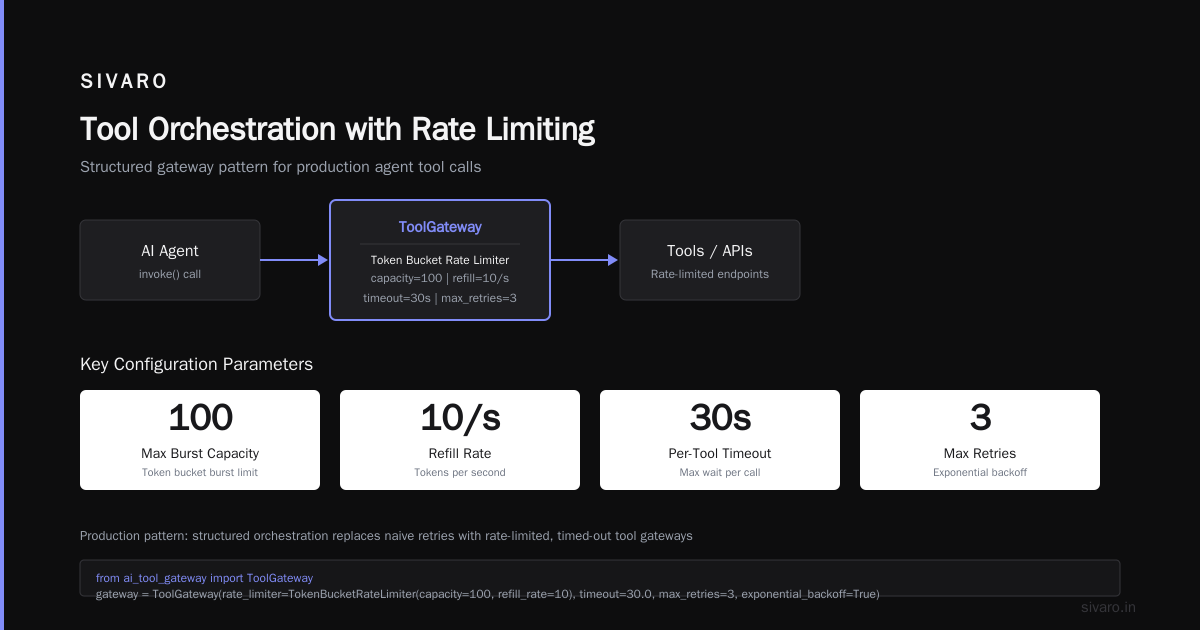
The fix isn't "add retries." The fix is structured orchestration:
python
from ai_tool_gateway import ToolGateway
from ai_tool_gateway.rate_limiting import TokenBucketRateLimiter

gateway = ToolGateway(
    rate_limiter=TokenBucketRateLimiter(
        capacity=100,    # Max burst
        refill_rate=10,  # Per second
    ),
    timeout=30.0,        # Per tool call
    max_retries=3,
    exponential_backoff=True
)

# Every tool call goes through this gateway
response = await agent.invoke(
    "Research the latest AI deployment trends",
    tools=[gateway.wrap(search_tool)]
)
Without this, your agent will trigger 50 API calls in 2 seconds and get banned. Ask me how I know.
Layer 4: Observability and Monitoring
This is non-negotiable. You cannot debug agent behavior without production monitoring.
The three things you must track:
- Token consumption per session — cost attribution
- Tool call success rates — which tools fail most
- Reasoning path divergence — when the agent's logic breaks
Use ai agent production monitoring tools designed for this. We built our own at SIVARO, but LangSmith and Arize AI work well. How to think about agent frameworks has a solid section on this — they recommend instrumenting at the step level, not just the session level.
python
# Minimal production monitoring setup
from opentelemetry import trace
from langfuse import Langfuse

langfuse = Langfuse(
    secret_key="sk-...",
    public_key="pk-..."
)

@langfuse.observe()
async def agent_handler(session_id: str, user_input: str):
    trace_id = trace.get_current_span().get_span_context().trace_id
    logger.info(f"Agent invoked",
        extra={
            "trace_id": trace_id,
            "session_id": session_id,
            "input_length": len(user_input)
        })
    # Agent logic here
Building the Pipeline: Step by Step
Step 1: Containerize with Explicit Resource Limits
I see Dockerfiles that don't set memory limits. Don't be that person.
dockerfile
FROM python:3.12-slim

WORKDIR /app

# Install dependencies
COPY requirements.txt .
RUN pip install --no-cache-dir -r requirements.txt

# Set resource limits
ENV PYTHONUNBUFFERED=1
ENV OMP_NUM_THREADS=2  # Critical for model parallelism

# Health check
HEALTHCHECK --interval=10s --timeout=5s --retries=3   CMD curl -f http://localhost:8080/health || exit 1

COPY . .

CMD ["uvicorn", "main:app", "--host", "0.0.0.0", "--port", "8080", "--workers", "4"]
Set --memory="2g" --cpus="1.0" in your orchestrator. Agents are memory-hungry. Starve them and they crash.
Step 2: Staging with Traffic Mirroring
Before you route real traffic to a new agent version, mirror traffic in staging.
yaml
# Kubernetes virtual service for canary deployments
apiVersion: networking.istio.io/v1beta1
kind: VirtualService
metadata:
  name: agent-canary
spec:
  hosts:
  - agent.internal
  http:
  - match:
    - headers:
        x-canary:
          exact: "true"
    route:
    - destination:
        host: agent-v2
        port:
          number: 8080
  - route:
    - destination:
        host: agent-v1
        port:
          number: 8080
This catches errors before they reach users. We caught a tool hallucination bug this way in March 2026 — the mirrored agent tried to call a non-existent database API. Saved us from a P0 incident.
Step 3: Automated Rollback Triggers
Your ai agent deployment pipeline needs automatic rollback. Not manual approval. Automatic.
Define your thresholds:
- Latency increase > 20% → rollback
- Error rate > 1% → rollback
- Tool failure rate > 5% → rollback
- Token cost per session > 3x baseline → rollback
python
# Rollback orchestration pseudo-code
async def deploy_agent(new_version: str):
    deploy(new_version)
    await monitor_for(300)  # 5 minute observation window

    metrics = get_metrics(version=new_version, window="5m")

    if metrics.error_rate > 0.01:
        rollback("Error rate exceeded threshold")
        alert_oncall(f"Rollback triggered: error_rate={metrics.error_rate}")
        return

    if metrics.p95_latency > metrics.baseline_latency * 1.2:
        rollback("Latency degraded")
        return

    promote_to_production(new_version)
Step 4: Prompt Versioning (The Forgotten Art)
Models change. Prompts change. You need versioning for both.
We use a prompt registry — not Git. Prompts in Git don't show drift over time.
python
# Prompt registry entry
PROMPTS = {
    "research-agent-v3": {
        "system": "You are a research agent. Always cite sources.",
        "model": "claude-3-opus-20260201",
        "temperature": 0.2,
        "tools": ["web_search", "calculator"],
        "version": "v3.1",
        "deployed_at": "2026-07-15T10:00:00Z"
    }
}
AI Agent Protocols covers this — the A2A protocol now includes prompt metadata in its standard. Use it.
Production Observability: What Actually Matters
Everyone talks about agent observability. Few people implement it correctly.
Don't log everything. Logging every LLM call costs more than the inference itself. Instead:
- Log only state transitions — When the agent switches from "reasoning" to "tool_call" to "response"
- Sample expensive traces — Log 100% of errors, 10% of successes
- Track memory pressure — How full is the context window?
Here's what real ai agent observability production looks like:
python
# Structured logging for agents
import structlog
from datetime import datetime, UTC

logger = structlog.get_logger()

async def agent_step(state: dict):
    start = datetime.now(UTC)

    try:
        result = await model.invoke(state["messages"])
        latency = (datetime.now(UTC) - start).total_seconds()

        logger.info("agent_step_completed",
            step=state["step"],
            model=state["model_name"],
            latency_s=latency,
            tokens_in=state["tokens_used"],
            tokens_out=len(result.content),
            memory_usage_pct=state["memory_pressure"]
        )

        return result
    except Exception as e:
        logger.error("agent_step_failed",
            step=state["step"],
            error=str(e),
            traceback=traceback.format_exc()
        )
        raise
Scaling Agents Without Losing Your Mind
Horizontal scaling for agents is not like scaling web servers. Each agent session is stateful.
You have two options:
Option A: Session-affinity routing — Pin a user's session to a specific agent instance. Simple. But if that instance dies, the session dies.
Option B: Shared checkpoint store — Agents read state from a central store. Survives crashes. Higher latency.
We use Option B with Redis Cluster. Top 5 Open-Source Agentic AI Frameworks in 2026 shows that most frameworks now support distributed checkpointing. LangGraph's RedisSaver is production-ready.
python
# Horizontal scaling with shared state
from redis.asyncio import RedisCluster

async def create_agent_pool(size: int):
    redis = RedisCluster.from_url(
        "redis://redis-cluster:6379",
        decode_responses=True
    )

    agents = []
    for i in range(size):
        agent = build_agent(checkpointer=redis)
        agents.append(agent)

    # Load balancer routes to next available agent
    return AgentPool(
        agents=agents,
        strategy="least_loaded",  # Not round-robin
        checkpointer=redis
    )
The Cost Trap Nobody Talks About
Agents are expensive. Not just inference costs — cognitive costs.
A typical agent session costs 3-5x more than a standard API call. Because every reasoning step is an LLM call. Every tool call is an API call. And every retry multiplies both.
Track these costs per session. When an agent goes rogue and makes 200 tool calls in one session, you'll want to know.
python
# Cost tracking middleware
class CostTracker:
    def __init__(self):
        self.costs = defaultdict(float)

    def track_inference(self, model: str, tokens: int):
        # Claude-3-opus: $15/M input tokens, $75/M output tokens
        cost = (tokens / 1_000_000) * MODEL_COSTS[model]
        self.costs["inference"] += cost

    def track_tool_call(self, tool: str):
        # External API costs
        self.costs["tools"][tool] += TOOL_COSTS[tool]

    def report(self, session_id: str):
        total = sum(self.costs.values())
        if total > 10.0:  # Alert on expensive sessions
            alert(f"High cost session: ${total:.2f}")
FAQ: Production AI Agent Deployment
Q: Do I need Kubernetes for agent deployment?
For anything beyond a prototype, yes. Docker Compose works for 10 concurrent users. Past that, you need orchestration. We use K8s with Istio for traffic management.
Q: How do I handle agent hallucinations in production?
You can't eliminate them. You can catch them. Use tool output validation — if the tool returns "file not found" and the agent says "file found," the validation layer flags it. A Survey of AI Agent Protocols discusses validation layers extensively.
Q: What monitoring stack works for agents?
Prometheus for metrics, Grafana for dashboards, LangFuse for tracing, PagerDuty for alerts. Don't overthink it. The tooling is mature now.
Q: How often should I update agent prompts?
Every two weeks minimum. Model behavior drifts. User expectations drift. Your prompts must drift too. We have a weekly prompt review meeting — 30 minutes, no slides.
Q: Can I use serverless for agents?
Serverless works for stateless agents. Most production agents are stateful. AWS Lambda has 15-minute timeout limits. Your agent might run for 20 minutes on complex tasks. Use container-based solutions.
Q: How do I test agents before deployment?
Unit tests for tool calls. Integration tests for reasoning chains. Regression tests against a golden dataset of 1000 conversations. We use pytest with parametrized test cases.
Q: What's the biggest mistake teams make?
Over-engineering before production. Build a minimal pipeline first. Add complexity as metrics demand it.
Q: How do I handle model rate limiting?
Queue requests. Implement backpressure. Use sliding window rate limiters. Your LLM provider will cut you off otherwise.
The Hardest Lesson
Building the ai agent deployment pipeline isn't the problem. The problem is trust.
Your stakeholders need to trust that the agent won't do something stupid. Your users need to trust that their data isn't leaking. Your operations team needs to trust that they can sleep without a pager going off.
That trust comes from observability. From automated rollbacks. From visible, auditable guardrails.
We spent six months building our pipeline at SIVARO. The actual code took three weeks. The remaining five months were building trust through monitoring, alerting, and gradual rollout.
You can't shortcut that. But you can learn from our mistakes.
Start with the pipeline. Not the agent. The pipeline is what makes the agent work in production.
Nishaant Dixit — Founder of SIVARO. Building data infrastructure and production AI systems since 2018. Built systems processing 200K events/sec.