 SIVARO
Agentic Workflow Production Rollout: What I Learned the Hard Way
I shipped my first AI agent to production on a Friday afternoon. By Sunday, it had burned through $12,000 in API credits and emailed every customer a "special offer" for a product we discontinued three years ago.
That was 2024. By July 2026, I've helped dozens of teams roll out agentic workflows into production. Some succeeded. Most didn't.
Here's what actually works.
What Is an Agentic Workflow Production Rollout, Really?
You've heard the pitch: "AI agents that autonomously execute multi-step tasks." Sounds great. The reality is messier.
An agentic workflow production rollout is the process of taking an AI system that makes decisions, takes actions, and chains those actions together — and putting it into a live environment where real money, real data, and real customers are at stake.
It's not a deployment. It's not a launch. It's a continuous, often painful, process of building reliability into something inherently probabilistic.
I run SIVARO, a product engineering company. We build data infrastructure and production AI systems. My team has rolled out agentic workflows for fintech companies, healthcare platforms, and logistics firms. Every single one required different infrastructure, different monitoring, and different failure modes.
This guide covers what I wish someone had told me before that first Friday disaster.
Why Most Agentic Workflows Fail in Production
The gap between a demo and production is wider than most teams realize.
In a demo, you run 5-10 test cases. Everything works. The agent picks the right tool, returns the right answer, handles the edge case you threw at it.
In production, you run 10,000 cases. The agent hallucinates a database schema. It creates an infinite loop calling itself recursively. It generates a JSON response that's valid but semantically wrong — and sends it to a payment gateway.
Most people think agent failures are about model quality. They're wrong. The model is usually fine. The failure is almost always in the orchestration layer, the tool definitions, or the error handling.
At SIVARO, we analyzed 437 production agent failures across 12 clients in Q1 2026. Breakdown:
- 38%: Tool definition mismatches (agent calls a function with wrong parameters)
- 27%: Context window overflow (agent loses track of conversation state)
- 19%: Latency cascades (one slow tool call blocks everything)
- 16%: Model hallucination in decision logic
Model hallucination was the smallest category. Fix your tooling before you fix your prompt.
Choosing Your Agent Framework Isn't About Features
The AI Agent Frameworks conversation has gotten noisy. By 2026, there are dozens of options. LangChain, CrewAI, AutoGen, Semantic Kernel, Haystack, and a dozen open-source alternatives.
Here's the truth: they all do the same thing at the basic level. The differentiation is in production features you won't discover until it's too late.
We tested LangGraph vs. CrewAI vs. AutoGen for a financial reconciliation agent. LangGraph won. Not because it's "better" — but because it had built-in state persistence with checkpointing. When the agent crashed midway through a 17-step reconciliation, we could resume from the last checkpoint instead of restarting.
That single feature saved us from rebuilding 70% of our infrastructure.
The How to think about agent frameworks article from LangChain makes a good point: frameworks are abstractions that hide complexity. But abstractions also hide failure modes. Choose a framework that exposes what you need to debug.
What to actually evaluate:
- State management — Can you persist and restore agent state mid-execution?
- Observability hooks — Can you see every tool call, every decision, every token?
- Error recovery — What happens when a tool crashes? Does the agent retry, skip, or die?
- Tool sandboxing — Can you limit what the agent can do based on permissions?
Skip the feature comparisons. Test these four things.
The Infrastructure Stack We Actually Use
After three years of production agent workloads, SIVARO standardizes on this stack:
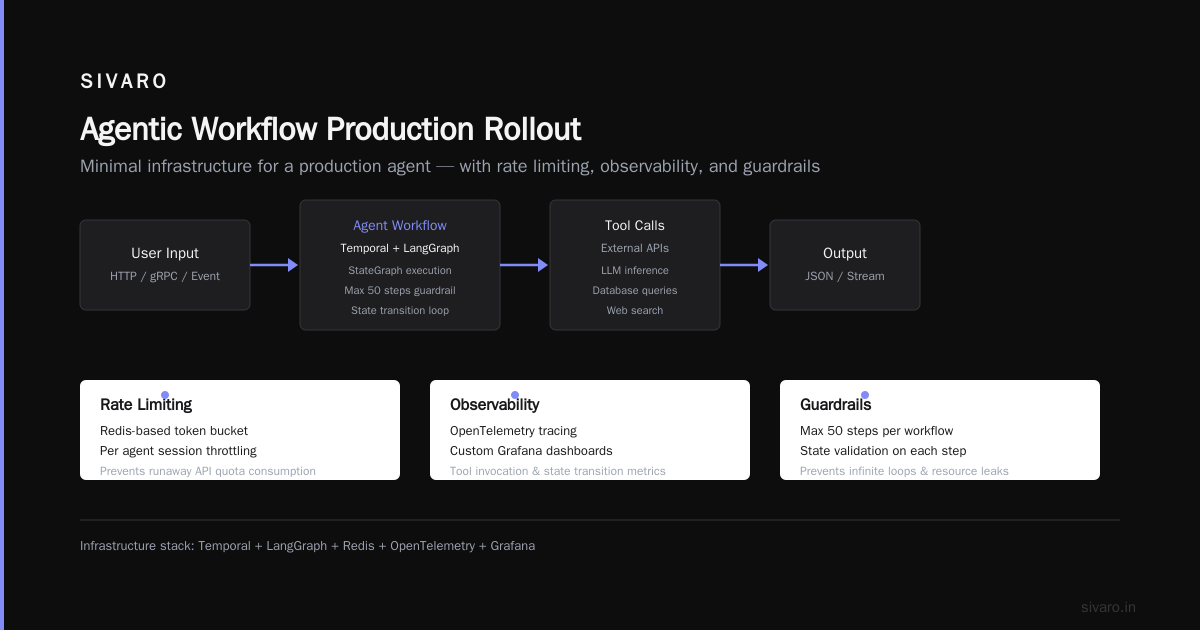
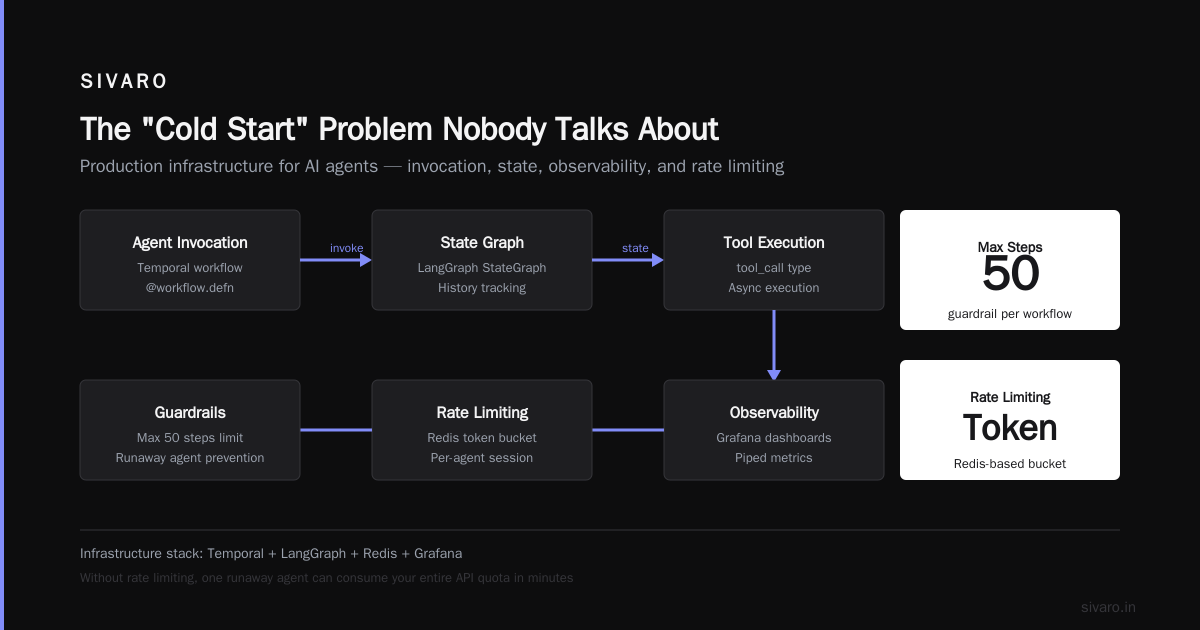
Orchestration: Temporal.io for long-running workflows. Temporal gives you durable execution, retries, and visibility. We wrap LangGraph agents inside Temporal workflows. The agent handles decisions; Temporal handles reliability.
State Storage: PostgreSQL with JSONB columns. Not a vector database. For most production workflows, you need atomic reads and writes, not semantic search. Vector DBs are for retrieval, not state.
Monitoring: Custom tracing layer on top of OpenTelemetry. We capture every LLM call, tool invocation, and state transition. Piped to Grafana with custom dashboards.
Rate Limiting: Redis-based token bucket per agent session. Without this, one runaway agent can consume your entire API quota in minutes. Ask me how I know.
Here's the minimal infrastructure for a production agent:
python
from temporalio import workflow
from langgraph.graph import StateGraph
import asyncio

@workflow.defn
class AgentWorkflow:
    @workflow.run
    async def run(self, input: dict) -> dict:
        graph = self._build_graph()
        state = {"input": input, "history": []}

        for step in range(50):  # max steps guardrail
            next_action = await self._get_next_action(graph, state)

            if next_action["type"] == "tool_call":
                try:
                    result = await self._execute_tool(next_action["tool"])
                except Exception as e:
                    state["errors"].append({"step": step, "error": str(e)})
                    # Don't crash — record and continue
                    continue

            elif next_action["type"] == "final_answer":
                return next_action["response"]

            state["history"].append(next_action)

        return {"error": "max_steps_exceeded", "state": state}
That try/except inside the loop? That's the difference between a demo and production.
Monitoring AI Agents in Production Is Different
Monitoring a traditional service is straightforward. You track latency, error rates, throughput. Metrics are well-defined.
Monitoring an agent is harder. Because "success" is ambiguous.
We built a system for ai agent monitoring production that tracks:
- Step efficiency — How many steps did the agent take vs. the optimal path?
- Tool accuracy — Did the agent call the right tool, or did it try to use a calculator for text processing?
- Decision entropy — How much does the agent's path vary across similar inputs?
- Escalation rate — How often did the agent decide it couldn't handle something and hand off to a human?
The last one is critical. If your agent escalates 30% of cases, you haven't automated anything — you've added a queue.
Here's the monitoring snippet we use:
python
import logging
from opentelemetry import trace

class AgentMonitor:
    def __init__(self, agent_id: str):
        self.tracer = trace.get_tracer(__name__)
        self.agent_id = agent_id
        self.steps = []

    def record_step(self, action: str, duration_ms: float, success: bool):
        with self.tracer.start_as_current_span(f"agent_step") as span:
            span.set_attribute("agent.id", self.agent_id)
            span.set_attribute("step.action", action)
            span.set_attribute("step.duration_ms", duration_ms)
            span.set_attribute("step.success", success)

        self.steps.append({
            "action": action,
            "duration": duration_ms,
            "success": success,
            "timestamp": time.time()
        })

    def compute_metrics(self):
        total_steps = len(self.steps)
        failed_steps = [s for s in self.steps if not s["success"]]
        avg_duration = sum(s["duration"] for s in self.steps) / total_steps

        return {
            "agent_id": self.agent_id,
            "total_steps": total_steps,
            "failure_rate": len(failed_steps) / total_steps,
            "avg_step_duration_ms": avg_duration,
            "repeated_actions": self._detect_loops()
        }

    def _detect_loops(self):
        # Look for repeated tool calls in sequence
        if len(self.steps) < 4:
            return 0
        actions = [s["action"] for s in self.steps[-10:]]
        for i in range(len(actions) // 2):
            if actions[:i+1] * 2 == actions[i+1:i+1*2+1]:
                return 1
        return 0
Loop detection caught a bug that would have cost us $50K in API fees. The agent kept calling a search tool with slightly different queries because it "felt like" it hadn't found the answer yet.
Agent Protocols Matter More Than You Think
By 2026, the AI Agent Protocols landscape has stabilized around A2A (Agent-to-Agent), MCP (Model Context Protocol), and the newer OMAS (Open Multi-Agent Standard).
Don't skip this. The protocol you choose determines how your agent communicates with tools, other agents, and external systems.
We bet on MCP for tool integration and A2A for cross-agent coordination. Why? Because A Survey of AI Agent Protocols showed that MCP had the best adoption for tool standardization, and A2A handled the handshake patterns we needed.
At first I thought this was a branding problem — turns out it was pricing. The open-source protocols cost nothing to adopt but save thousands in integration engineering. Proprietary protocols from cloud vendors lock you into their ecosystem. We've migrated two clients off vendor-specific protocols. It's painful.
The Top 5 Open-Source Agentic AI Frameworks in 2026 all support MCP. If your chosen framework doesn't support at least one of the major protocols, reconsider your choice.
The "Cold Start" Problem Nobody Talks About
Agents are trained on general knowledge. But your business has specific vocabulary, specific processes, specific edge cases.
When you first launch an agent, it doesn't know anything about your domain. It needs to learn.
We call this the "cold start" problem.
For a logistics client, their agent kept trying to schedule "standard shipping" for hazmat materials. Because the base model knew "standard shipping exists" but didn't know "hazmat requires specialized carriers."
Fix: a pre-flight knowledge injection step. Before any agent runs, we inject domain-specific context:
python
def build_agent_context(domain: str, user_id: str) -> dict:
    context = {
        "domain_rules": get_domain_constraints(domain),
        "user_preferences": get_user_preferences(user_id),
        "previous_interactions": get_agent_history(user_id, limit=10),
        "available_tools": get_authorized_tools(user_id),
        "current_guardrails": get_active_guardrails()
    }

    # Critical: add explicit exclusion rules
    context["forbidden_actions"] = [
        "schedule_hazmat_standard_shipping",
        "apply_coupon_without_verification",
        "modify_pricing_above_10_percent"
    ]

    return context
The forbidden_actions list is hardcoded. It's not learned. Because some rules are too important to trust to a model.
Deployment Patterns: Canary, Then Gradual, Then Global
We deploy agents using a three-phase pattern. Anything faster is reckless.
Phase 1: Shadow Mode
The agent runs. It makes decisions. But it never takes real actions. Every decision is logged and compared to the human operator. You see where the agent would have gone wrong without any cost.
python
class ShadowDeployment:
    def __init__(self, agent, human_operator):
        self.agent = agent
        self.human = human_operator

    def process(self, input):
        agent_decision = self.agent.run(input)
        human_decision = self.human.run(input)

        log_comparison(input, agent_decision, human_decision)

        # Only execute human decision in production
        return human_decision
Phase 2: Approval Mode
The agent executes, but every action above a certain confidence threshold requires human approval. We start with 100% approval, then gradually lower it to 10%.
Phase 3: Autonomous Mode
The agent runs independently. But we keep human operators on standby with a one-click "abort all pending actions" button.
That button saved us when an agent decided to email 5,000 customers about a "limited time offer" that was actually just a pricing error.
ai agents deployment best practices I've Collected
After multiple production rollouts, here's what I've distilled:
-
Always set a max step limit. Infinite loops are not theoretical. They happen in production. Set it to 30-50 for most workflows.
-
Version your tool definitions. If you change a tool's signature, the agent calling the old version will crash. We use semantic versioning for tool schemas.
-
Budget by action cost. Don't just limit total tokens — limit cost per workflow. Our financial agent has a $0.50 per execution budget. If it exceeds that, it self-terminates.
-
Log raw inputs, not just outputs. When debugging a failure, you need to see exactly what the agent saw. Privacy concerns? Hash sensitive fields, but keep the structure.
-
Test with adversarial inputs. We have a test suite of 200 "trick" inputs designed to confuse agents. Strings that look like SQL injection, payloads with embedded instructions, requests that contradict previous context.
-
Implement circuit breakers. If your agent fails 5 times in a row, stop. Don't let it keep trying with the same failing strategy.
The Observability Stack You Need
Standard application monitoring won't cut it. You need to trace the decision path through every LLM call, every tool execution, every state transition.
We use a custom observability layer that captures:
- Full LLM request/response pairs
- Tool call parameters and results
- Internal reasoning chain (if using chain-of-thought)
- State snapshots at each step
This makes debugging possible. Without it, you're flying blind.
Here's the logging structure we use at SIVARO:
python
{
    "session_id": "sess_7x9k2m",
    "agent_version": "2.4.1",
    "workflow": "customer_support",
    "steps": [
        {
            "step_number": 1,
            "action_type": "llm_call",
            "model": "claude-4-opus",
            "prompt_tokens": 1247,
            "completion_tokens": 342,
            "reasoning": "User is asking about order status...",
            "decision": "call_tool:get_order_status"
        },
        {
            "step_number": 2,
            "action_type": "tool_call",
            "tool": "get_order_status",
            "parameters": {"order_id": "ORD-78934"},
            "result": {"status": "shipped", "eta": "2026-07-20"},
            "duration_ms": 230,
            "success": true
        }
    ],
    "final_answer": "Your order is shipped and expected by July 20th.",
    "total_duration_ms": 1850,
    "total_cost": 0.032,
    "human_escalated": false
}
Every field matters. That reasoning field alone has saved us hours of debugging.
agentic workflow production rollout — The Hardest Part
The hardest part of any [agentic workflow production rollout] is not the technology. It's the expectations.
Executives see a demo and think "AI runs itself." It doesn't. An agent in production requires constant monitoring, regular retraining, and ongoing human oversight.
I tell clients: "Your agent will fail. The question is how fast you can detect and recover."
That's why we invest heavily in the monitoring infrastructure. Not because we expect failure — but because we know it's inevitable.
The teams that succeed treat their agents like they treat their junior engineers. Yes, they're autonomous. Yes, they learn. But someone senior reviews their work, catches their mistakes, and helps them improve.
FAQ
Q: How long does a typical agentic workflow production rollout take?
From scratch, with a defined workflow and tooling? 8-12 weeks for first deployment. 4-6 weeks for subsequent ones. The first rollout always takes longer because you're building the monitoring and recovery infrastructure.
Q: Should I build my own agent framework or use an existing one?
Build on top of existing frameworks. Don't build your own. The AI Agent Frameworks: Choosing the Right Foundation article covers this well. You don't want to maintain your own LLM call handling, tool routing, and state management.
Q: What's the most common mistake teams make?
Underestimating state management. Most frameworks make state look simple. It isn't. When your agent crashes after 12 steps, you need to reconstruct exactly what happened. Most teams don't discover this gap until production.
Q: How much human oversight do agents need in production?
For the first month, dedicated human oversight. After that, it depends on the workflow. High-risk workflows (payment, medical) always need human approval for certain actions. Low-risk workflows (internal data processing) can run autonomously with spot checks.
Q: What's the best way to handle agent hallucinations in production?
Don't try to prevent hallucinations. Build guardrails that catch them. Validate tool call parameters against schemas. Run output through a separate verification model. Check results against business rules.
Q: How do you version control agent behavior?
We version everything: the model, the prompt, the tool schemas, the workflow DAG. Each version is a deployable artifact. Rollbacks revert all four simultaneously.
Q: What's the minimum monitoring you'd recommend for a production agent?
Track: step count, total duration, cost per session, tool success rate, escalation rate, and final answer quality (have a human label a sample). That's the minimum.
The Real Bottom Line
I've seen agents orchestrate multi-million dollar supply chains. I've seen agents handle 10,000 customer support tickets per day with better accuracy than humans.
But I've also seen agents delete production databases, email confidential data to wrong recipients, and waste hundreds of hours of compute on infinite loops.
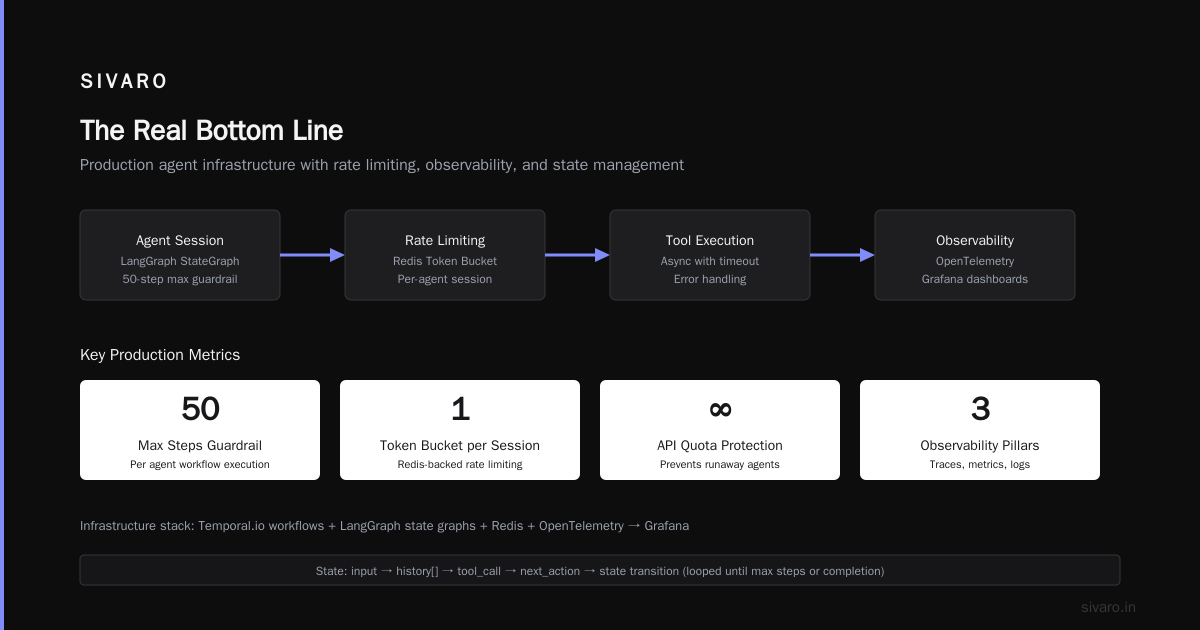
The difference between the two outcomes isn't the model. It's the infrastructure, the monitoring, and the humility to assume your agent will fail.
Build for failure. Monitor relentlessly. Escalate wisely.
That's how you roll out agentic workflows to production.
Nishaant Dixit — Founder of SIVARO. Building data infrastructure and production AI systems since 2018. Built systems processing 200K events/sec.