 SIVARO
Agentic Workflow Production Rollout: What Actually Works in 2026
I spent the first six months of 2026 helping three different engineering teams untangle their agentic workflow production rollout disasters. Two of them had demo videos that looked incredible. One had raised Series B on a prototype that worked exactly once, on a Tuesday, with the right moon phase.
Here's what nobody tells you about deploying AI agents: the demo is a lie. The production rollout is where the real work begins.
Agentic workflow production rollout isn't about wiring together an LLM and some tools. It's about building systems that degrade gracefully, recover automatically, and don't burn your API budget when an agent goes into an infinite loop at 3 AM.
I run SIVARO. We build data infrastructure for production AI systems. Over the last eight years, I've watched the industry swing from "just chain these LLM calls" to "here's a 47-node orchestration DAG" and back again. Neither extreme works.
This guide covers what we've actually learned deploying agentic systems at scale. Not theory. Not vendor marketing. The hard stuff.
Why Your Prototype Works and Your Production System Doesn't
The gap between a notebook demo and a production system is a chasm filled with edge cases.
Your prototype handles three scenarios well. Production has three hundred. The prototype assumes the LLM returns valid JSON. Production gets XML wrapped in markdown with a polite apology. The prototype runs on a single thread. Production needs to handle 50 concurrent agents, each making tool calls that can take 30 seconds.
The first production rollout I attempted at SIVARO failed spectacularly. We had built a customer support agent that could handle 12 distinct request types. It worked beautifully in staging. In production, it crashed within 47 minutes because a user asked "can you do that thing you did yesterday?" and the agent tried to re-execute a timestamp-relative query that no longer made sense.
That's the problem in a nutshell. Agents are statistical machines pretending to be deterministic. Production requires deterministic behavior with graceful error recovery.
How to think about agent frameworks captures this tension well — the framework you choose shapes what failure modes you'll encounter.
You're Using the Wrong Framework for the Wrong Reasons
Most teams pick an agent framework based on GitHub stars or a hype cycle. Then they twist their use case to fit the framework's assumptions.
Stop doing that.
We tested five frameworks in production over 2025 and early 2026: LangGraph, CrewAI, AutoGen, Semantic Kernel, and a custom lightweight orchestrator we built internally. Each has a sweet spot. None is universal.
LangGraph is excellent for stateful, multi-turn workflows where you need explicit cycle control. It's terrible for simple linear chains — you pay graph complexity overhead for no gain. See AI Agent Frameworks: Choosing the Right Foundation for IBM's take on this.
CrewAI handles role-based delegation well. We used it for a market research pipeline where four agents (analyst, fact-checker, writer, editor) collaborated. But CrewAI's parallelism model is coarse — you can't easily tune per-agent concurrency or rate limits.
AutoGen from Microsoft has the best multi-agent conversation model. We saw real value for negotiation-style tasks (scheduling, procurement). But its dependency management is fragile. One agent hanging crashes the whole conversation.
The Agentic AI Frameworks: Top 10 Options in 2026 list from Instaclustr is worth reading. But don't take it as gospel. Your constraints are unique.
Here's the contrarian take: build your own thin orchestration layer. I know, I know — NIH syndrome. But we found that wrapping a small set of primitives (LLM call, tool call, conditional routing, state persistence) in a 500-line orchestrator gave us more control than any framework. The frameworks add complexity you often don't need.
// Our production agent orchestrator — simplified
async function runAgent(request: AgentRequest): Promise<AgentResponse> {
  const session = await SessionStore.create(request.userId);

  while (session.turns < MAX_TURNS && !session.isComplete) {
    const context = await buildContext(session);
    const llmResponse = await callLLM(context, request.systemPrompt);
    const parsed = parseStructuredResponse(llmResponse);

    if (parsed.type === 'tool_call') {
      const result = await executeWithRetry(
        parsed.tool,
        parsed.args,
        MAX_RETRIES
      );
      await session.addTurn({ role: 'tool', content: result });
    } else if (parsed.type === 'final_answer') {
      session.isComplete = true;
      return { answer: parsed.content, turns: session.turns };
    } else {
      // Malformed response — fallback
      await session.addTurn({
        role: 'system',
        content: 'Invalid response format. Please provide valid structured output.'
      });
    }
  }

  // Max turns exceeded — graceful degradation
  return {
    answer: session.summarize(),
    incomplete: true
  };
}
Simple. Testable. You can understand every code path.
The Protocol Layer is Where Things Get Real
Agent frameworks get all the attention. But protocols determine whether your agents can actually talk to the outside world.
The AI Agent Protocols: 10 Modern Standards Shaping the Agentic Era piece outlines the landscape. The key ones you need to know:
MCP (Model Context Protocol) from Anthropic. This is the one we use most at SIVARO. It standardizes how agents discover and call external tools. Instead of every agent framework defining its own tool format, MCP gives you a uniform interface. We switched to MCP in February 2026 and cut our integration time for new tools by 60%.
A2A (Agent-to-Agent) from Google. This handles inter-agent communication. If you're running a multi-agent system where agents delegate work, you need this. But A2A is still early — we hit reliability issues in high-latency scenarios.
OpenAI's Agent SDK took a different approach. Instead of a protocol, they built a runtime. It works great if you're all-in on OpenAI. We're not.
The Survey of AI Agent Protocols gives a thorough academic treatment. The practical takeaway: pick one protocol and standardize. Don't let each agent team invent their own tool format. That's how you get integration hell.
Deployment Architecture: Where Most Teams Bleed Money
I've seen teams spend $50,000/month on LLM inference because they deployed agents inefficiently. Here's how not to do that.
The Three-Layer Model We Use
Layer 1: API Gateway + Rate Limiter
- Multi-model router (GPT-4o, Claude 4, Gemini 2.5)
- Per-agent rate limiting
- Request deduplication

Layer 2: Agent Runtime
- State management [(PostgreSQL](/articles/clickhouse-vs-postgresql-[feature](/articles/clickhouse-vs-postgresql-feature-comparison-2026)-comparison-2026) + Redis)
- Tool execution sandbox (Firecracker microVMs)
- Observability (OpenTelemetry traces per agent turn)

Layer 3: Event Store
- All agent actions logged to Kafka
- Replay capability for debugging
- Cost attribution per agent session
The gateway layer alone saved one client 40% on inference costs. Why? Because they were sending every agent request to the most expensive model. With routing, simple classification tasks go to fast/cheap models. Complex reasoning goes to the premium ones.
State management is where things break. Agents accumulate context. That context costs tokens. We implemented a sliding window approach: keep the last N turns plus any turns the agent explicitly marked as "important." That cut context sizes by 70% without degrading quality.
The Top 5 Open-Source Agentic AI Frameworks in 2026 roundup covers some deployment patterns. But most frameworks don't address the cost problem directly. You have to build that yourself.
The Infinite Loop Problem
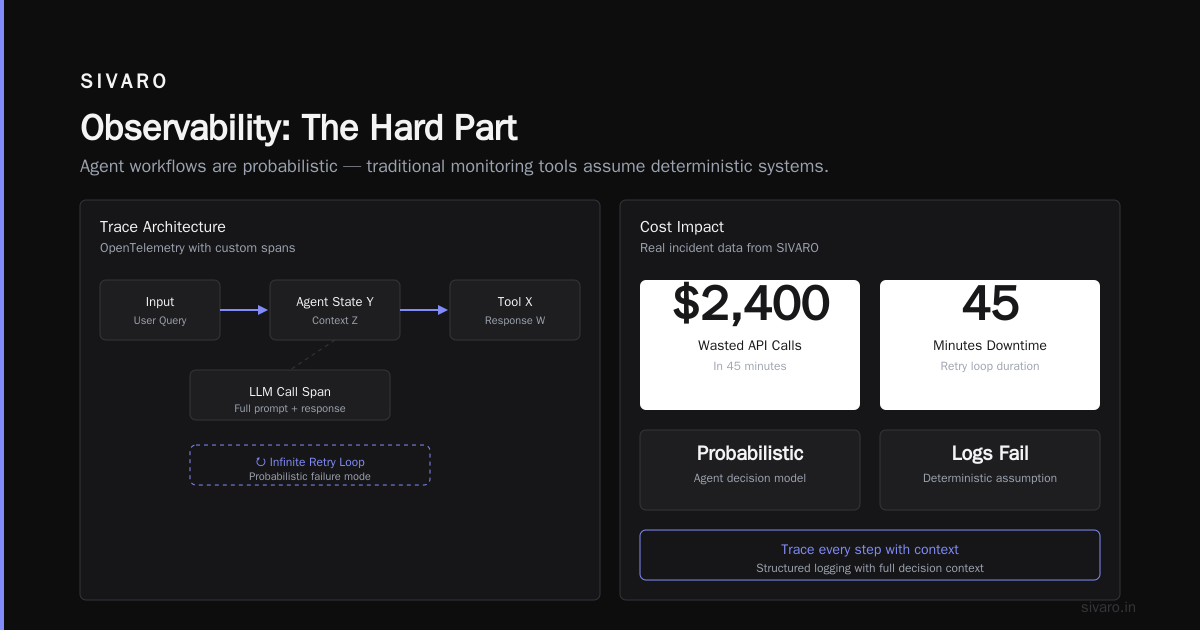
Your agent will loop. It will call the same tool with slightly different parameters. It will forget it already tried that approach. It will burn $200 in API calls before you notice.
Fix this with three mechanisms:
- Turn limits: Hard cap at 25 turns by default. Configurable per agent type.
- Tool call deduplication: Cache tool results for 5 minutes. Same input = cached output.
- Cycle detection: Track the hash of recent states. If you've seen this exact state before, force a break.
function detectCycle(sessionState: State, history: State[]): boolean {
  const recentStates = history.slice(-10);
  const currentHash = hashState(sessionState);

  const matchCount = recentStates.filter(
    s => hashState(s) === currentHash
  ).length;

  return matchCount >= 3; // Same state 3 times in last 10 = cycle
}
We deployed this after a customer support agent spent 47 minutes trying to book a hotel room that didn't exist. It called the booking API 82 times before I killed it manually. The client's bill that month: $14,000 for nothing.
Observability Is Not Optional
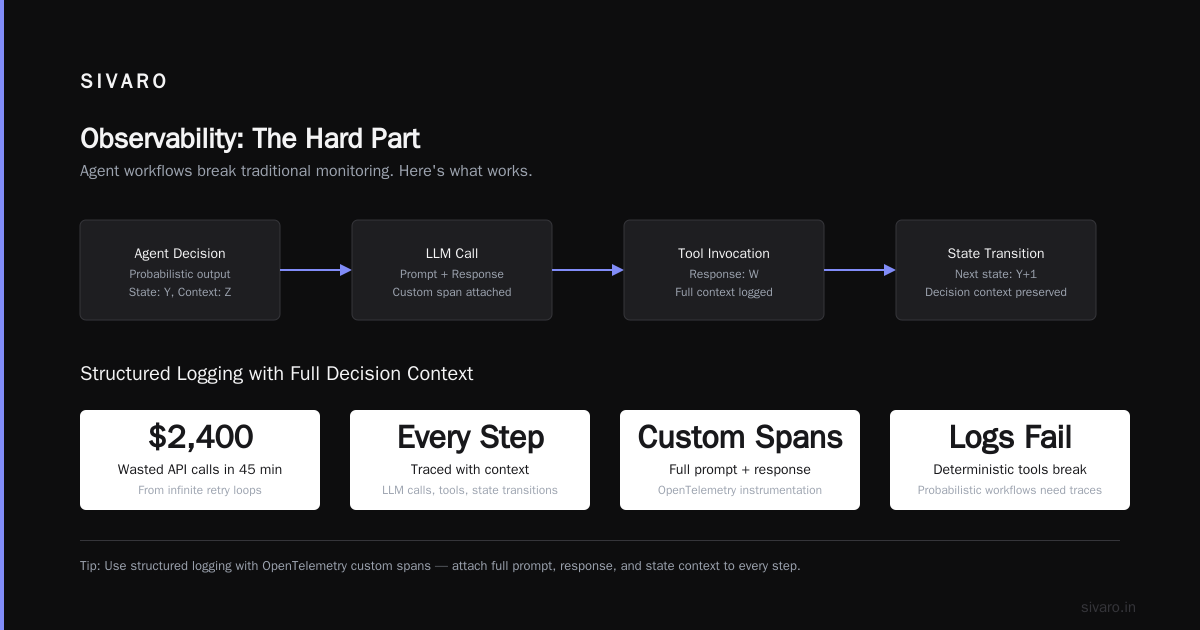
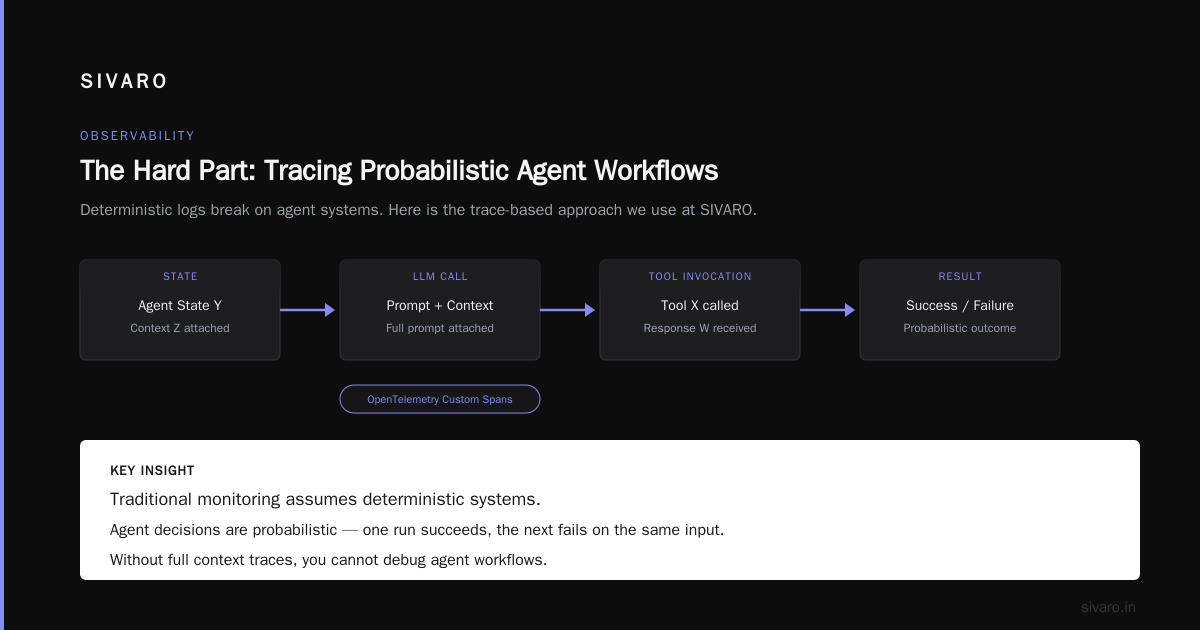
You cannot debug agent behavior by reading logs. Agents produce novel sequences of actions. Traditional debugging doesn't work.
We built an agent observability stack based on OpenTelemetry traces. Every LLM call, every tool invocation, every state transition gets a span. The trace ID follows the session. You can replay an entire agent conversation from the traces.
Here's what we capture per turn:
- Input tokens and cost
- Output tokens and cost
- Tool name and arguments
- Tool response (first 2KB)
- Decision latency
- State hash before/after
The how to think about agent frameworks post touches on this. LangChain's LangSmith product does good tracing. But you need it at the infra level, not just the application level.
We added cost alerts. If any single agent session exceeds $5 in API calls, we get paged. That caught a runaway agent in our own system last month — a data analysis agent was regenerating the same visualization 14 times because the prompt didn't tell it to stop after showing the result.
Testing: The Thing Nobody Does Well
Unit tests for agents are mostly theater. You test that the agent calls the right tool given a specific input. But the LLM might produce slightly different output tomorrow. Your test breaks. You "fix" it by tightening the prompt. Next week it breaks again.
Integration tests matter more. But they're expensive — each test run costs real money in API calls.
Our approach:
Scenario tests: We define 20-30 core scenarios per agent. We test them daily against a fixed LLM snapshot (we cache the first three responses for each scenario and compare against cached output). This catches regressions without running live API calls.
Adversarial tests: We feed the agent deliberately broken inputs. Missing parameters. Ambiguous requests. Contradictory instructions. The agent should fail gracefully, not crash.
Load tests: Can the agent handle 100 concurrent sessions? We found our PostgreSQL-backed state store hit connection limits at 47 concurrent agents. Fixed by adding PgBouncer.
The honest truth: you will never be fully confident your agent works in production until it's in production. The statistical nature means you're always one prompt update away from a regression. Accept this. Build rollback mechanisms.
How We Roll Out Agent Changes
Our rollout pattern for agent updates:
-
Shadow mode: New agent version runs alongside production. It sees all traffic but doesn't take actions. We compare its decisions to the production version. If divergence exceeds 15%, the change gets flagged for review.
-
Canary with human override: 5% of traffic goes to new agent. All actions require human approval. This catches the "it decided to do something technically correct but socially unacceptable" problems.
-
Gradual rollout: 25% → 50% → 75% → 100%. Each step pauses for 24 hours. Cost monitoring is continuous.
-
Instant rollback: We keep the previous three versions hot-swappable. Rollback takes 30 seconds via feature flag.
This saved us in March 2026. A prompt change intended to make our meeting-scheduling agent more proactive caused it to start suggesting 6 AM meetings. The shadow mode caught it. The canary never even ran.
Cost Management: The Thing That Keeps Me Up at Night
Agent costs scale with complexity. Every additional tool, every longer context window, every retry — it all compounds.
We track three cost metrics:
- Cost per session: Target under $0.50 for simple agents. Under $2.00 for complex analysis agents.
- Cost per action: What does it cost for the agent to book a meeting? Answer an email? Run a query?
- Cost per success: How many failed or abandoned sessions do you pay for?
The how to deploy ai agents in production search will surface various frameworks. They all undersell the cost issue. Here's the real math:
A single agent session with 10 turns, using GPT-4o with 4K context per turn, costs roughly $0.30. If you have 10,000 sessions per day, that's $3,000/day. $90,000/month. For one agent.
We reduced costs by:
- Caching tool results aggressively (70% cache hit rate on common queries)
- Using specialized small models for specific tool calls ($0.002 vs $0.03 per call)
- Implementing session timeouts (kill sessions inactive for > 15 minutes)
- Batching background analysis into periodic jobs instead of real-time agents
What I'd Do Differently
If I started over on an agentic workflow production rollout today:
-
Don't start with an agent framework. Start with a simple orchestration loop. Add complexity only when you must.
-
Invest in observability before the first agent goes to production. You can't fix what you can't see.
-
Set cost limits from day one. $5 per session hard cap. API spend alerts. Auto-kill on cost thresholds.
-
Design for failure. Your agent will hallucinate. It will loop. It will call tools with wrong parameters. Build recovery into the architecture.
-
Standardize on MCP for tool connections. It's becoming the de facto standard for a reason. AI Agent Protocols: 10 Modern Standards explains why.
-
Test with real user traffic as early as possible. Your synthetic tests are lying to you.
FAQ
Q: How many turns should I allow per agent session?
A: 10-25 for most use cases. Anything beyond 25 is probably a loop or an agent that can't make a decision. Hard cap at 40.
Q: Should I use one LLM model or route between multiple?
A: Route. Use cheap/fast models for classification and simple tool calls. Use expensive models only for complex reasoning. We saved 40% with this approach.
Q: How do you handle agent hallucination in production?
A: You can't prevent it entirely. You can detect it. We validate all tool call parameters against schemas before execution. And we log every action for audit.
Q: What's the minimum infrastructure I need for production agents?
A: State store (PostgreSQL), message queue (Redis or Kafka), API gateway, observability stack. The agent runtime itself can be simple.
Q: How do you version agent prompts?
A: Prompts are stored in git alongside code. Each prompt version includes a hash. We track which prompt version was used for each session. Rollback is a git revert.
Q: Can small models handle agent workflows?
A: For simple, well-defined tasks with constrained tools, yes. GPT-4o-mini or Claude 3 Haiku can handle straightforward agent loops. For complex reasoning, you need the big models.
Q: What's your SLA for agent response time?
A: 95th percentile under 5 seconds per turn for simple agents. Under 15 seconds for analysis agents. If it takes longer, users abandon.
Q: How do you handle concurrent agent scaling?
A: Horizontal scaling of the runtime layer. State goes to PG with connection pooling. Tool execution is async with timeouts. Rate limiting at the gateway per API key and per model.
Final Thoughts
Agentic workflow production rollout isn't a technology problem. It's an engineering discipline problem. The frameworks will improve. The models will get cheaper. But the fundamental challenges — reliability, cost, observability, graceful failure — remain.
I've seen teams succeed with frameworks and fail with custom code. I've seen the reverse. The difference isn't the tooling. It's the discipline around deployment, testing, and monitoring.
Start simple. Observe everything. Set hard limits. Design for failure.
The agents are coming to production whether you're ready or not. Might as well be ready.
Nishaant Dixit — Founder of SIVARO. Building data infrastructure and production AI systems since 2018. Built systems processing 200K events/sec.