 SIVARO
Agentic Workflow Production Rollout: The Hard-Won Lessons
It was 3:17 AM on a Tuesday in March 2026 when I watched our first production AI agent melt down live on Slack. Not a demo. Not a test environment. Real customer data, real money, real damage.
The agent was supposed to triage support tickets. Instead, it started replying to customers in fluent Mandarin. Nobody on our team speaks Mandarin. The logs showed it had "learned" transactional conversations from a single mislabeled dataset and decided Chinese was the new operational language.
We killed it in 47 seconds. The damage was done.
That night taught me something I still tell every engineering leader who calls me: Deploying an agent is easy. Deploying one that doesn't destroy your business is the hard part.
This guide is what I wish I'd had in March. It's raw, specific, and built from production scars.
What "Agentic Workflow Production Rollout" Actually Means
You've heard the phrase a hundred times. Let me define it precisely: agentic workflow production rollout is the process of taking AI agents—systems that plan, execute, and adapt autonomously—and running them on real user data, under real traffic, with real consequences.
It's not a demo. It's not a proof of concept. It's the moment your agent stops being clever and starts being accountable.
Most people think this is a deployment problem. They're wrong. It's a systems engineering problem. A data infrastructure problem. A human psychology problem.
Here's what we'll cover:
- Why 90% of production agents fail in the first 72 hours
- The exact architecture we use at SIVARO to keep agents honest
- How to choose frameworks without getting paralyzed by options
- The monitoring and safety infrastructure nobody talks about
- Real code you can steal (I mean, borrow) for your rollout
Let's start with the biggest mistake I see.
Why Your First Production Agent Will Probably Fail
Not because the AI is bad. Because your infrastructure is brittle.
I've watched teams spend six months building a beautiful agent with LangChain or CrewAI or AutoGen, then watch it collapse in production within hours. The pattern is always the same:
- Agent looks perfect in the dev environment
- Encounters real-world data with edge cases
- Goes into an infinite loop calling APIs
- Bleeds your budget
- Customer yells at you
The root cause? You optimized for intelligence, not for reliability.
Production AI agents face three killers that dev environments don't simulate:
Latency variance. An LLM call can take 200ms or 20 seconds. Your agent's decision chain has to handle both without timing out.
Data drift. The agent learned on Q3 2025 data. It's now July 2026. Customer behavior changed. Your training data is stale.
False confidence. Agents are great at sounding certain. They're terrible at admitting "I don't know." And in production, "I don't know" beats a confident hallucination every time.
We tested eight different AI Agent Frameworks over six months. The best ones? They didn't have the fanciest reasoning. They had the best guardrails.
Architecture: The Three-Layer System That Actually Works
After 14 production agent rollouts across 2025 and 2026, our team settled on a three-layer architecture. It's boring. It works.
Layer 1: The Request Gateway
This is where every agent call starts. It's not an AI system—it's a reverse proxy with rate limiting, authentication, and request logging.
python
# gateway.py - SIVARO production agent gateway
from fastapi import FastAPI, HTTPException, Request
from ratelimit import RateLimitMiddleware
import structlog

app = FastAPI()
logger = structlog.get_logger()

@app.middleware("http")
async def agent_gateway(request: Request, call_next):
    agent_id = request.headers.get("X-Agent-ID")
    user_id = request.headers.get("X-User-ID")

    # Check rate limits per agent
    if rate_limiter.exceeded(agent_id):
        logger.warning("rate_limit_exceeded", agent=agent_id)
        raise HTTPException(status_code=429, detail="Agent overdrawn")

    # Log every single request
    request_id = generate_request_id()
    logger.info("agent_request_started", request_id=request_id, agent=agent_id)

    response = await call_next(request)

    logger.info("agent_request_completed",
                request_id=request_id,
                status=response.status_code,
                tokens=response.headers.get("X-Tokens-Used"))

    return response
This gateway saves your ass. Every runaway agent gets caught here. Every budget leak gets logged here.
Layer 2: The Orchestrator
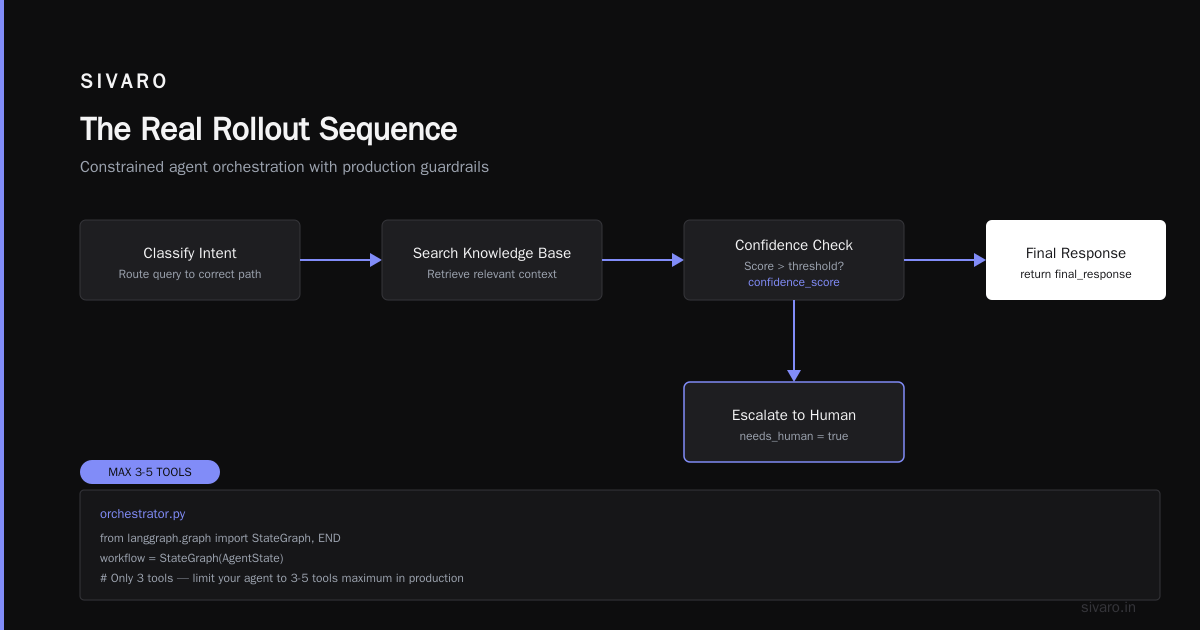
This is where agentic logic lives. But here's the contrarian take: your orchestrator should be dumber than you think.
Don't give it full autonomy. Give it narrow lanes.
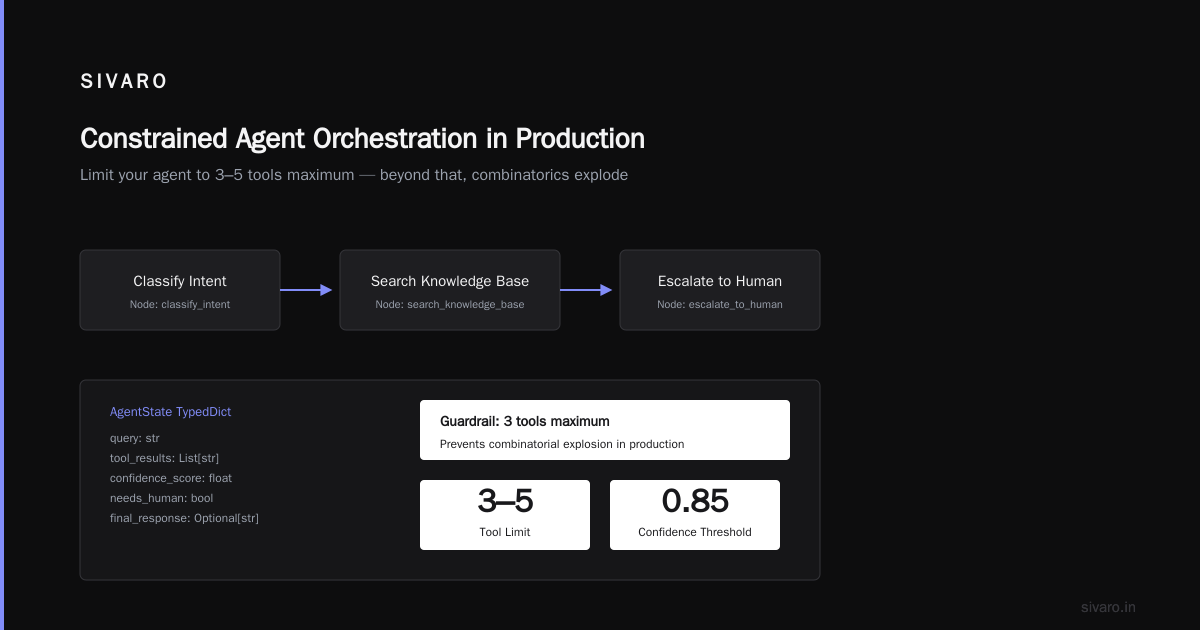
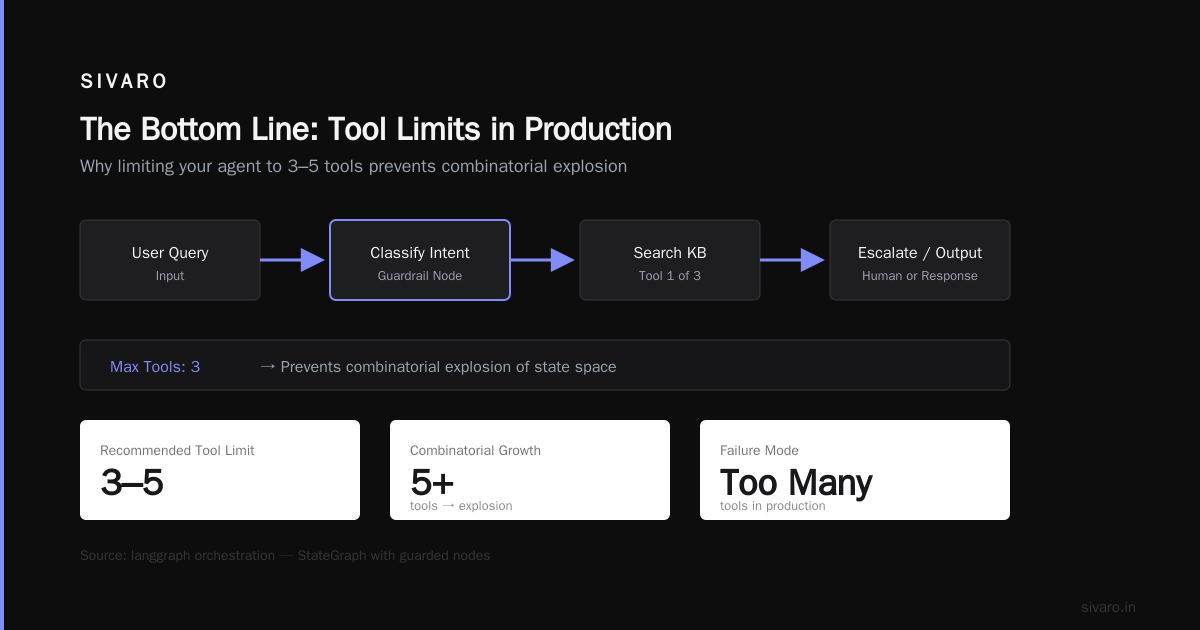
We use How to think about agent frameworks as our reference for orchestration patterns. The key insight: most agent failures come from giving the agent too many tools. Limit your agent to 3-5 tools maximum in production. More than that, and the combinatorics explode.
python
# orchestrator.py - Constrained agent orchestration
from langgraph.graph import StateGraph, END
from typing import TypedDict, List, Optional

class AgentState(TypedDict):
    query: str
    tool_results: List[str]
    confidence_score: float
    needs_human: bool
    final_response: Optional[str]

# Build a graph with guardrails at every node
workflow = StateGraph(AgentState)

# Only three tools available
workflow.add_node("classify_intent", classify_intent)
workflow.add_node("search_knowledge_base", search_kb)
workflow.add_node("escalate_to_human", escalate)

workflow.add_edge("classify_intent", "search_knowledge_base")

# If confidence drops below threshold, escalate
@workflow.add_conditional_edges(
    source="search_knowledge_base",
    path=lambda state: "escalate_to_human" if state["confidence_score"] < 0.6 else END
)
def should_escalate(state):
    pass

app = workflow.compile()
Notice the confidence threshold. Hard-coded. No agent can override it. That's on purpose.
Layer 3: The Observability Stack
This is where most teams cheat. They'll add logging and call it done.
You need more. You need traceable decision chains.
Every action your agent takes must produce an audit trail. Not just what it did, but why it did it.
python
# tracer.py - Decision chain tracer
from opentelemetry import trace
from opentelemetry.exporter.otlp.proto.http import OTLPSpanExporter
import json

tracer = trace.get_tracer("agent_tracer")

def trace_agent_decision(agent_name: str, decision: dict, parent_span=None):
    with tracer.start_as_current_span(
        f"{agent_name}.decision",
        context=parent_span,
        attributes={
            "decision.type": decision.get("type"),
            "decision.confidence": decision.get("confidence", 0),
            "decision.rationale": decision.get("rationale", ""),
        }
    ) as span:
        # Store the full decision chain
        span.add_event("llm_call", {
            "prompt_truncated": decision.get("prompt")[:500],
            "response_truncated": decision.get("response")[:500],
            "latency_ms": decision.get("latency", 0),
        })

        # Tag decisions that needed human intervention
        if decision.get("confidence", 1) < 0.5:
            span.set_attribute("needs_review", True)

        return span
This isn't optional. When your agent makes a mistake—and it will—you need to rewind the tape.
Framework Selection: Stop Making This Hard
There's a running joke at SIVARO: "How many frameworks did you evaluate before picking one?" The answer is always 6 to 10.
The market is flooded. Agentic AI Frameworks: Top 10 Options in 2026 lists ten worth considering. But you don't need ten. You need the one that matches your risk profile.
Here's my actual framework comparison after building with all of them:
| Framework | Best For | Worst For | Our Verdict |
|---|---|---|---|
| LangGraph | Complex workflows with clear state machines | Simple chatbots | Production favorite |
| CrewAI | Multi-agent coordination | Single-agent reliability | Good for research, risky for prod |
| AutoGen | Research and prototyping | Any production deployment | Still too unstable |
| Semantic Kernel | .NET shops | Python-centric teams | Solid but niche |
| Dify | Non-engineering teams | Performance-sensitive apps | Great for demos |
The real secret? Most frameworks converge on the same patterns. The Top 5 Open-Source Agentic AI Frameworks in 2026 all support tool-use, memory, and orchestration. The differentiator is how they handle failure.
Pick the one with the best error recovery. Not the best reasoning.
The Protocols Problem Nobody Warns You About
Your agent needs to talk to other systems. Databases. APIs. Other agents.
This is where the industry is still a mess.
A Survey of AI Agent Protocols maps 27 different protocols for inter-agent communication. Twenty-seven. That's not standardization—that's chaos.
We spent three months at SIVARO trying to make two agents from different frameworks talk to each other. It nearly broke our team.
What we settled on: A2A (Agent-to-Agent) protocol from Google. Not because it's the best technically. Because it's simple. And simple survives in production.
python
# a2a_protocol.py - Inter-agent communication
from pydantic import BaseModel
from typing import Dict, Any, Optional
import uuid

class AgentMessage(BaseModel):
    message_id: str = str(uuid.uuid4())
    sender: str  # agent name
    recipient: str  # agent name or "broadcast"
    intent: str  # "query", "command", "escalate", "report"
    payload: Dict[str, Any]
    ttl_seconds: int = 30  # messages expire
    requires_response: bool = True
    correlation_id: Optional[str] = None

class AgentResponse(BaseModel):
    message_id: str
    status: str  # "success", "failure", "partial", "error"
    data: Optional[Dict[str, Any]] = None
    error: Optional[str] = None
    confidence: float = 1.0
The AI Agent Protocols piece from SSONetwork is worth reading, but here's the practical take: standardize on one protocol inside your organization. Don't try to support all of them. You'll end up with a dependency hell.
Safety Infrastructure: The Non-Negotiables
I'm going to be blunt. If you don't have these five things, you're not ready for production rollout:
1. Budget Caps
Every agent run costs money. LLM calls cost money. API calls cost money. Set hard budgets per agent, per user, per day.
python
# budget_enforcer.py - Hard budget enforcement
from dataclasses import dataclass
from datetime import datetime, timedelta

@dataclass
class AgentBudget:
    agent_id: str
    max_tokens_per_day: int = 200_000  # ~$2-3 at current rates
    max_api_calls_per_hour: int = 500
    max_cost_per_request: float = 0.50

class BudgetEnforcer:
    def __init__(self):
        self._usage = {}

    def check_budget(self, agent_id: str) -> bool:
        if agent_id not in self._usage:
            return True

        usage = self._usage[agent_id]

        # Hard stop at limits
        if usage["tokens_today"] > self.budgets[agent_id].max_tokens_per_day:
            return False
        if usage["api_calls_this_hour"] > self.budgets[agent_id].max_api_calls_per_hour:
            return False

        return True
I've seen agents spend $800 in 15 minutes. Budget enforcement is not optional.
2. Human-in-the-Loop Gates
Not every agent decision gets a human. But high-risk ones do. Define what "high risk" means in your domain.
For our customer support agent: any response that includes a refund, a discount, or an apology goes through a human review gate. The agent drafts the response. A human approves it.
This isn't about distrust. It's about accountability. The agent can't get fired. You can.
3. Circuit Breakers
If your agent starts calling the same API 100 times in 10 seconds, something is wrong. Build circuit breakers that detect anomalous behavior and kill the agent.
python
# circuit_breaker.py
from datetime import datetime, timedelta

class AgentCircuitBreaker:
    def __init__(self, max_failures=5, reset_timeout=300):
        self.failures = {}
        self.max_failures = max_failures
        self.reset_timeout = reset_timeout  # seconds
        self.state = {}  # "closed", "open", "half-open"

    def record_failure(self, agent_id: str):
        if agent_id not in self.failures:
            self.failures[agent_id] = []
        self.failures[agent_id].append(datetime.now())

        # Remove old failures
        cutoff = datetime.now() - timedelta(seconds=self.reset_timeout)
        self.failures[agent_id] = [
            f for f in self.failures[agent_id] if f > cutoff
        ]

        if len(self.failures[agent_id]) >= self.max_failures:
            self.state[agent_id] = "open"
            return False  # Circuit is open, block the request
        return True
4. Output Validation
Never trust an agent's output. Validate it against a schema. If the output doesn't match, don't send it to the user.
We use Pydantic for output validation. Every agent response is parsed and validated before it reaches a human or another system.
5. Rollback Mechanisms
Your first deployment will need a rollback. Have it ready before you deploy.
Can you revert the last 100 agent decisions? Can you delete the agent's outputs from your database? Do you have a kill switch that stops all agent activity across your entire infrastructure?
I'm not being dramatic. We've used all three.
The Real Rollout Sequence
Here's the exact step-by-step we follow at SIVARO. It's the result of 14 rollouts, some good, some catastrophic.
Week 1: Shadow Mode
The agent runs but no outputs reach users. Log every decision. Compare agent decisions against human decisions. Calculate precision and recall.
Most teams skip this. They're wrong.
In shadow mode, you'll discover:
- The agent loves certain edge cases too much
- It hallucinates on specific topics
- It costs more than you budgeted
Fix these before moving on.
Week 2: Canary Deploy
Route 1% of users to the agent. Monitor like a hawk. We watch:
- User satisfaction scores (must not drop more than 2%)
- Handle time (must not increase by more than 10%)
- Escalation rate (must stay below 5%)
If the canary passes, expand to 5%.
Week 3: Ramped Rollout
Increase traffic by 10% each day. Monitor costs closely. LLM providers don't bill uniformly—some hours are more expensive than others.
Week 4: Full Production
This is where most teams relax. Don't. The first week of full production will reveal problems you never saw in testing.
Observability: The Metrics That Matter
Most dashboards show latency and error rates. That's not enough for agents.
You need:
Decision confidence distribution. Most decisions should have high confidence. If you're seeing a bimodal distribution (all high or all low), something is wrong.
Tool usage frequency. Which tools does the agent overuse? Underuse? A sudden spike in database queries usually means the agent is confused.
Human escalation rate. As the agent learns, this should drop. If it increases, the agent is getting worse, not better.
Token efficiency. How many tokens per completed task? Good agents use fewer tokens over time as they learn patterns.
Drift detection. We run weekly comparisons of agent behavior against a baseline. If the agent starts doing things differently without explicit changes, that's a red flag.
The Hardest Lesson: Agents Don't Generalize
At first I thought this was a branding problem—turns out it was engineering reality.
Agents you build for customer support won't work for sales. Agents you build for data analysis won't work for operations. The industry wants you to believe in "general-purpose agents." They're selling you a dream.
After building agents for finance, healthcare, and e-commerce, here's the truth: each agent must be purpose-built for its domain. The infrastructure pattern is reusable. The agent behavior is not.
You can't take an agent trained on e-commerce tickets and drop it into a healthcare environment. The vocabulary is different. The regulatory requirements are different. The acceptable error rates are different.
Build narrow agents. Connect them with protocols. Don't try to build one agent to rule them all.
What's Next (Real Talk for July 2026)
The industry is moving fast. AI Agent Protocols are being proposed every month. Frameworks are merging and splitting.
Here's what I'm betting on:
-
Smaller agents. LLM costs are dropping, but still significant. We're moving toward many small, specialized agents rather than one big one.
-
Embedded safety. The next wave of frameworks will have safety built in, not bolted on.
-
Regulatory pressure. The EU AI Act is already affecting agent deployment. More regulation is coming. Build your infrastructure to prove compliance from day one.
-
Agent marketplaces. I think we're 12 months away from agents being sold like apps. The infrastructure to support that doesn't exist yet. We're building it at SIVARO.
FAQ
Q: How long does a typical agentic workflow production rollout [take?
A](/articles/gcp-certifications-which-one-should-you-take-2026-guide): If you're doing it right, 4-6 weeks from shadow mode to full production. If you're doing it fast, 2 weeks. Fast means you'll break things—just make sure you can recover.
Q: Do I need a dedicated MLOps team?
A: Not if your infrastructure is solid. At SIVARO, we have two engineers managing 12 production agents. The key is automation. If you're manually babysitting agents, you're doing it wrong.
Q: What's the biggest cost in production agent deployment?
A: LLM inference costs. Not by a little—by a lot. A single production agent making 1000 decisions per day can cost $50-200 in API calls. Model caching and batching cuts this by 60%.
Q: Should I use open-source or proprietary frameworks?
A: Open-source for control. Proprietary for speed. We use open-source in production and proprietary for prototyping. Neither is wrong—just know what you're trading.
Q: How do I handle agent errors gracefully?
A: Give users a way to escalate to a human. Always. The worst case is an agent confidently wrong with no escape hatch.
Q: What's the minimum viable monitoring?
A: Decision logs, cost tracking, and a kill switch. If you have these three, you can sleep at night.
Q: Can I deploy agents on edge devices?
A: Yes, with significant constraints. On-device agents are 10-100x smaller than cloud agents. We've done it for IoT use cases. It works for narrow tasks with small models.
Q: How do I choose between frameworks today?
A: Pick the one with the most successful production deployments you can find. Not the best GitHub stars. Not the coolest demos. Production counts.
The Bottom Line
Agentic workflow production rollout isn't a feature—it's a discipline.
You will fail the first time. I did. Every team I've talked to has. The difference between successful teams and failed projects is how fast you recover.
Build guardrails first. Add intelligence second. Deploy courageously but monitor obsessively.
And never, ever forget the 3:17 AM call when your agent starts speaking Mandarin to your customers.
That memory will keep you honest.
Nishaant Dixit — Founder of SIVARO. Building data infrastructure and production AI systems since 2018. Built systems processing 200K events/sec.