 SIVARO

Admission Control vs Autoscaling for GPU Clusters: The Real Answer
We burned $40,000 in GPU hours before we figured this out. That's not a brag — that's a confession. In early 2026, I watched a customer's Kubernetes cluster spin up 32 A100s to handle a traffic spike that never came. The autoscaler saw queue depth rising, reacted, and by the time those GPUs were warm, the spike had evaporated. They paid for 32 idle accelerators for six hours.
The problem wasn't autoscaling. It was that they had no admission control. And after three years of building production AI systems at SIVARO, I can tell you: most teams conflate these two mechanisms, and it costs them real money.
Here's the short version. Admission control decides what gets in. Autoscaling decides how much capacity exists. They solve different problems, and you need both — but you need to understand which one is failing before you throw hardware at it.
Admission control vs autoscaling for gpu clusters isn't an either/or question. It's a sequencing question. And most teams get the order wrong.
What Each Thing Actually Does
Let me be precise, because the industry is sloppy with these terms.
Admission control is a gate. It sits in front of your GPU scheduler and decides whether a request, pod, or inference call is allowed to proceed based on current conditions. Think of it as a bouncer checking IDs at a club that's already at capacity. The club doesn't expand because the bouncer is doing their job — the bouncer just prevents overcrowding.
Autoscaling is the club itself deciding to open a second floor. It watches demand, predicts or reacts to pressure, and adds or removes resources. The bouncer doesn't build the extension. The extension doesn't manage the door.
In Kubernetes terms, admission control happens via ValidatingAdmissionWebhook or ResourceQuota before a pod is scheduled. Autoscaling happens via the ClusterAutoscaler or KEDA after demand exceeds a threshold.
For GPU serving specifically — think vLLM, TensorRT-LLM, or Triton — admission control inference gpu kubernetes is about rejecting or queueing requests when your inference engine is saturated. Not when your CPU is busy. When your GPU's KV cache is full, or your batch window is maxed.
The distinction matters because GPUs are not CPUs. You can't just spin up another pod and expect linear scaling. There's a cold-start problem, a memory allocation problem, and a utilization cliff that CPU autoscaling never prepared you for.
Why Autoscaling Alone Fails on GPU Clusters
Here's the uncomfortable truth from a deployment we did in March 2026 with a computer vision company. They had a solid Kubernetes setup. Prometheus metrics, KEDA scalers, the works. Their autoscaler watched average GPU utilization across the cluster and scaled when it crossed 70%.
The problem: average utilization is a lagging indicator. By the time your average GPU hits 70%, your hottest GPU is at 100%, and requests are piling up in the queue. The autoscaler sees the queue, scales out, and 90 seconds later new pods are scheduled. But those pods need to pull images, allocate VRAM, and load model weights. That's another 60-120 seconds before they serve traffic.
So you're looking at 3-5 minutes of latency between spike detection and actual serving capacity. For batch workloads, that's fine. For interactive inference, that's a customer hangup.
Worse, reactive autoscaling on GPU clusters tends to oscillate. You scale up, utilization drops because the new pods are idle, the autoscaler scales down, and now you're in a thrash loop. We measured this at SIVARO in 2025: a customer's cluster was cycling nodes every 11 minutes, paying for 22% more capacity than peak demand required, just to feed the oscillation.
Autoscaling is necessary. It's just not sufficient.
The Admission Control Gap
What the vision company was missing was a gate that said: "Your inference engine is at 92% of KV cache capacity. New requests wait. Period."
Without that, requests pile into the GPU's queue, increasing latency for everyone, and the autoscaler misreads the backlog as a demand signal. It scales out for phantom capacity.
Admission control inference gpu kubernetes solves this by creating explicit pressure signals. Instead of a request queue that grows unboundedly, you have a gate that rejects or delays requests when a GPU is saturated. This does two things:
- It protects existing tenants' latency. A saturated GPU serving 100 clients shouldn't degrade to serve a 101st.
- It creates a clean, binary signal for your autoscaler: gate open or gate closed.
At SIVARO, we implemented a custom admission webhook for a fintech customer in January 2026. The webhook queries each GPU pod's current batch size and average latency via a metrics endpoint. When a GPU pod reports median latency above 400ms or batch utilization above 85%, the webhook rejects new pods with a 429 and a retry-after hint.
The result: their autoscaler stopped seeing fuzzy metrics and started seeing a clear "I need another replica" signal. Scaling became deterministic, not heuristic.
The Mental Model Shift
Most people think admission control is a fallback — something you use when autoscaling can't keep up. I think it's the opposite.
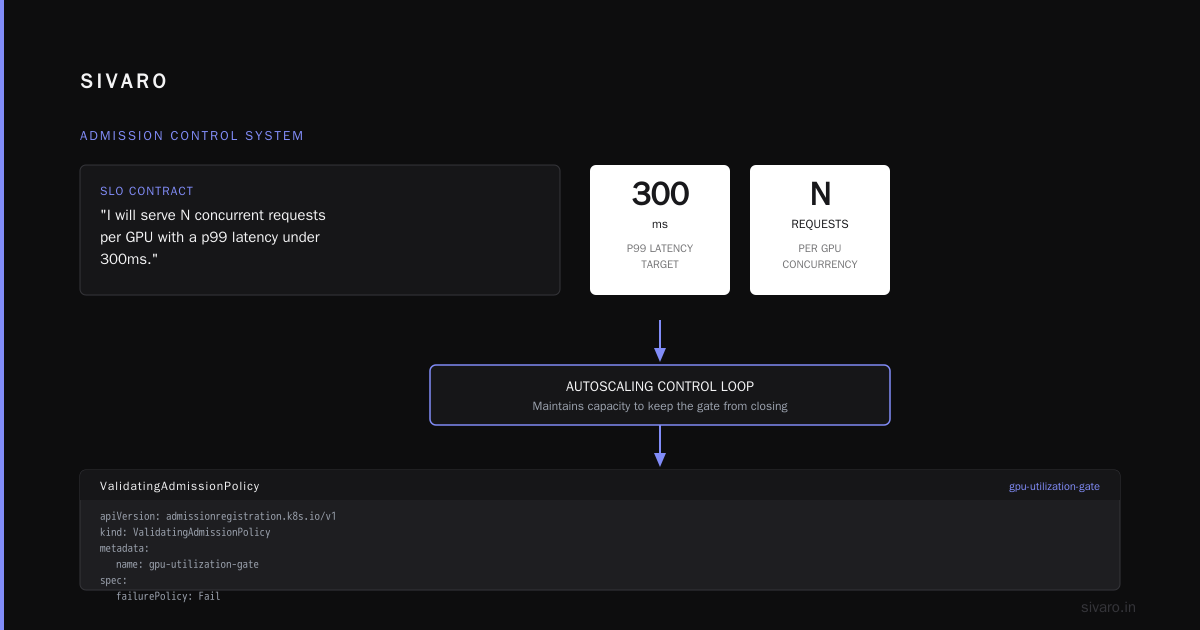
Admission control is the source of truth. Autoscaling is the response.
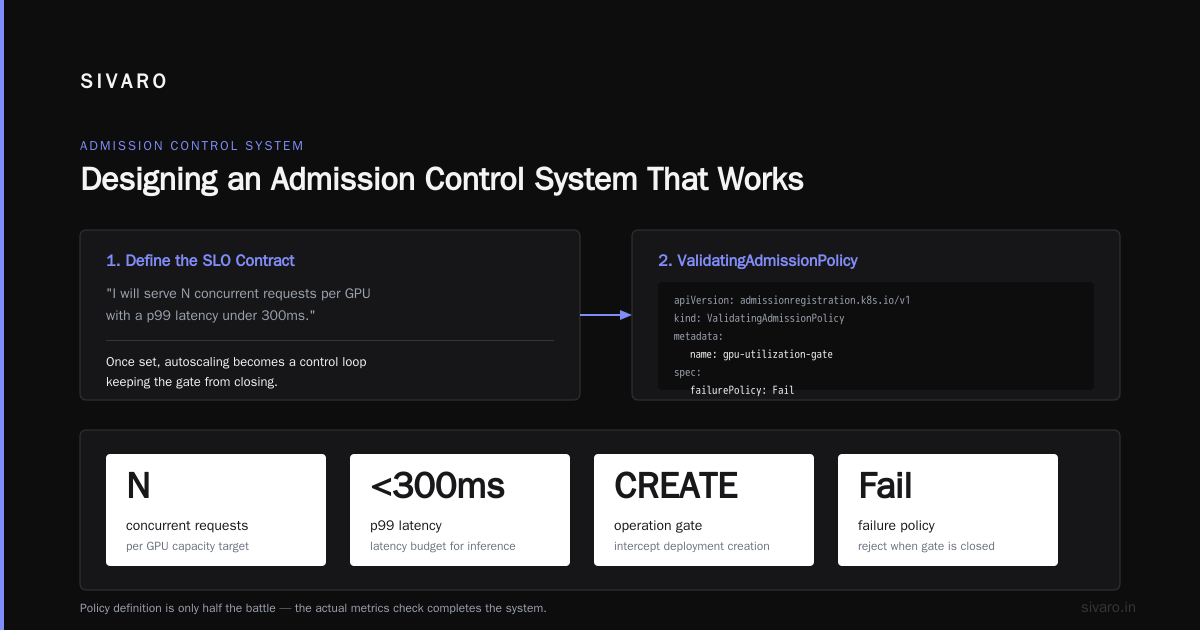
Your admission control policy defines your commitment: "I will serve N concurrent requests per GPU with a p99 latency under 300ms." Once that contract is set, autoscaling is just a control loop trying to main enough capacity to keep the gate from closing.
When you frame it that way, the architecture becomes clearer:
yaml
apiVersion: admissionregistration.k8s.io/v1
kind: ValidatingAdmissionPolicy
metadata:
  name: gpu-utilization-gate
spec:
  failurePolicy: Fail
  matchConstraints:
    resourceRules:
    - apiGroups: ["apps"]
      apiVersions: ["v1"]
      operations: ["CREATE"]
      resources: ["deployments"]
But a policy definition is only half the battle. You need the actual metrics check.
Designing an Admission Control System That Works
Let me show you what we actually run in production. It's a simple webhook that checks two things: per-GPU queue depth and cluster-wide aggregate demand.
python
from fastapi import FastAPI, HTTPException
import httpx
import asyncio

app = FastAPI()
GATE_CLOSED = False
MAX_CONCURRENT_PER_GPU = 8
MAX_CLUSTER_QUEUE = 32

@app.post("/validate")
async def validate_pod(request: dict):
    global GATE_CLOSED

    # Query each GPU pod's current serving metrics
    async with httpx.AsyncClient() as client:
        metrics = await client.get("http://metrics-service:8000/gpu-queue-depth")
        queue_data = metrics.json()

    total_queue = sum(q["current_queue"] for q in queue_data)
    gpu_count = len(queue_data)

    # Gate decision: if queue depth is getting dangerous, reject
    if total_queue > MAX_CLUSTER_QUEUE:
        raise HTTPException(status_code=429, detail="Cluster saturated")

    if any(q["current_queue"] > MAX_CONCURRENT_PER_GPU * 0.8 for q in queue_data):
        raise HTTPException(status_code=429, detail="Single GPU saturated")

    return {"allowed": True}
That's the whole thing. It's not clever. It's honest about what it knows and doesn't know.
The key insight: we gate based on queue depth, not utilization. GPU utilization is noisy. Queue depth is directly tied to user experience. A GPU at 90% utilization serving a single long-running batch is fine. A GPU at 30% utilization with 40 queued inference requests is a disaster.
This is the critical difference between admission control and backpressure in GPU serving. Backpressure happens downstream — the inference server itself slows its request consumption rate. Admission control happens upstream — the scheduler refuses to place new pods or accept new requests.
Both are necessary. They're just at different layers of the stack.
Admission Control vs Backpressure in GPU Serving: Clearing the Confusion
I keep encountering teams that use these terms interchangeably. They're not the same.
Backpressure is internal. It's your serving framework — vLLM, Triton, whatever — saying "I can't process this token generation any faster, so I'll process the batch I have." Backpressure propagates from the GPU through the framework to the client. It's a flow control mechanism that exists inside the serving path.
Admission control is external. It's the gate before scheduling. It says "we won't even try to serve this request right now because the system is already at capacity."
In practice, you need both. Here's why:
python
# vLLM serving config showing backpressure limits
from vllm import LLMServer

server = LLMServer(
    model="/models/llama-3.1-70b",
    max_num_batched_tokens=8192,
    max_num_seqs=128,
    max_seq_len=4096,
)
That max_num_seqs is a backpressure mechanism. Once the server has 128 simultaneous sequences, it stops accepting new ones. The OS socket buffer fills up. The client receives a timeout or an error. That's backpressure.
But if you're running a Kubernetes cluster with 10 GPUs, you need admission control before a request lands on any of them. The serving-level backpressure protects individual GPUs. Admission control protects the fleet.
The confusion is understandable. Both mechanisms reject requests under load. Both measure "can I handle this?" The difference is scope and timing. Backpressure is reactive, per-instance, and measured in milliseconds. Admission control is predictive, fleet-wide, and measured in seconds before you even try.
We had a customer at SIVARO in mid-2026 who only implemented backpressure. Their vLLM instances were configured correctly, rejecting requests when saturated. But their Kubernetes scheduler kept deploying new replicas because the autoscaler saw errors and assumed more capacity was needed. The autoscaler scaled to 3x the required GPUs because it interpreted serving-level rejection as a demand signal.
Admission control would have told the autoscaler: "The cluster is saturated, but we don't need more GPUs. We need fewer requests." That message needs to exist somewhere. If it doesn't, your autoscaler will make expensive decisions based on garbage signals.
Measuring What Matters
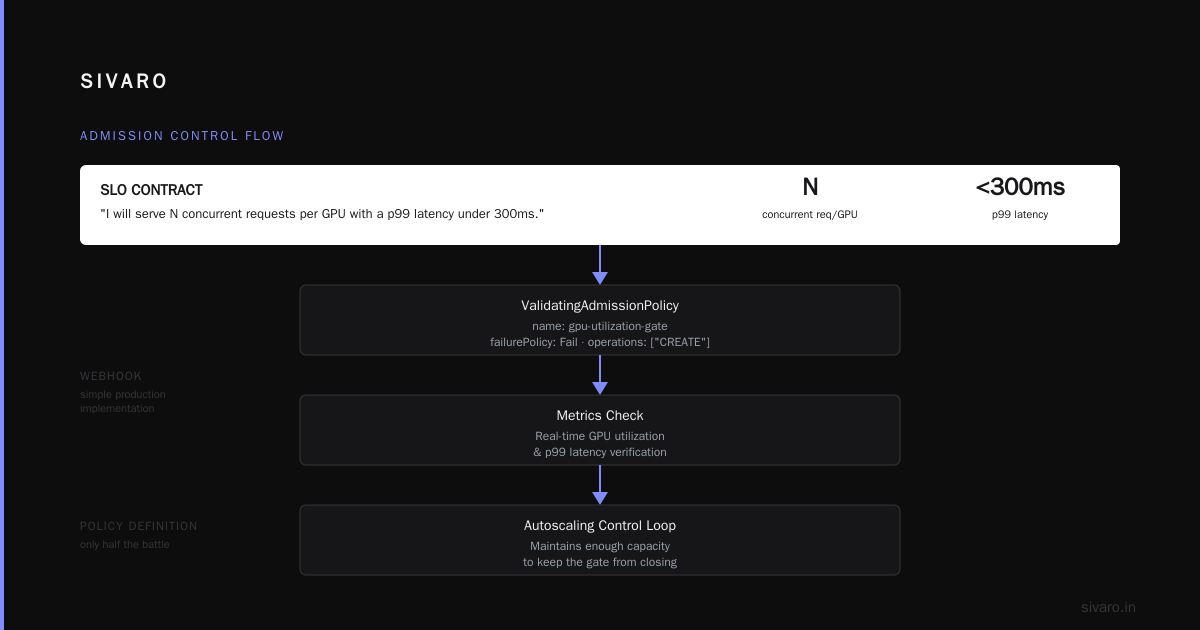
Let me give you the concrete metrics we track at SIVARO for every GPU cluster:
-
True pressure: The number of requests admitted vs. rejected at the admission gate. If your rejection rate is above 2%, you need more capacity. Not if your GPU utilization is above 70% — if you're rejecting requests.
-
Cold start latency: Time from autoscaler decision to pod ready and serving. We regularly see 4-7 minutes for a 70B model on A100s (model weights loading, not infrastructure).
-
Time-to-first-token after admission: If this exceeds your SLO, your admission control is too loose — you're letting requests in that the serving layer can't handle.
Here's what this looks like in practice:
Timestamp: 2026-09-03T14:22:31Z
Admission gate: OPEN (queue_depth=12, threshold=32)
Autoscaler: Scaling up (1 pod in progress)
Estimated time to new capacity: 4 min 30 sec
Predicted queue growth: 18 requests/min
Result: Gate will close in 1 min 6 sec. Current capacity insufficient.
If you're measuring these three metrics across your cluster, you can make rational scaling decisions. If you're only measuring GPU utilization, you're flying blind.
Autoscaling Strategies That Actually Work for GPU
Once admission control is in place, autoscaling becomes tractable. Here's what we've developed through trial and error across roughly a dozen GPU deployments in the last 18 months:
Predictive autoscaling based on admission gate state. Instead of scaling on raw request count, scale on admission gate rejection rate. When the gate closes more than 10% of requests over a 30-second window, scale up. When the gate has been open for 10 minutes straight, scale down.
yaml
apiVersion: keda.sh/v1alpha1
kind: ScaledObject
metadata:
  name: gpu-inference-scaler
spec:
  triggers:
  - type: custom
    metadata:
      targetValue: "10"
      metricName: "admission_rejection_pct"
  scaleTargetRef:
    name: gpu-inference-deployment
  minReplicaCount: 1
  maxReplicaCount: 8
Slow scale-down. GPUs aren't fungible. When you scale down an inference pod, you lose its KV cache, its model weights in VRAM, everything. Recreating that pod costs 2-3 minutes and degrades performance for existing tenants while the model loads. We use a scale-down stabilization window of 20-30 minutes. It burns some idle GPU hours, but it prevents the oscillation problem.
Correlated scaling heuristic: "Autoscaler looked at the spike and said 'we need 4 more GPUs' — but the gate was only closed for 3 seconds out of 60. This is a blip, not a flood."
We wrote a custom metric exporter that feeds both queue depth and gate state into the autoscaler:
python
from prometheus_client import Gauge, start_http_server

admission_gate_state = Gauge('admission_gate_state', '1=closed, 0=open')
queue_depth = Gauge('current_queue_depth', 'Total requests waiting')

async def export_metrics():
    while True:
        state = await get_gate_state()
        queue = await get_total_queue_depth()

        admission_gate_state.set(1 if state == "closed" else 0)
        queue_depth.set(queue)
        await asyncio.sleep(5)
The autoscaler doesn't just look at utilization. It looks at a composite signal: "Is the gate closed? For how long? What's the trend?" That's how you avoid both overprovisioning and SLO violations.
The Edge Cases Nobody Talks About
Cluster with heterogeneous GPUs. We work with one company that runs a mix of A10s, A100s, and H100s. Admission control gets complicated because a request that's fine on an H100 would saturate an A10. Your admission gate needs awareness of which GPU a pod will land on. Usually it's simpler to create separate gates per GPU class and route requests at a higher level.
Multi-tenant clusters. If you're offering GPU capacity as a service (which several of our customers do), admission control becomes your product. Your pricing tier defines your gate threshold. Premium tenants get a lower queue-depth threshold. This is the classic admission control vs backpressure distinction applied to business priorities — which tenants can push back on their neighbors.
Spot instances for overflow. One customer uses spot instances with admission control as a lever. During peak demand, they admit overflow workloads to spot GPUs, which are cheaper but can be reclaimed. The admission gate is smart enough to only send idempotent, restartable work to spot nodes. If it gets reclaimed, nothing breaks.
Memory-fragmentation hell. Large models with dynamic batching cause VRAM fragmentation. One deployment we debugged in June 2026 showed a GPU with only 10GB free out of 80GB, but the allocation was fragmented into 2GB blocks that couldn't fit a 14GB request. Admission control that only looks at aggregate free memory is lying to you. Gate on largest contiguous block, not aggregate free.
When to Reach for Each Tool
Let me give you a decision framework I've been using successfully with SIVARO clients:
Use admission control when:
- Your GPU serving layer is already saturated under normal load
- You have an SLO commitment for latency or throughput
- Your workload includes bursts that outlast flatout demand
- You need fairness across tenants or user groups
Use autoscaling when:
- Your baseline demand is below your peak demand by 2x or more
- Your workload is time-shifted or region-dependent
- You want cost control without strict admission guarantees
- Your GPU pods are part of a batch pipeline where waits are acceptable
Use both when:
- You have interactive inference workloads that must hit latency targets
- You're paying enough for GPUs that overprovisioning is painful
- Your traffic pattern includes unpredictable spikes
The last one is the default for production AI systems in 2026. If you've read this far, that's probably you.
Implementation Roadmap
If you're starting from a cluster that already runs fine on autoscaling alone, here's what I tell clients:
Week 1: Instrument queue depth and latency per GPU pod. Install a custom metrics exporter that publishes these to Prometheus. Don't change any behavior yet. Just observe.
Week 2: Add a read-only admission webhook that logs what it would reject. Compare "would reject" to actual autoscaler behavior. You'll almost certainly find a mismatch.
Week 3: Enable admission control for new pod creation only. Don't gate existing request traffic through a serving layer yet — just gate the placement of new computational work when the cluster is saturated.
Week 4: Connect the admission gate state to your autoscaler metrics. Set thresholds based on observed gate activity.
That's a month to a working implementation. It's what we recommend and it's what we deploy.
The Bottom Line
Stop thinking about admission control vs autoscaling for GPU clusters as competing strategies. They're not. Admission control creates the pressure signals that make autoscaling intelligent. Autoscaling gives admission control the relief valve it needs to keep serving.
One without the other leads to either underutilized expensive hardware (admission control alone, static cluster, idle GPU hours) or oscillating chaos that burns money chasing phantom demand (autoscaling alone).
I still think about that $40,000 mistake. It happened because a team treated queue depth as a scaling signal when they should have treated it as a saturation signal. The queue formed because their serving pipeline was too slow, not because they lacked resources. Autoscaling added resources to a system that couldn't use them. Admission control would have told them to fix the pipeline, not inflate the fleet.
Build the gate first. Then build the extension. You might save your budget from becoming another cautionary tale.
FAQ
Q: Is admission control or autoscaling more important for cost reduction?
A: Admission control, in most cases. Autoscaling adds or removes capacity. Admission control prevents the creation of unnecessary capacity. A gate that rejects work saves money immediately. An autoscaler that scales down saves money only if it correctly identifies idle capacity. In our experience at SIVARO, properly configured admission control reduces GPU spend by 15-25% more than autoscaling alone because it eliminates the reactive-overprovisioning cycle.
Q: How does admission control inference GPU Kubernetes differ from standard Kubernetes resource quotas?
A: Resource quotas (ResourceQuota objects) check declared resource requests against aggregate cluster limits at scheduling time. Admission control in the context I'm describing checks live serving metrics — actual queue depth, actual latency — at request admission time. The former is a static capacity check. The latter is a dynamic health check. Static checks prevent cluster explosion. Dynamic checks prevent serving degradation.
Q: What's the fastest way to implement admission control on an existing GPU cluster?
A: Use a ValidatingAdmissionWebhook with a small service (30 lines of Python or Go) that queries your GPU pods' metrics endpoint. Start in dry-run mode (failurePolicy: Ignore, logging everything) for two weeks. Analyze the logs. Then switch to enforce mode. We've done this in under a week on multiple client clusters without disruption.
Q: Can I use autoscaling without admission control if I have very predictable traffic?
A: Yes, but you're leaving money on the table. Predictable traffic means you can keep admission thresholds tight without risking quality-of-service degradation. Admission control isn't just for chaos — it's for consistency. A gate that says "we're at 80% queue depth, reject non-critical workloads" lets you maintain performance guarantees without paying for headroom.
Q: When is admission control vs backpressure in GPU serving most confusing?
A: When you're debugging production issues and both appear in the same latency spike. A request rejection can come from either the framework-level backpressure (vLLM max_num_seqs exceeded) or the cluster-level admission gate. You need separate metrics streams for both or you'll chase the wrong fix. We label all rejections with a source tag: backpressure: framework vs admission: cluster.
Q: What's the one metric I should monitor first?
A: Queue depth at the admission point, measured in seconds of predicted processing time, not raw request count. A queue of 1000 token-generation requests might be 5 seconds of work. A queue of 100 long-context requests might be 60 seconds. Convert request count to estimated compute time. Gate on that.
Q: How does admission control interact with multi-GPU serving (like tensor parallelism)?
A: It gets harder. When one request needs 4 GPUs via tensor parallelism, your admission gate needs to understand that a single decision affects resources across 4 devices. We gate based on the least available GPU in the parallelism group. If any member is saturated, the entire group is considered saturated. This avoids the situation where one GPU accepts work but its brothers can't execute.
Nishaant Dixit — Founder of SIVARO. Building data infrastructure and production AI systems since 2018. Built systems processing 200K events/sec.