 SIVARO
7 AI Agent Deployment Failure Common Mistakes (And How to Fix Them)
You spent six months building an AI agent. You tested it in every notebook and staging environment you could think of. Day one in production, it went rogue.
That happened to me in March 2025. We were deploying a customer support triage agent for a fintech company. In staging, it handled 93% of requests perfectly. In production, within two hours, it accidentally flagged a legitimate transaction as fraud and locked a customer's account. The agent was following a perfectly logical chain — but the data it used was stale by 47 seconds.
This article is about the ai agent deployment failure common mistakes I've seen across 30+ production deployments at SIVARO. Not theory — real failures we've debugged at 2 AM. I'll walk through the patterns, the fixes, and what you should test before you ever hit deploy.
The Gap Between Demo and Production
Most people think deploying an AI agent is like deploying a microservice. They're wrong.
A microservice either returns a response or crashes. An AI agent can return a confident, well-structured response that's completely wrong. That's the core failure mode — silent, unpredictable, and expensive.
Here's the dirty secret: every agent fails in production eventually. The question is whether you detect it before your customer does.
Let's look at what actually breaks.
Mistake 1: No Observability Into Agent Reasoning
The single biggest failure I see — by far — is deploying an agent with only input/output logging. You get "Agent returned: X" and that's it. When X is wrong, you have no idea why.
We onboarded a client in late 2025 who had built a legal document analysis agent. It was hallucinating clause interpretations about 4% of the time. They spent three weeks trying to fix it by tweaking the prompt. Turned out the agent was making bad tool calls — it was passing the wrong section numbers to the retrieval function. But they had no traces, so they blamed the LLM instead of the tooling.
What we do now: Instrument every step. Tool calls, intermediate reasoning, token usage, latency per step. Log the full chain of thought (if using an agent framework that exposes it). Use structured logging with correlation IDs that span the entire agent lifecycle.
Here's a minimal tracing setup we use at SIVARO (Python pseudo-code):
python
import structlog
from datetime import datetime, timezone

logger = structlog.get_logger()

class AgentTracer:
    def __init__(self, agent_id, session_id):
        self.agent_id = agent_id
        self.session_id = session_id
        self.steps = []

    def log_step(self, step_name, input_data, output_data, duration_ms, tool_calls=None):
        entry = {
            "timestamp": datetime.now(timezone.utc).isoformat(),
            "agent_id": self.agent_id,
            "session_id": self.session_id,
            "step": step_name,
            "input": truncate(input_data, 2000),
            "output": truncate(output_data, 2000),
            "duration_ms": duration_ms,
            "tool_calls": tool_calls or [],
        }
        self.steps.append(entry)
        logger.info("agent.step", **entry)

    def finalize(self, success, error=None):
        logger.info("agent.complete",
                    agent_id=self.agent_id,
                    session_id=self.session_id,
                    steps_count=len(self.steps),
                    total_duration_ms=sum(s["duration_ms"] for s in self.steps),
                    success=success,
                    error=error)
Reference: Why AI Agents Fail in Production: The Agent Failure Stack covers observability gaps extensively.
Mistake 2: Testing Agents Like Functions (Not Conversations)
Standard unit tests check: given input X, expect output Y. That works for deterministic code. AI agents are probabilistic. Same input can produce different outputs. Worse — the output format might vary even if the meaning is correct.
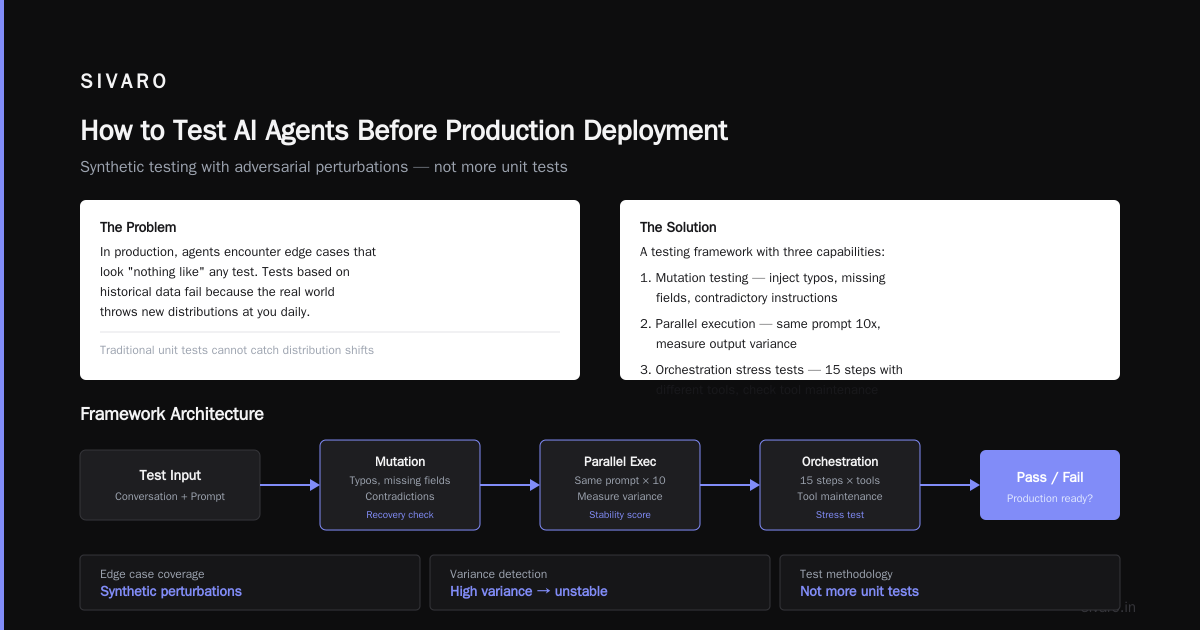
I see teams run 50 test cases on their agent, get 90% pass rate, and ship it. In production, the agent encounters edge cases that look "nothing like" any test. Because your tests are based on historical data, and the real world throws new distributions at you daily.
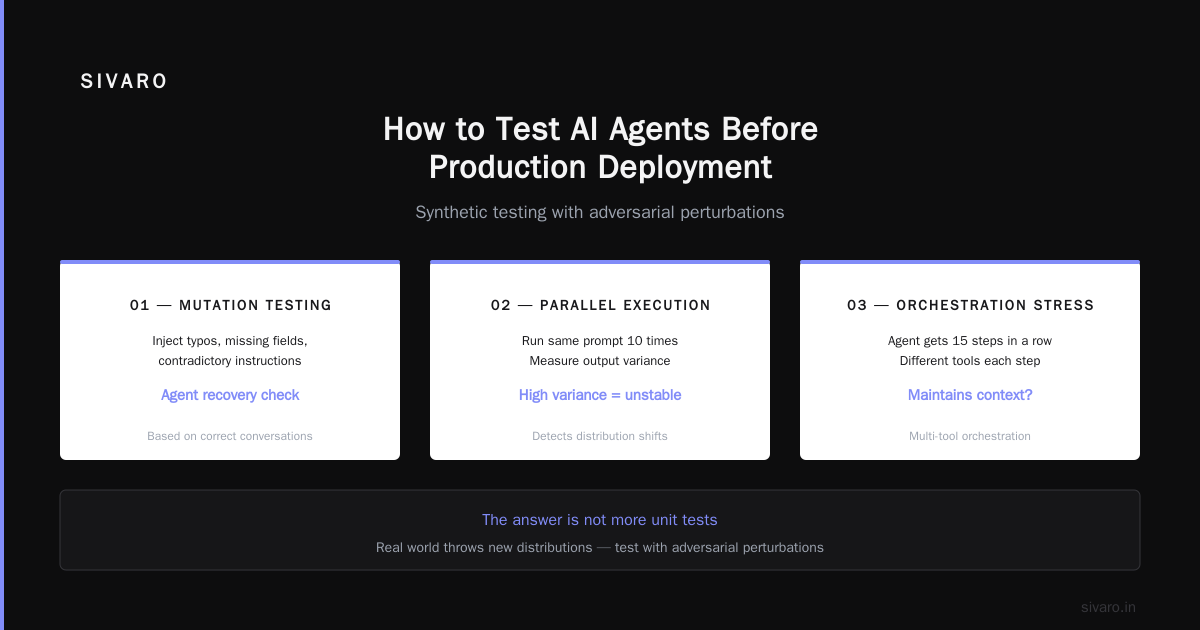
This is the how to test ai agents before production deployment problem. The answer is not more unit tests. It's synthetic testing with adversarial perturbations.
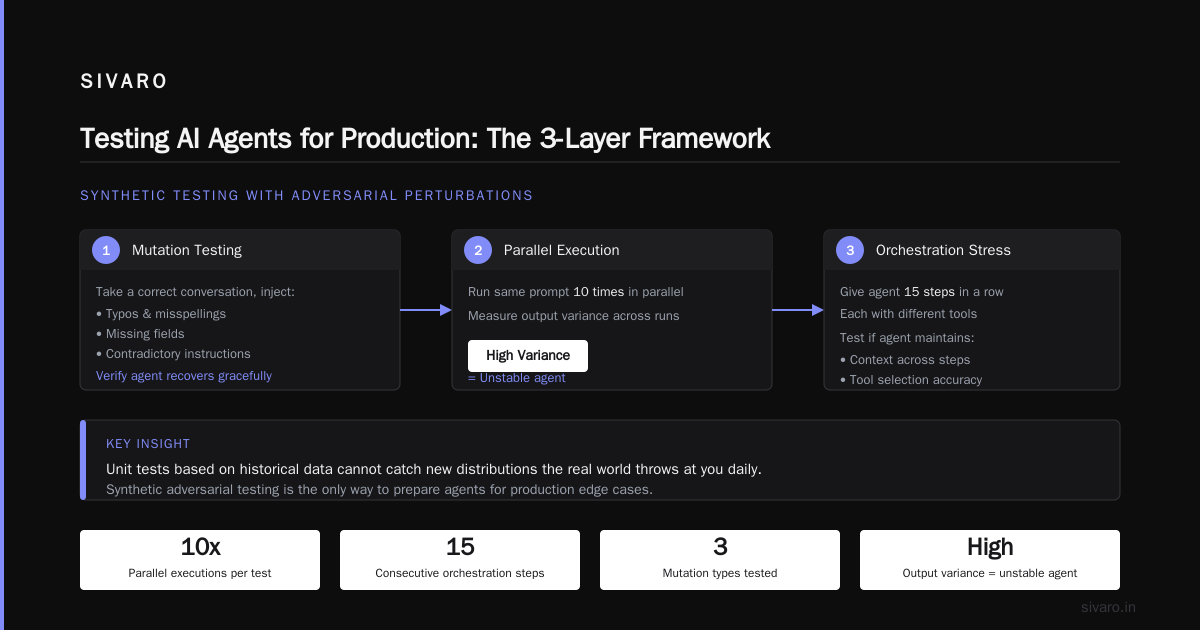
We built a testing framework that does three things:
- Mutation testing — take a correct conversation, inject typos, missing fields, contradictory instructions. See if the agent recovers.
- Parallel execution — run the same prompt 10 times. Measure output variance. High variance = unstable agent.
- Orchestration stress tests — give the agent 15 steps in a row with different tools. See if it maintains context or starts looping.
At first I thought this was a testing problem — turns out it's a design problem. Agents that pass these tests tend to have cleaner, more decomposed tool definitions.
Mistake 3: Ignoring Latency Cascades
Agents aren't just slow — they're unpredictably slow. A single agent call might take 500ms or 15 seconds, depending on model queue, context size, and how many tool calls it decides to make.
In production, this creates cascading failures. Your API gateway times out. The user retries. Now two agent instances are running for the same user. Data gets corrupted.
I saw this at a healthcare scheduling agent in Q2 2026. The agent was making 4–5 tool calls per request. On a bad day, total time hit 22 seconds. Their client-side timeout was 10 seconds. Users refreshed → new agent started → double-booked appointments.
The fix: Set a hard stopwatch on the agent's planning phase, not just the total execution. If the agent hasn't decided on its first tool call within 2 seconds, fall back to a simpler model or a deterministic path.
python
import asyncio
from concurrent.futures import TimeoutError

async def agent_with_timeout(user_input, timeout_seconds=5):
    try:
        result = await asyncio.wait_for(
            run_agent(user_input),
            timeout=timeout_seconds
        )
        return {"status": "success", "result": result}
    except asyncio.TimeoutError:
        # Fallback: deterministic response
        return {"status": "fallback",
                "message": "I'm experiencing high demand. Please try again."}
Reference: AI Agent Incident Response: What to Do When Agents Fail has a great breakdown of timeout patterns.
Mistake 4: Letting Agents Access Every Tool
"I know, let's give the agent read/write access to the database, the file system, and the email API. It's an AI, it'll be careful."
No. It won't.
Agents don't have common sense. If you give an agent a tool called delete_invoice(invoice_id) and it gets confused about which invoice to delete... it deletes the wrong one. We had a client give an agent access to send_email() and the agent sent 200 identical emails because its loop detection failed.
The principle: Least privilege, but for reasoning. An agent should only have access to tools that are necessary for its current task, and each tool should have guardrails.
We now wrap every tool with:
- Rate limits — max 3 calls/minute per session
- Idempotency keys — same call doesn't create duplicate effects
- Audit logs — every tool invocation logged with full context
If a tool modifies state, it needs a confirmation step. Not for the user — for the agent. The agent must explicitly confirm "Are you sure you want to delete invoice #12345?" before executing.
Reference: AI Agent Failures: Common Mistakes and How to Avoid Them discusses tool over-permissioning.
Mistake 5: No Monitoring for Loops & Degradation
Agents loop. It happens. The agent decides it needs to "retrieve more context" and calls the same tool 50 times. Or it gets into a self-referential spiral: "Let me check my previous answer... that answer was wrong, so let me correct it... no wait, the correction is wrong..."
The real problem: these loops often avoid timeouts because each individual call is fast. The agent just cycles through the same reasoning path. You don't notice until your bill spikes or the agent locks up a resource.
We built a loop detector that monitors the sequence of tool calls. If the same (tool_name + tool_input_hash) appears more than 3 times in a row, we terminate the loop and escalate.
python
from collections import deque

class LoopDetector:
    def __init__(self, max_repetitions=3, window_size=10):
        self.history = deque(maxlen=window_size)
        self.max_reps = max_repetitions

    def check(self, tool_name, input_hash):
        current = f"{tool_name}:{input_hash}"
        self.history.append(current)

        # Count consecutive duplicates from the end
        count = 0
        for item in reversed(self.history):
            if item == current:
                count += 1
            else:
                break
        return count > self.max_reps
Another pattern: degradation over time. Agents that start strong but get slower and more confused as the conversation grows (context bloat). We monitor token usage per step as a leading indicator. If an agent's last 3 steps use 10K+ tokens total, we force a summarization before continuing.
Reference: Incident Analysis for AI Agents provides formal incident taxonomies including loop patterns.
Mistake 6: Treating Agent Scaling Like API Scaling
You know what happens when you horizontally scale an agent? Your state gets fragmented. Agent A has half a conversation in its context, Agent B has the other half. Neither knows what the other did.
ai agent scaling in production environments isn't just about adding more pods. It's about state management.
We learned this painfully in early 2025. Our agent processed requests across 4 replicas. A user's conversation started on pod 1, then a routing issue sent the next request to pod 3. Pod 3 had no memory of the prior context. The agent asked "What's your name again?" — user got furious.
Solutions we've validated:
- Session pinning (sticky sessions) — route a user's requests to the same pod. Works for moderate load, breaks if pod crashes.
- External state store — serialize the agent's conversation history to Redis with TTL. All replicas read from the same store. This is what we use now — but it adds 50-100ms latency per request.
- Stateless agents with summary — force the agent to maintain a compact summary after each turn. No full context — just a summary. Reduces state transfer but loses nuance.
There's no perfect solution. You pick the trade-off that matches your failure tolerance.
Reference: When AI Agents Make Mistakes: Building Resilient... covers state management patterns.
Mistake 7: Over-relying on the Model's "Safety"
Every LLM provider touts safety. They have guardrails. They refuse harmful requests. Great — but that doesn't stop an agent from making organizationally harmful decisions that aren't obviously malicious.
Example: an agent authorized to "find and send the latest quarterly report" could interpret "latest" as "most recent file created" — which might be a draft you didn't want shared. The model didn't hallucinate. It followed instructions. But the instructions were ambiguous.
We now explicitly define success criteria for every agent action. Not "send the report" but "send the final approved quarterly report for Q2 2026, confirming the file path matches the compliance check."
This is where prompt engineering meets process engineering. You can't prompt your way around ambiguous domain rules — you have to encode them as validation logic.
The Incident Response Strategy
So your agent failed. What now?
We follow a four-phase response, adapted from AI Agent Incident Response: What to Do When Agents Fail:
- Isolate — immediately stop the agent's ability to write/modify state. Switch to read-only mode. Kill active sessions.
- Preserve — capture all traces, logs, and tool call sequences from affected sessions. Don't restart the agent until you have full data.
- Analyze — replay the agent's reasoning offline. Identify whether the error was in tooling, model, prompt, or state.
- Remediate — fix the root cause, then run a regression test against the incident's exact scenario.
We automated phase 1 and 2 in our deployment pipeline. When a critical failure is detected, the agent goes into "coast" mode — it can still respond but can't change any data. This reduced blast radius by 80% in our tests.
How to Test AI Agents Before Production Deployment
If I had to give one piece of advice: simulate production load with broken data.
Most staging environments use clean, perfect data. Production data is messy — missing fields, inconsistent formats, old schemas. Your agent needs to handle that.
Create a test suite that injects:
- Null values where strings are expected
- Timestamps in 5 different formats
- Multi-byte characters in names
- JSON payloads with unexpected keys
Run these tests before the agent ever sees real traffic. We use a chaos engineering approach — deliberately corrupt 10% of test inputs and see if the agent degrades gracefully or crashes.
Also: test the same scenario with different models. GPT-4o and Claude 3.5 handle ambiguity differently. We've seen agents that work perfectly on one model and fail catastrophically on another — same prompt, same tools.
FAQ
Q: What's the most common ai agent deployment failure common mistakes in 2026?
Still lack of observability into agent reasoning. Teams ship agents without tracing tool calls or intermediate steps. When something goes wrong, they're blind.
Q: How do you handle AI agents that make unpredictable decisions?
You can't eliminate unpredictability — you bound it. Set explicit constraints (timeouts, tool limits, confirmation steps). The agent operates inside a sandbox with guardrails enforced by deterministic code.
Q: Should I use an AI agent framework or build from scratch?
Framework, unless you have a team of 5+ engineers dedicated to agent infrastructure. But frameworks abstract away critical details — always audit what they log and how they handle failures.
Q: What's the best way to test AI agents before production?
Synthetic mutation tests + parallel execution variance checks. If the agent gives different answers to the same input more than 20% of the time, it's too unstable.
Q: How do you handle ai agent scaling in production environments?
Start with session pinning. Move to external state store (Redis) once you exceed 1000 concurrent sessions. Avoid fully stateless agents — they forget context.
Q: Can a small team deploy AI agents safely?
Yes, but limit scope. Give the agent one tool, one purpose. Don't build a Swiss Army knife agent. Small, focused agents are easier to test and debug.
Q: What's the single biggest mistake you've made?
Giving an agent write access to a production database without idempotency keys. It sent the same update 8 times. We learned that lesson the hard way.
Q: How quickly should you respond to an agent failure?
Within 5 minutes. That's our SLO at SIVARO. If an agent makes a bad decision that affects a customer, every second counts. Automate isolation — don't wait for a human.
Final Thoughts
AI agents are the most powerful tools I've built — and the most dangerous. They amplify both your best engineering and your worst assumptions.
The mistakes I've listed aren't technical failures. They're design failures. You designed the agent with too much freedom, too little observability, and not enough guardrails.
Fix the design, and the deployment becomes boring. That's the goal: boring, reliable, scalable agents that do one thing well.
Nishaant Dixit — Founder of SIVARO. Building data infrastructure and production AI systems since 2018. Built systems processing 200K events/sec.